

Learn how to use NetworkMiner to analyse recorded traffic files and practice network forensics activities.
NetworkMiner is an open-source traffic sniffer, pcap handler and protocol analyser. Developed and still maintained by Netresec.
“NetworkMiner is an open source Network Forensic Analysis Tool (NFAT) for Windows (but also works in Linux / Mac OS X / FreeBSD). NetworkMiner can be used as a passive network sniffer/packet capturing tool to detect operating systems, sessions, hostnames, open ports etc. without putting any traffic on the network. NetworkMiner can also parse PCAP files for off-line analysis and to regenerate/reassemble transmitted files and certificates from PCAP files.
NetworkMiner makes it easy to perform advanced Network Traffic Analysis (NTA) by providing extracted artefacts in an intuitive user interface. The way data is presented not only makes the analysis simpler, it also saves valuable time for the analyst or forensic investigator.
NetworkMiner has, since the first release in 2007, become a popular tool among incident response teams as well as law enforcement. NetworkMiner is today used by companies and organizations all over the world.”
For this room, you will be expected to have basic Linux familiarity and Network fundamentals (ports, protocols and traffic data). We suggest completing the “Network Fundamentals” path before starting working in this room.
Tip: If you have loaded multiple pcap files, they will be merged by NetworkMiner. If they are not related to each other, make sure to remove the previously loaded pcap file/s and reload the pcap file you want to analyze.
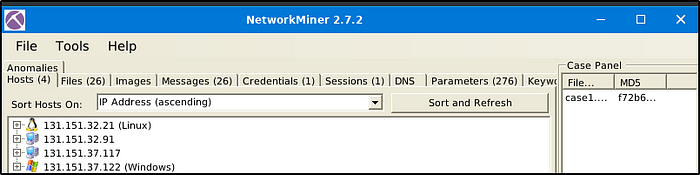
The image below is for loading one pcap file.
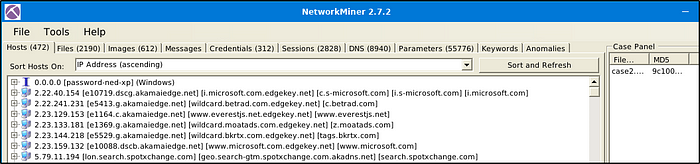
The following image is the result when two pcap files are loaded

To remove a pcap file, go to “Case Panel’, select and right-click the file that we want to remove, in this example, “case1.pcap”. Select “Remove selected files and Reload Case Files”.
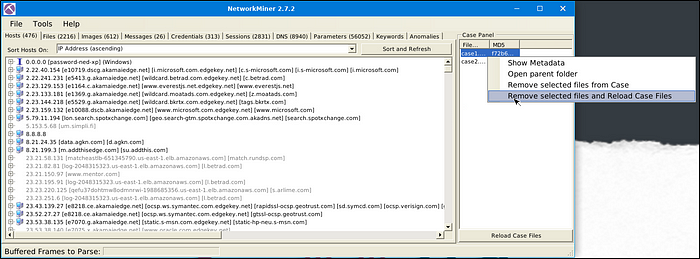
This would remove “case1.pcap” file and will reload “case2.pcap” file as seen in the image below.
Task 4: Tool Overview 1
Answer the questions below
Use mx-3.pcap
What is the total number of frames?
Answer: 460
Use the “2.7.2” version of NetworkMiner. Go to the “Case Panel” and right-click on the loaded pcap file. Select “Show Metadata”.


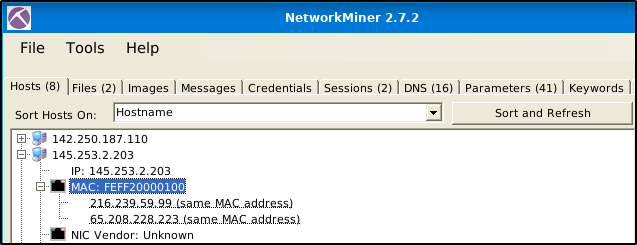
How many IP addresses use the same MAC address with host 145.253.2.203?
Answer: 2
Use the “2.7.2” version of NetworkMiner. “Under the “Hosts” menu, expand the IP addresses. One of the IP addresses has two IP addresses that use the same MAC address.
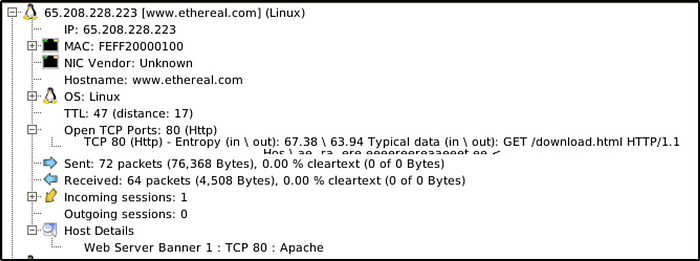
How many packets were sent from host 65.208.228.223?
Answer: 72
Both version would show the information.

What is the name of the webserver banner under host 65.208.228.223?
Answer: Apache
Both versions show the information.
Use mx-4.pcap
What is the extracted username?
Answer: #B\Administrator
Version 1.6.1 did not grab any credentials.

What is the extracted password?
Answer: $NETNTLMv2$#B$136B077D942D9A63$FBFF3C253926907AAAAD670A9037F2A5$01010000000000000094D71AE38CD60170A8D571127AE49E00000000020004003300420001001E003000310035003600360053002D00570049004E00310036002D004900520004001E0074006800720065006500620065006500730063006F002E0063006F006D0003003E003000310035003600360073002D00770069006E00310036002D00690072002E0074006800720065006500620065006500730063006F002E0063006F006D0005001E0074006800720065006500620065006500730063006F002E0063006F006D00070008000094D71AE38CD601060004000200000008003000300000000000000000000000003000009050B30CECBEBD73F501D6A2B88286851A6E84DDFAE1211D512A6A5A72594D340A001000000000000000000000000000000000000900220063006900660073002F003100370032002E00310036002E00360036002E0033003600000000000000000000000000
Same as the previous question. Only version 2.7.2 is able to grab credentials.

Task 5: Tool Overview 2
Note: Version 2.7.2 was used to answer the questions in this task.
Answer the questions below
Use mx-7 pcap
What is the name of the Linux distro mentioned in the file associated with frame 63075?
Answer: centos
Let’s go to “Files” menu and filter with keywords “63075”, selecting “ExactPhrase”, and for the column, “Frame nr.”

What is the header of the page associated with frame 75942?
Answer: Password-Ned AB
Same method as the above, except changing the keyword with the frame number being filtered. Open the file to see the header of the page.

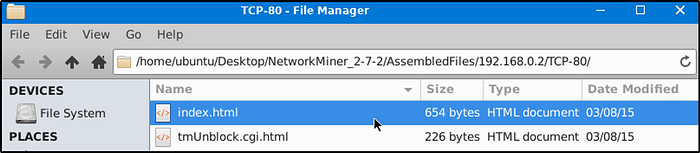

What is the source address of the image “ads.bmp.2E5F0FD9.bmp”?
Answer: 80.239.178.187
Same method as the above, except changing the keyword with the file name.

What is the frame number of the possible TLS anomaly?
Answer: 36255
Go to “Anomalies” menu. Two frame numbers are identified. Select the first one.
Use mx-9 file
Look at the messages. Which platform sent a password reset email?
Answer: facebook
Select the second message and browse through the information about the message. Although the answer is “facebook”, I am not quite sure if the content of the message has something to do with resetting a password.


What is the email address of Branson Matheson?
Answer: branson@sandsite.org
We can see the email address of “Branson Matheson” from the first image in the previous question.
Task 6: Version Differences
Answer the questions below
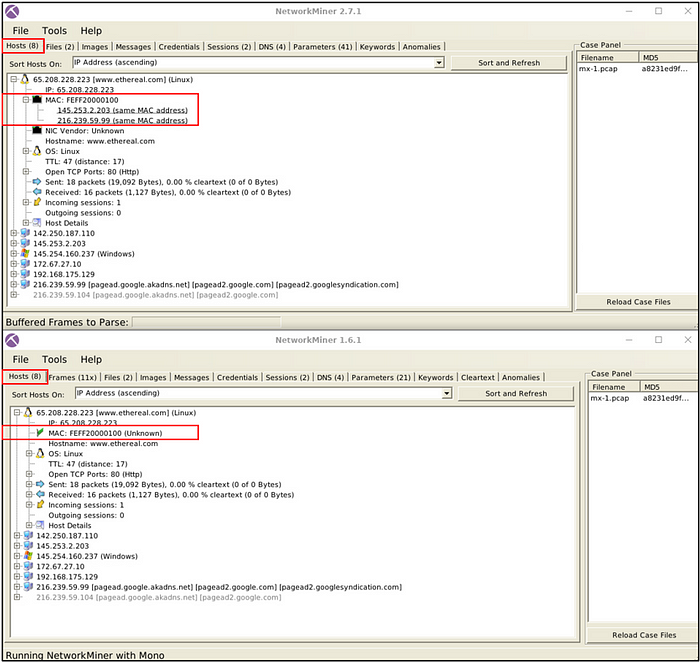
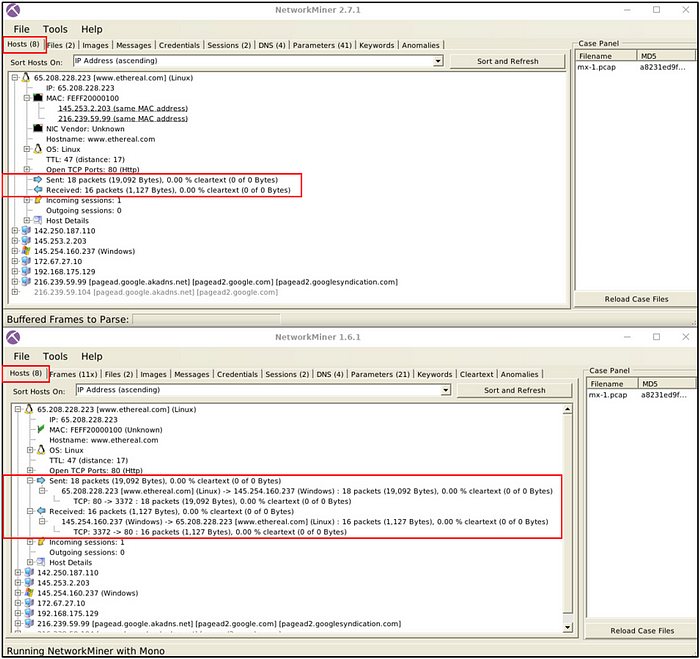
Which version can detect duplicate MAC addresses?
Answer: 2.7
From the image provided to us, it is noticeable that version 2.7 is able to identify conflict of MAC address, as also observed in Task 4.
Which version can handle frames?
Answer: 1.6
It is pretty evident in the image provided, that version 2.7.1 does not handle frames.
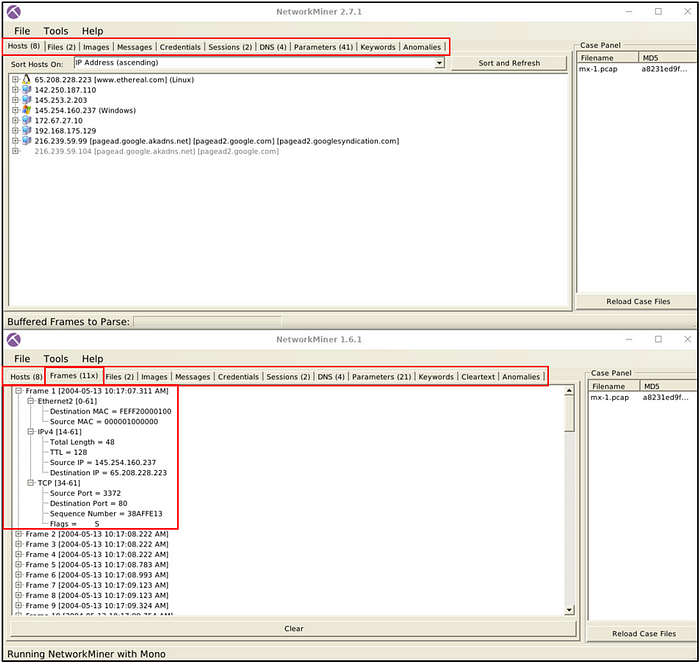
Which version can provide more details on packet details?
Answer: 1.6
Versions after 1.6 do not provide more details on packet details.
Task 7: Exercises
You’ve learned what NetworkMiner is and how to use it. Let’s put this into practice!
Answer the questions below
Use case1.pcap
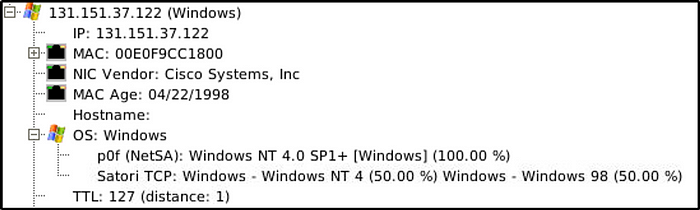
What is the OS name of the host 131.151.37.122?
Answer: Windows — Windows NT 4
Go to “Hosts” menu and scroll down to the IP address.
Investigate the hosts 131.151.37.122 and 131.151.32.91.
How many data bytes were received from host 131.151.32.91 to host 131.151.37.122 through port 1065?
Answer: 192
Expand “Incoming Sessions” and select the port number that we are interested in.
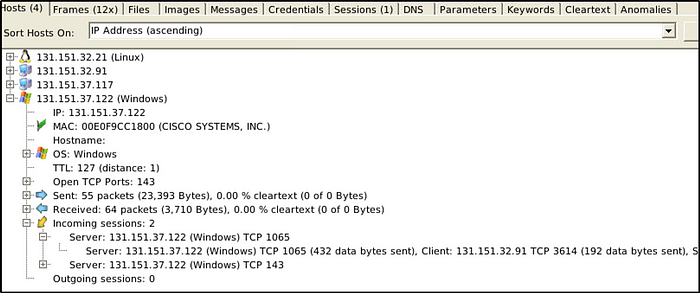
How many data bytes were received from host 131.151.37.122 to host 131.151.32.21 through port 143?
Answer: 20769
Expand the port number that we are investigating.

Note: So far, I have been using version 2.7.2 to answer the questions above.
What is the sequence number of frame 9?
Answer: 2AD77400
For this question, use version 1.6.1. As learned previously, versions above 1.6 does not handle frames.

What is the number of the detected “content types”?
Answer: 2
Use version 2.7.2 for this question. Go to “Paremeters” menu, type in “content-type” as our filter keyword and then select “Parameter name” for the column. There are two types of “Content-Types” as seen in the “Parameter value” column.

Use case2.pcap
Investigate the files.
Note: Version 2.7.2 was used to investigate the pcap file.
What is the USB product’s brand name?
Answer: asix
Go to “Files” menu and type in “usb” as our filter keyword, and select “Filename” for the column.

What is the name of the phone model?
Answer: Lumia 535
Go to “Images” menu and scroll until an image of a phone with a selfie photo appears. The model name is found in the filename itself.

What is the source IP of the fish image?
Answer: 50.22.95.9
Go to “Files” menu and type in “fish” as the filter keyword and select “Filename” column.

What is the password of the “homer.pwned.se@gmx.com”?
Answer: spring2015
The “Credentials” menu is where captured credentials are stored.

What is the DNS Query of frame 62001?
Answer: pop.gmx.com
Let’s go to “DNS” menu and we will filter the DNS query by using the frame number as the keyword.

Thanks for reading. 🙂
Happy learning.
 Igor_sec's Blog
Leave a comment